A phone is a phone is a phone is a phone. Well, is it?
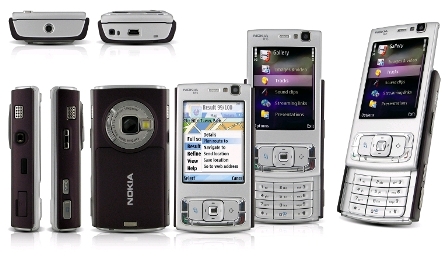
When it comes to Nokia’s N95 smartphone, this simple conclusion isn’t that clear. Nokia introduced their flagship model in December 2006 and started shipping it sometime around March/April this year.
I got mine some three months ago through a 24-month plan with Germany’s T-Mobile with average monthly costs of EUR 15,46, so even if I’d sell the phone now via eBay or other channels, I’d make (at least) around EUR 130,- profit (SIM card stays unused in the drawer during those 24 month). I am using it with a prepaid card on a 3G (UMTS) enabled network where I am paying EUR 0,24 per MegaByte.
Unfortunately, my current network provider does not offer 3.5G (HSDPA) connections although the phone is capable of handling those. My other (third) network provider (Vodafone Germany) does offer 3.5G but charges around EUR 20,- per MegaByte just like T-Mobile, which is completely insane and totally over-priced. The prepaid card runs on the E-Plus Network which is known for low tariffs but also for a (relatively) shitty network infrastructure so I had the choice between low tariffs & 3G or higher tariffs & 3.5G. Since I’ve been very comfy with surfing the inet via 2.5G (GPRS) with “Suffercom“ in Kenya, the theoretical network speed isn’t that important anyways. Besides – with running the phone in GSM mode instead of UMTS, battery runtime is optimized.
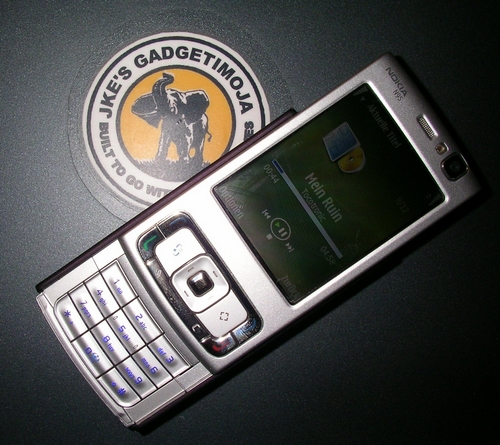
my Nokia N95 on top of my laptop
Three months are a good time to draw a line and have a closer look at what’s good and bad on this phone. Although I’ve already blogged some few impressions earlier here, here, here, here, here, here and here, I often thought about compiling another list of things I do not like about this phone. And while there are a few things that could be changed with a firmware update in future, other issues are hardware related and unfortunately meant to stay forever. Unless of course some Chinese “copyist” comes up with an alternative case for the N95 which could be used instead (a case modder, that is).
The N95 is a so-called smartphone, and while it is released under Nokia’s N-Series where the “N” stands for eNtertainment, the phone comes with everything you can currently put in a mobile phone: a fast variety of possible network connections (GPRS, EDGE, UMTS, HSDPA, Wi-Fi, Bluetooth, InfraRed); a decent 5MPx cam (CMOS sensor though); mp3/mp4/avi media player for music, videos and pictures; basic picture and video editing; SMS; MMS; e-mail; an internal browser; 240×320 px screen resolution; flash memory; mini-USB connector; video camera with good frame rate; GPS (!!); office tools for viewing MS-Office files (doc, xls, ppt); Adobe’s PDFormat viewer of up to 2mb size and all of this running on Nokia’s S60 platform which is an operating system that has its roots in the PSION PDAs from the mid 1990s if anyone still remembers them.
I have used a Nokia 6230i before which was and still is a perfect phone – except for the limited camera (1,3 mpx, no flash) and the horrible multimedia player which had problems handling bigger playlists. Since I am often using my phone as an mp3 player and taking lots of pictures, it suddenly became clear that I should eventually invest some money on a better phone.
AND THAT is actually where the trouble begins! The 6230i is a phone-phone. A phone in the first place, something for calling people and writing SMS. The N95 is a multimedia machine though, and Nokia also calls it “..what computers have become”. What they meant to say and left out was that this also includes all the downsides of a mobile computer resp. a multitasking operating system. That’s just like comparing a simple calculator to a scientific one. Or a VW Beetle to a Mercedes S320. More equipment and luxury means more problems.
I could actually stop my review here and go back to my 6230i, as I need a reliable, a working phone with enough battery power. Nokia’s competitors like SonyEricsson and/or Samsung do produce interesting alternatives, and – hey – if the N95 wasn’t available, I’d have gone for the SE K800i by now. Only: SonyEricsson for some unknown reason completely messed up the keypads of their phones! This is so sad and I am sure they lost many customers due to that strange policy. (SE, give us more phones like K800i! The successor model K810i has a horrible keypad and most others after that as well).
So I am stuck with my N95 and have to learn appreciating it the way others do. Or maybe I am just too disappointed by it as I had apparently expected it being as efficient as the 6230i.
Usability is a BIG issue for me – and this recent usability test proves that the N95 isn’t as convenient as the iPhone. The iPhone on the other hand is a design concept for me with lots of smart solutions, but it lacks even basic services such as MMS or a decent cam, and since it comes with an internal battery AND is part of Apple’s “walled gardens” concept (proprietary systems), it is a no-go for me.
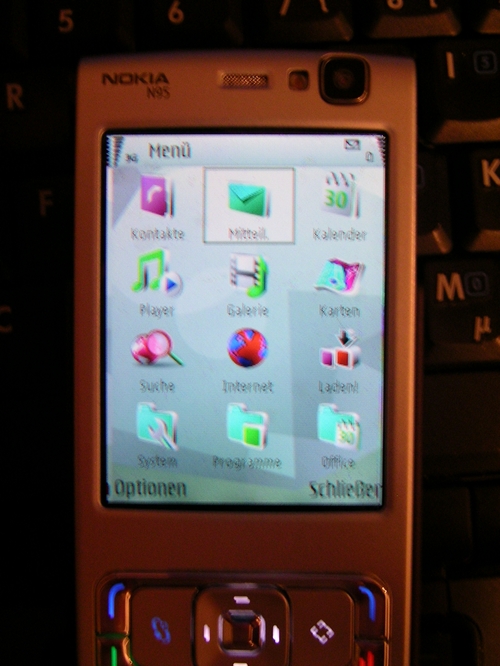
the N95 after 1,5 months – a broken display which had to be exchanged
Now, Nokia is a global player with a wide range of phones available for different budgets and needs. While their low-cost, entry market phones like 1xxx and 2xxx series really convince in countries like Kenya, their middle-class / mass market phones like the above mentioned 6230i also provide a lot of usability for a set price. The top range though, where my N95 is supposed to be one of the flagship models (note: the E90 communicator model has recently been taken from the market for further improvements as it developed some hard- and software issues), clearly isn’t as performing as it could or should be.
In other words: IF you are paying something like EUR 500,- to 700,- on a state-of-the-art phone, you may want to expect certain qualities – and at least a reliable phone that provides you with some basic services.
Well…. I don’t know about other N95 users who may be overwhelmed by their phones, but my N95 is under-performing.
The recent 2nd editions of the N95 for the US market (N95-US with a better camera and support for the US 3G system) as well as the brand-new 8GB version of the N95, which is due to come out in October this year (next week!), actually proves that Nokia realized how they messed up with the initial N95 version I am stuck with.
Coming back to the phone’s usability, let me summarize the following issues:
Keypad
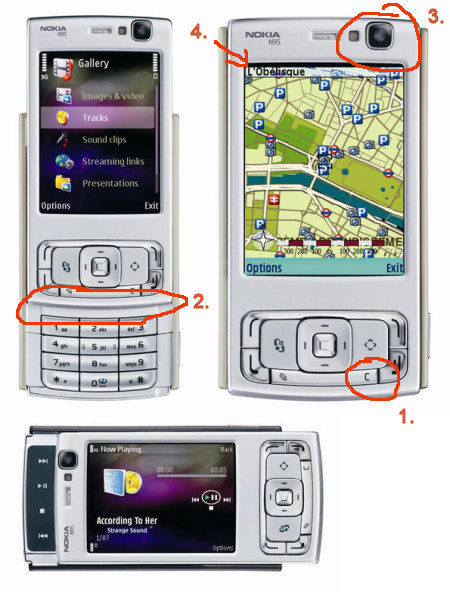
The keypad on the front cover (”S60 keypad”) is way too narrow and I understand it was already moved down and away from the screen to shorten the distance to the actual number keypad (Nokia calls this the “ITU keypad”). While writing text (e.g. SMS), I sometimes type in a wrong letter which needs to be corrected. Hitting the delete (”C”) button on the front panel sometimes – unfortunately – results in hitting the
a) red phone button by mistake => the phone goes back to the standby screen, or b) multimedia key by mistake => the phone comes up with a so-called multimedia menu, which by itself takes about 2-3 seconds to load.
To change this, Nokia or any 3rd party parts contributor (aka case modder from China) should redesign the keypad on the front cover (a). As for the multimedia menu: it could be deactivated or reassignable to another key once all keys are fully programmable. This could be done through a firmware update.
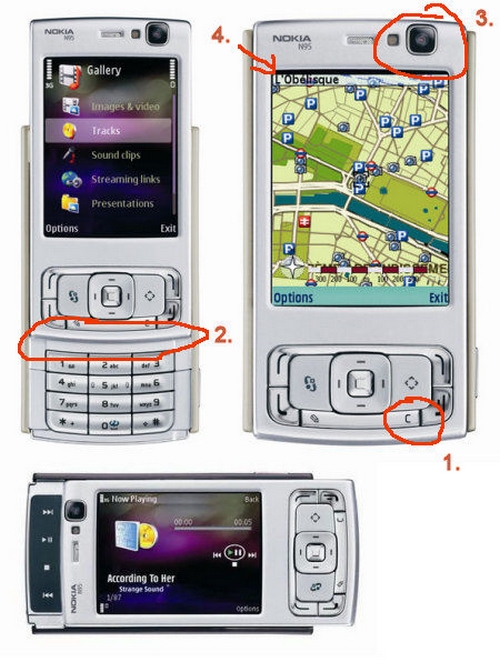
Front Cover
Other slider phones from Nokia such as the 6110 navigator or E65 come with a gently inclined front cover. While writing text on the N95 number keypad, my thumb often hits the edge of the front panel. This could be avoided or limited by removing this artificial border and reshaping the front cover so that the thumb may freely move between the (lower) number keypad and the keypad on the front cover.
The front video camera on the upper right corner looks like as if it has been put there at the last moment. Obviously, there should be a better way of moulding it into the front cover (as seen on the 8GB version!!). What’s that space between the display and the keypad good for anyways?
The phone also is a “slided” typed model, meaning that the front cover moves in two different directions. While this is somehow neat, I actually realize every day how much I hate slider phones and want my brick phone back.
Now imagine with Nokia’s infamous slider built quality, the slider OF COURSE developed problems over the time – although mine is still one of the better phones. There’s a workaround to stop the play level between the front cover and the main body as shown on different Youtube videos (~ untighten 3 screws on both sides and put some adhesive tape on top of the sliding rails to limit the play).
My Nokia 7110 back in 1999 (!) also head a nasty slider problem. It’s not a bug, it’s a Nokia!
Display
I “secured” the display on my N95 with some BRANDO display protector (foil) as it a) looks as if the screen actually is a bit sensitive to scratches and b) there’s a gap between the display and the frame = no seamless transition between the display and the frame as seen with other phones (= which shows that such an approach to a better design is possible and that it was just left out because someone over at Nokia didn’t pay attention).
As with other mobile devices, a display always consumes lots of energy. Maybe Nokia could implement a stricter energy saving mode for the display, although of course the display brightness as well as the duration until it goes back into a half standby mode may already be adjusted by the user. I am saying it’s a “half standby” mode, as the display on a SE K800i seems to be even more efficient (battery wise). Again, plenty of room for improvements within the firmware.
Oh and btw: just after 1,5 months usage, the display suddenly flipped the screen from left to right and then completely went out black. The flex band inside was ok, but the display had to be exchanged.
Telephony
Speech quality of course always depends on the network, and while coverage in my area isn’t always the best, callers sometimes tell me they’re having problems understanding me while using the phone. A workaround is to use a headset, but in all honesty: you wouldn’t want to use it that way while talking for half an hour.
And the headset itself is an issue as well. Oh my. It just isn’t always responding to a keypress.
Speakers
The internal stereo speakers on both sides are actually quite good. While playing stereo soud on them, the “stereo effect” comes out pretty nicely. Well done, Nokia!
As for the loudspeaker on top: well, it’s a tiny, squared speaker. No great resonance from that little thing.
Media Player
The internal media player ist nice although it’s usability could be a bit better. Sound is good enough for me, but using it with the headsets has given me some headaches lately. You see, whenever I removed the headsets on my Nokia 6230i, the player would just stop playing (which is good as you wouldnt want to have it playback through the speakers if, by accident, the plug comes out of the socket (which is 3,5mm – a blessing, as you can actually use ANY other headset and aren’t forced to use any proprietary system from Nokia)). On a SE K800i, the phone ask you whether you would want to have it continue playing through the speakers. Well…on the N95, the phone just redirects the sound to the speakers without asking me! And this although the S60 platform offers many other situations where it will ask the user twice if e.g. it shall *really* go online or *really* download that e-mail I just clicked on. Hell, yeah! Just do it, you ***** phone! *NARF*
The media player is also directly related to the:
Multimedia Menu
The multimedia menu. Oh my. WHAT kind of IDIOT designed this stupid menu???! It is SOOOOO USELESS! I NEVER NEED IT…and consequently put this as a *wish* on S60’s feature wishlist.
There are two ways to access this menu: either by pressing (or often accidently hitting) the multimedia key to the right of the joypad, or by switching the display from portrait into landscape view.
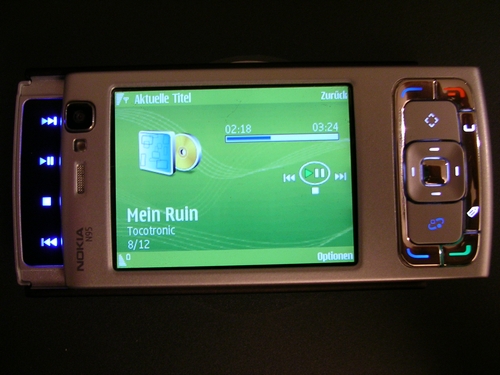
landscape view on the N95
Let’s say you are in standby mode and portrait view and want to switch into landscape view (as shown above) to access the (blue iluminated) multimedia keys on the left to e.g. stop the media player. BEFORE the phone actually reacts to the keypress, it first of all loads this ****** multimedia menu which takes 2-3 seconds alone.
I had this argument in a mobile phone shop with another dude who was SO convinced of the S60 platform and really loved his N95. I then asked him: “ok, how do you stop the media player if the phone is locked?” – “Simple”, he replied, “just slide it the other way open and press the media keys”. – “And what about that multimedia menu that pops up in between?” – “Oh…..”. Yeah. Stupid.
Nokia, in case you are reading this: pls disable the multimedia menu, or at least (if it belongs to your marketing strategy) give us a function to reassign the keys on the front cover and the side. Thank You!
SMS
Sending SMS, MMS, E-Mails & Co from the phone is dead simple. Only: once you hit the wrong key (again due to the narrow keypad), it will return to standby mode and move your written piece into the DRAFTS folder. On the 6230i, which btw runs on an older version of the S40 platform, an SMS is left in the editor, so once you return to the editor, you’ll find your draft there ready for editing.
Gallery
The gallery is just nice and also doesn’t take too long to load. It creates thumbnail versions of your images which are loaded for preview. If you stumble across a video in your gallery, it automatically loads the REAL PLAYER to playback videos. There’s another add-on for the phone that provides a DivX player, so playback of those files is also possible.
VoIP & Wi-Fi
I am using FRING on the phone which is a neat little all-in-one messenger tool for chatting and using VoIP with configured services such as Skype, ICQ, Google Talk, MSN Messgenger, Twitter (!) and SIP. I have my SIPGATE number configured with the phone as well as Gizmo (which I haven’t used for a while). VoIP works but you’ll sure need a strong WLAN / Wi-Fi connection for this to work fine. Also used it through my UMTS connection (fortunately, the port is open for that service) and it just works. WLAN/WiFi connectivity is a bit tricky. The phone is said to having some problems with certain routers. Sometimes it works fine, sometimes the connection brakes off all the time. Annoying.
So, in theory: services work. When it comes to actually using everything the time you need it, something like network coverage may be a problem, so my take on this is that Wi-Fi was just added for the US-american market (due to the availability of hotspots there) or for home usage where many ppl nowadays are having their own Wi-Fi routers hooked up to a cable or DSL modem.
Germany’s famous Fritz!Box WiFi router by AVM actually works much better for VoIP – I had my fixed line phone directly connected to the router and so I wonder why I should use VoIP at home through my mobile if instead I could use it much better through a fixed phone.
Battery
The battery. Well well well. The 950mAh battery inside the phone is nothing but a joke. It lasts for a day with limited usage. That’s why the two new versions of the N95 will come with a slightly improved battery, but honestly: WHY only now? Why couldn’t they come up with a better battery life and power management in the first place?
And why Li-On instead of the Li-Polymer battery as seen with older Nokias?
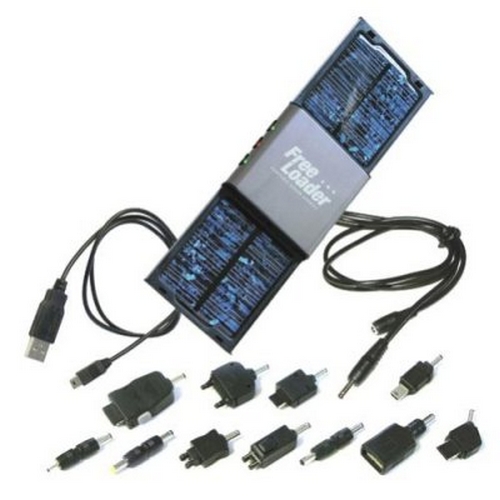
The battery is why I’ve been looking out for external power supplies (like that solar charger below) that will help me recharge the phone while travelling, far away from any power socket. The charger that comes shipped with the phone is very small and light (good!), but only because you’ll always have to carry it around with you. Clearly, the N95 isn’t a phone I’d take out on a Safari in the bush!
I bought a 2nd battery (4,- EUR fake from China) and another desktop charger so that the phone at least stands up straight in a cradle while recharging.
Battery life clearly affects many other parts of the phone: pure mp3 playback WITH THE TRANSMITTER SET INTO OFFLINE MODE! (to enhance playback time) gives me about 2-3 hrs which is just ridiculaaaas! The phone also comes with a Video-Out cable so that you can hook it up to your TV/multimedia system and use it as a game console. LOL! This drains the batteries quite quickly.
The limited energy provided by the small battery is actually reason enough to return this phone to the shop and go for any other – better – phone. What’s it all worth with all these gadgets if the battery only last for half a day?!
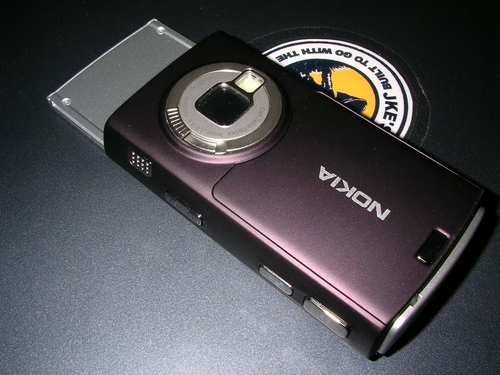
the camera module on the back
Cam
The internal digital camera has a 5mpx resolution achieved through a CMOS chip, which is what you’ll know from other phones and better webcams. PROPER LIGHTING is the KEY to decent pictures with such a technology, so during daylight, pictures turn out fine. The cam is good, and for most of my needs it actually is sufficient enough. Only, and yeah, even though it is good enough, the autofocus on SonyEricsson’s K800i cam is FASTER. Focusing with the N95 takes a while. Well….no hurry in Africa.
And then of course the shutter sound may not be disabled. I am used to taking secret shots with my 6230i with no sounds and lights emitted from the phone, but the N95 always flashes up a small LED to autofocus (ok, this can not be changed) and sometimes even comes with the flash LED which is SO extremely bright that you can quickly be hated by all your friends if you’re into taking a snap shot of them during night time + using the flash. This LED flash is not as a convenient as the Xenon flash on the K800i.
To activate the camera, you can either select it from the menu, and / or slide open the protectice cover on the back of the phone. There’s a small contact inside that automatically starts up the camera once the cover is opened.
Browser
The default browser that comes shipped with the S60 platform is somewhat okay, but it lacks the comfort of OperaMini. Especially the “BACK” function only reloads the previous page instead of loading it from the phone’s cache. Why? Stupid.
And then of course there’s no way of setting a default browser on the firmware. The EU actually sues Microsoft for shipping WindowsXP with a fixed browser? Well, Nokia does the same with us.
Nokia PCSuite
Nokia’s PCSuite, the software to sync the phone with a Windows system is just crap. And besides: I am still looking for a decent (!) way to edit the phone book. The directory on M$ Outlook sucks, all free XML sync services (as mentioned the other day) just provide the editing for names & numbers (but no snail mail addresses) and Nokia’s own PC Suite doesn’t provide any editing function. Why not?
Speaking of syncing the phone with another computer: the N95 has a nice USB mini-B connector, so basically most other USB cables you’ll know from your digital camera will work with the phone as well. There’s no stupid & proprietary Nokia PopPort connector any more so this is a GREAT improvement. We’ll also see a change in this in near future as the mobile phone industry is said to have teamed up for a single connector standard which would be a blessing for most users. One cable type for all gadgets! Only: charging – as seen with the famous Motorola V3 series – isn’t yet possible through the USB port. A brilliant example for Nokia’s marketing on accessories…
RAM
Random Access Memory on the N95 is limited to 20 MBs once the machine is fully loaded. The 8GB version comes with 80 MBs so multitasking failures due to a limited RAM capacity are less likely to happen with the improved version.
I wonder if one could use the other memory instead to extend the RAM (like a swap file) but I guess that just isn’t possible.
GPS
The internal GPS runs on Nokia Maps, a free mapping software provided by Nokia with maps for different countries. You’ll only pay for the navigation. The phone also works with other free and commercial mapping software like MGMAPS (awesome!) or Route66. Also, Nokia’s “SportsTracker” software is just awesome for tracking exercises.
However – the internal GPS antenna is located beneath the lower keypad – on the bottom of the phone. In order to use the GPS and improve reception of satellite signals, you’ll always have to slide open the phone to reveal the lower keypad. The Nokia 6110 navigator though comes with Route66 software pre-installed and the GPS antenna on top of the phone, so the 6110 is a dedicated, much faster GPS device than the N95.
Again, the N95 is an all-in-one gadget, a prood-of-concept-styled phone which main purpose, I suppose, was to show to the interested masses what may actually implemented into a phone.
My list of direct criticism based on bad experiences with the phone could go on and on, but I will just leave it for now. Further plans are to wait for the next firmware update and see if any of the bugging isssues have been improved. If not, I will sell the phone and get another one with similar camera and video qualities (oh, did I mention the near DVD video recording quality? that’s just awesome for such a phone. but then again: battery runtime…*sigh*). Wi-Fi isn’t really that important although it was one of the reason for me to actually get it. Back then I didn’t know that Wi-Fi coverage would be that bad, and to actively keep it connected to a nearby Wi-Fi router for VoIP usage, the battery is just too weak.
I really really hope that Nokia will have a closer look at the current N95 model and see if there’s any improvement possible through the firmware. A stronger battery would also be nice, or at least an official case mod which would enable consumers to pimp the current N95 into a better one.
The N95 truly is “what computers have become”, and while it really only lacks the keyboard we’ve seen on the E61(i) or even the SideKick (ooooh, a hidden keyboard underneath the display in a sidekick style would be so great!) to make it become a real computer, it does not provide the most basic functions I need a phone for: being a reliable gadget in my pocket.
(is this my longest post ever?)