Gcompris

I’ve played with Edubuntu on the office laptop today and came across this nice suite for kids & boys like me who like to play smart games:

gcompris

If you have access to kids ;-), think they should learn something about computers and don’t want to buy any extra gadgets/toys, then GCompris may just be what you’re looking for.

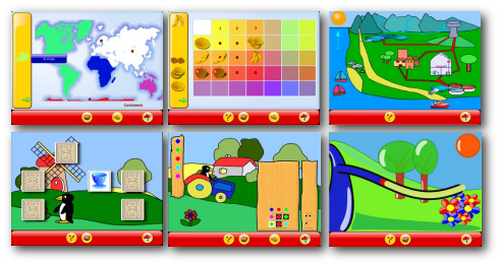
screenshot selection

GCompris is an educational software suite comprising of numerous activities for children aged 2 to 10. (…) Currently GCompris offers in excess of 100 activities and more are being developed. GCompris is free software, that means that you can adapt it to your own needs, improve it and, most importantly, share it with children everywhere.”

In order to promote the use of GNU/Linux, the windows version has a limited number of activities. It is possible to access all the activities for a fee” – which is 20,- EUR. Best option is to use the LiveCD version, or – if you can – try Ubuntu with the Edubuntu add-on package.

Edubuntu has really improved since I’ve first blogged about it in 2005. Nice! My new boss has 3 kids who often play in the office. So I thought about giving them an older laptop with Edubuntu + a mouse and see how far they’ll get with it.

mobile blogging, part 3

It’s almost one year ago that I published three (1, 2, 3) articles on mobile blogging – and nothing has really changed since then.

Back in 2007, both the Nokia N95 and the Apple iPhone were released – two completely different phones that were only compared on numerous blogs due to setting new standards on each segment: the N95 being a true multimedia phone with a decent 5mp cam, 640×480 @ 30fps video (albeit a mono mic), a (slow) internal GPS module and a really nice multimedia player. With the latest firmware, it even plays flash videos (YouTube & Co.) and has different applications run at the same time (sort of multitasking). The iPhone on the other hand provided a compatible device that suits Apple users – a nice user interface and all-in-one device like the N95 which unfortunately still missed some basic phone tools (MMS, Bluetooth exchange, etc.). And although both phones aren’t the only cool devices out there, they sold quite well. Even if the iPhone doesnt feature all these special goodies the N95 comes with, Apple’s phone still has the best browser on a mobile phone.

screenshot0009

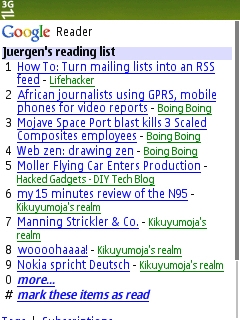
GoogleReader on my N95…

Back in 2007 I had bought the N95 because the music player on my Nokia 6230i had constantly failed (due to a bug in the firmware) and because I urgently wanted to have a new, sexy phone. Something that enables a better mobile blogging experience.

And that’s exactly the basic point here: until now, no mobile phone has actually delivered this *sweet mobile blogging* experience so far.

Back in 2007, I argued that it’s a software issue. And still believe it is. So instead of buying new phones, a systematic adjustment between the phone’s software (firmware & single programmes) and your blogging platform (WordPress, Vox, Typepad, etc.) comes into mind.

Sure, there’s this WP iPhone app some of us have tested some time ago, but still: it doesnt work that well, and it doesn’t provide a similar experience we’re having online on our laptop, surfing the net with decent browsers on bigger screens with full JavaScript support etc..

And this – I believe – is also one of the many reasons for the success of Twitter. Twitter just filled that gap on mobile blogging, phone manufacturers have failed on providing. Why? Because that special Twitter experience is the same whether you’re online via a browser window on your laptop, use it via an extra widget somewhere on the desktop, have it run as a stand-alone utility on S60 & iPhone platforms or just use SMS (for sending only, though).

You know I had a discussion with my Minister of Finance earlier this week on getting a new phone (again), and I had mentioned the new Nokia E71 and why it could be an improvement on what I am looking for (~ mobile blogging device). However, with the above mentioned discussion on mobile blogging being a software issue, I am rather confused now and think I should stick to my N95 at this point. Maybe wait for Google Android’s phone being released by the end of this year?

Another interesting developement since 2007 is the success of so-called Netbooks – which are lightweight laptops at 7″-10″ screen sizes, often equipped with an energy saving CPU, a solid state disk and enough flexibility to provide surfing the net, answering your e-mails and doing some other office work. Battery runtime still is an issue though, often only giving 2-3 hrs. Netbooks are currently sold for 300-400,- EUR in Europe and are small enough to fill that special gap the need for mobile blogging has created.

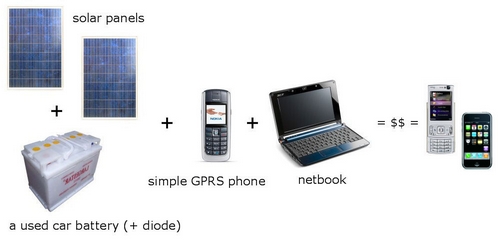
So here’s my conclusion: instead of waiting for the ultimate mobile web experience via a dedicated & maybe also expensive smart phone, I’ll bet on another setup: ppl – especially those in need in a rural Africa – will imho be introduced to the combination of basic GPRS & UMTS (3G) phones, hooked up to cheaper laptop computers such as netbooks.

Not today, not tomorrow – but maybe in two years time when basic netbooks wil sell for ~ 150,- EUR and will also be sold on the African continent in a big style. Why? Because a mobile phone is – although it is often shared with members of the extended family – still a device for a single user (despite of these new Nokias that come with multiple phonebooks). A computer though can easily be shared with others. Here’s what I had in mind:

Image1

Solar panels are already for sale in rural Kenya as well as simple GPRS-capable phones, netbooks could be equipped with a free & open OS (+ BT, serial port & USB cable driver package) and it would still cost below the amount you’d normally spend on a) getting a normal desktop pc online or b) a fancy smartphone that just still doesnt deliver the real web experience.

And the best part: this setup isn’t reduced to the needs of a rural environment, but also applies to urban areas in the US, Europe or Asia. In other words: if I had to do true mobile blogging right now, I’d go for this setup (ok, maybe without those solar panels).

Netbooks are what Twitter is used to be to SMS: added value.

High Capacity Solar Charger Battery by Chinavasion

chinvasion-CVSBT-5504-7-computerx


Chinavasion has this new “High Capacity Solar Charger Battery for PC Laptop + Mobile Phone” for sale which looks quite promising in terms of it’s 20.000 mA/h accu – enough to feed your laptop’s battery.

Recharging the internal battery of cells (yeah! :-) is said to take around 3h @ AC and 8-10h through the use of the solar panel. What irritates me a bit is that on their website they are talking about a monocrystalline solar panel type, although it obviously is a polycrystalline type? Anyhow, an interesting alternative for ~ 96,- EUR. Let’s see when this will hit the European market (soon?).

I am still dreaming about a foldable solar panel that I can put on the cover of my 15,4″ HP nx8220 laptop and that will recharge a 2nd battery pack in an unused space, e.g. the media bay that currently hosts the DVD burner. Unless someone comes up with a much better (slimmer) rechargeable battery system, I am currently more interested in devices that generate power instead of just storing it (mechanical, solar, …. devices vs. NiMH/LiOn/…battery storage systems).

A sustainable power supply + decent bandwidth = JKE happy :-)

Kubuntu & ich

Ich finde es erstaunlich, wie sehr ich mich in den letzten Tagen an Kubuntu (KDE) gewöhnt habe. Meinen zweiten Rechner im Büro (nen altes TOSHIBA Tecra S1) habe ich inzwischen auch schon mit Ubuntu (Gnome) ausgestattet, dort aber als Windows Install über Wubi.exe, einfach um nur mal zu sehen, wie das alternativ läuft.

Mein Rechner zu Hause (HP nx8220 laptop, 1,86 GHz Centrino, 2 GB RAM, 120GB HDD) ist mit WinXP & Kubuntu 8.04 bespielt, habe den Bildschirm letztens ein bißchen an mein WinXP feeling angepasst (mag es einfach + ohne Effekte), mit den Windows Schriftarten und der gleichen Tapete wie bei WinXP im Hintergrund.

Der Grundbedarf an Programmen entspricht ca. dem was ich unter WinXP mache, es ist alles dabei und was dann wirklich nicht verfügbar ist, läuft entweder unter Wine oder direkt unter XP.

Eben beim Schreiben dieser Zeilen dachte ich mir, nee, moment, stimmt das wirklich? Was ist mit Nemetschek (CAD), ArcView (GIS), Aquasys (Hydrologie)? Was ist mit diversen shareware Programmen wie zB PaintShopPro (welches ich seit Jahren zufrieden benutze einfach weil mir Photoshop immer zu umfangreich war)? Kann Gimp wirklich Photoshop & PSP ersetzen? Na klar! Und die spezielle Software gibt es auch für Linux Systeme – dann sogar meist kostenlos. Dies ist übrigens auch ein Grund, wieso ich mir die Tage selber auferlegt habe, bei Bildbearbeitungsaufgaben im Büro nur noch Gimp zu verwenden (vom Stick, portable Version). Mzeecedric macht es wohl ähnlich, oder?

Über den Wechsel von Windows zu einem Linux-basierten Betriebssystem gibt es tausende von interessanten Blogeinträgen – allein den Wechsel selber zu erfahren und einfach mal durchzuziehen, empfinde ich als eine gute Erfahrung, die man mal selber machen muss. Meine Zeitinvestition bisher bei den Einstellungen (wo kann ich was einstellen? wie hängt was zusammen? wo sind die Applikationen? etc.) beläuft sich auf ca. 8h.

Ein Beispiel: die “Installation” meines Yakumo DVB-T Quicksticks (nur digital, mit dem hybriden digitalen/analogen hatte ich auch schon diverse Probleme unter XP früher) zum Fernsehschauen auf dem Laptop hat innerhalb von 1 Minute geklappt. Nix Treiber extra installieren. Nur Me-TV über den Paketmanager herunterladen, starten, Stick wurde erkannt und innerhalb einer Minute waren alle Sender gefunden. Was will man mehr? Zum Vergleich: unter WinXP muss man erst die Treiber des baugleichen Freecom-Sticks installieren (bzw erstmal die Routine haben, dass Treiber von einer mitgelieferten CD eh nicht aktuell sind), dann idealerweise ProgDVB laden (shareware aus Russland) und hoffen, dass die Software wg der BDA-Treiber nicht abschmiert.

Es sind genau diese Kleinigkeiten, bei denen ich dann denke: klar, jetzt kann ich auch die Apple-User verstehen. Der Erfolg von Apple vor allem in den USA zeigt doch vor allem, dass die Benutzer ein funktionierendes System (gegenüber) der Vielfalt an Möglichkeiten vorziehen. Genau dieses “alles passt”-Gefühl habe ich jetzt unter Kubuntu.

Und dann wundere ich mich, wieso ich Bekannten und Verwandten in der Vergangenheit nicht doch zu Linux geraten habe. Für die meisten Zwecke (Internetsurfen, Office, Solitär spielen) ist Kubuntu völlig ausreichend und vor allem sicherer als dieses WinXP.

*Sicherer* bedeutet für mich, dass ich meiner Mum zB gerne einen 1GB USB Stick geben würde, den sie dann für ihre Arbeit als DaF-Lehrerin benutzen kann. Wenn ich ihr aber einen solchen Stick gebe, wird der mit ziemlicher Sicherheit innerhalb kürzester Zeit malware-versucht sein und ihr System infizieren. Ich wohne aber zu weit weg, um einfach mal vorbeizuschauen und Computerprobleme zu richten.
Wenn ich ihr System jetzt auf Kubuntu umstellen würde, könnte ich ihr guten Gewissens so einen Stick in die Hand drücken, da sich diese malware nicht auf dem Kubuntu System vervielfacht.
Nachteil jedoch: viele inkomatiblen Probe CDs aus dem Sprachunterricht würden uU nicht funktionieren weil die nur auf Windows ausgelegt sind.

Und das ist total ärgerlich, da meiner Meinung nach die Mehrheit der Computer-Gelegenheitsnutzer (aka Generation Golf, die als Singles am WE durch Singlebörsen surft) mit so einem System wie Kubuntu ideal bedient wäre. Wer von dieser Zielgruppe hat denn eigentlich seinen *Eigene Dateien* Ordner auf eine andere Partition (sofern vorhanden) ausgelagert oder gar gesichert? Eben.

Wenn man allerdings seit Jahren nur mit Windows arbeitet, die Jahre der HomeComputer (Atari, Amiga, C64) schon ein viertel Jahrhundert zurückliegen und man so in dieser Windows-Denkweise drinsteckt, ist ein Wechsel zu einem anderen Betriebssystem unheimlich schwer.

So beschränkt sich das bisher meist nur auf freaks bzw. auf diejenigen, die Zeit für eine Umstellung opfern und den Wechsel auch wirklich wollen.

Jedes Mal wenn ich unter Kubuntu arbeite, ärgere ich mich, dass ich vieles noch nicht verstanden habe und frage mich dann zB, wieso es “nicht so einfach wie bei WinXP” sein kann. Dabei ist es vielmehr die Gewohnheit, die mir WinXP vertrauter erscheinen lässt. Einfacher ist es dort nämlich auch nicht.

Ich bin gespannt, ob und wie sich meine Arbeit am Computer zukünftig von XP zu Kubuntu verlagern wird. Gerade hinsichtlich der Verbreitung von freier und offener Software (+ Betriebssysteme) und meinem an dieser Stelle oft geäußerten Wunsch, alle wichtigen Computersysteme in Kenia mögen doch bitte auf ein Betriebssystem wie Ubuntu umgestellt werden, empfinde ich es als sinnvolle Investition, sich rechtzeitig mit Alternativen vertraut zu machen.

(disclaimer: meine ersten aktiven Unix Berührungen machte ich 1996 an der FH FFM und war damals eher abgenervt, die ersten populären SuSe Distributionen waren auch nicht so der Hit. Mit Apple’s OS konnte ich mich ob der beschränkten Möglichkeiten nie anfreunden. Richtig Spaß (!) macht mir das alles erst seit Ubuntu 5.04.)

@Turbodave: habt Ihr bei der neuen Airline eigentlich auch Ubuntu-basierende Laptops? Du hattest ja imho schon mehrfach gewechselt zwischen den OS, jeweils mit gemischten Gefühlen…

MS Exchange & me (as a user)

Why do ppl use the calendar on Microsoft (Office) Outlook? – Because it runs on their place of work and syncs with their PDAs.

In my case: I use MS Outlook under WinXP (at home) to sync the address book on my mobile phone (despite of online service as mentioned earlier). I could just as well use an alternative e-mail client, but I am using MS Outlook (under XP, that is).

There’s this colleague of mine who uses an MS Excel sheet to manage his appointments. Needles to say that these sheets are on his computer only and remain there.
We requested him to open up his calendar to the whole team but he hasn’t done so since then.
I am not the one to complain about this because I am also hardly ever using that MS Outlook calendar at work.

outlook2003 preview 07
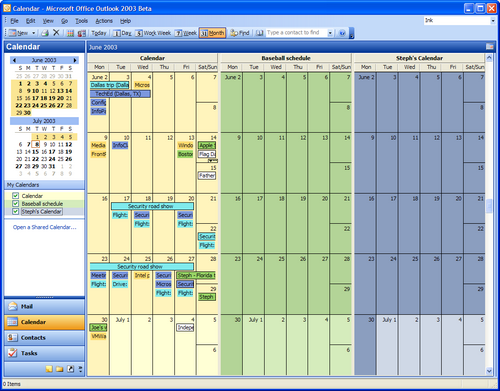
screenshot of a calendar @ MS Outlook 2003

The other day an old friend of mine (who happens to work in the same organization) asked me if I’d like to have lunch with him. Now, instead of just accepting my “OK”, he then proceeded and sent me a request for the Outlook calendar. Since we both work at the same company, since we’re both using Outlook to organize our schedules, since he has a company phone that syncs with our MS Exchange server – all of this makes sense (for him).

However – I am not using a company phone. And I do prefer running a paper version of my calendar. If it had to be an electronical version, I would love to have one that:

  • syncs with just about any phone / PDA / etc.
  • syncs with any corporate IT structure & their regulations (!!!!)
  • is an all-in-one solution for private and professional contacts
  • has a public and private section

Google Calendar…is it a suitable alternative for my needs?

And: a request for an open synchronisation – is that due to MS Exchange or the inability / unwillingness of our IT dept. to unlock this special mode due to security reasons & co? What is MS Exchange capable of and what kind of services are used? What is required so that users from different organisations can have one tool online that manages their schedules and still syncs with all different systems? Which system doesn’t require one single server but instead just syncs different servers & user data to a global network? Which system (mabye Zimbra?) enables me to sent a request for an appointment to a user that isn’t connected to our MS Exchange server?

the FF3 map

There are those maps out there which are based on statistical data – assumed, accumulated and unproven figures that may indicate a certain trend and/or just show what the situation has been when the data was collected.

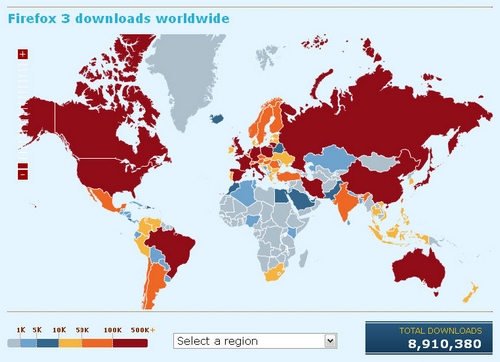
When we look at today’s map of Firefox 3 downloads worldwide in just 24 hours (for a world record):

firefox

…I really wonder what ppl will say about this in future, and also how many organizations will take THIS as a basis for their future planing on the availability of internet access, the spread of alternative internet browsers (such as the Firefox 3 suite) and what kind of internet-saturation (?) it takes to actively participate in such a call for a world record (read: the request to download FF3 on this particular day was imho promoted through the blogosphere? If so, it could be a nice indicator for the blogosphere).

However – 8,9 million downloads in just one day are just impressive!