the touchpad story

16052008210

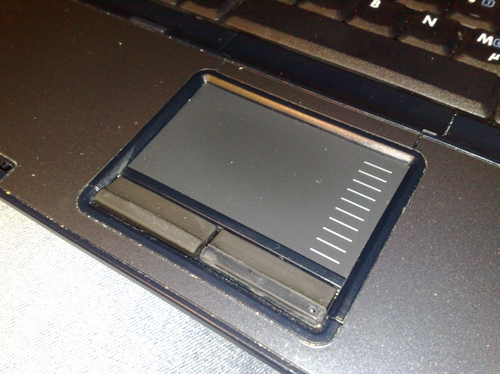
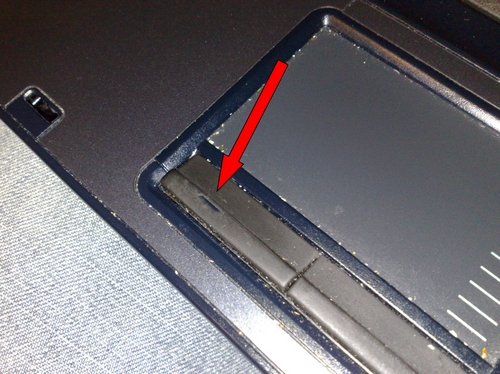
Although – or maybe because – I diligently clean my HP nx8220 laptop on a regular basis (sometimes even with Isopropyl acohol), the rubber on my laptop’s touchpad today went into early retirement.

Nothing to worry about, but then… you know there are some things in life that have a 1a priority – and my machine here apparently has that status.
A quick search on eBay revealed no luck in finding the right spare part – and it’s a pity because I recently had another HP nx8220 here where I exchanged some parts with my current machine and somehow missed to change the touchpad as well. Stupid.

So what do you do if spare parts aren’t available and things keep on bugging you? Right – fix it in a jua kali way:

17052008212

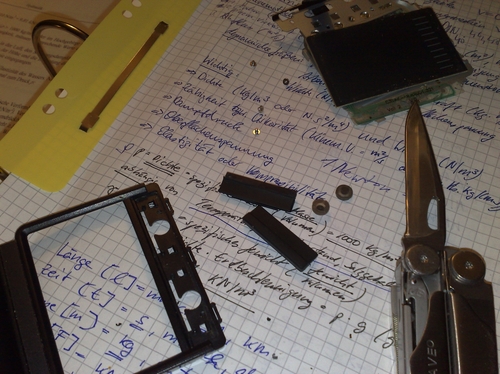
Now where would I be without my Leatherman Wave? Ahh….priceless.

17052008215

Removed the touchpad from the laptop, opened it, cleaned it, swapped buttons (!), removed the rubber “hole” and reassembled it. Quick fix, took me 15 minutes. Not as pretty as a used & cleaned touchpad from The Bay, but works fine and once I’ll get around a decent spare part, I can still exchange it.

Now, I really have to think about limiting my daily usage to avoid any further damage. Can’t be that I’ve already ruined a keyboard and now this touchpad within a timeframe of almost 2 years. HP Compaq built quality? HP = huge problems, high price. But still the best laptop I’ve ever used. Except for my landlord’s ThinkPad X41 of course. :-)

WXGA vs WSXGA+

I’ve upgraded the WXGA screen on my HP nx8220 to a much brighter WSXGA+ display. In other words: from a 1280×800 pixel resolution to a stunning 1680x1050px.

As a consequence of this, my blog now looks like this:

before:

blog@1280

after:

blog@1680

I’ve added a black 2px frame to the screenshots so highlight the actual difference in sizes. I am still undecided if this was a good move – am currently working with a 120dpi font instead of the usual 96dpi under WinXP – but then: it gives me the freedom to actually just rescale the screen to a much lower resolution whenever needed.
Unfortunately, each TFT screen only works best at a certain screen resolution, so this one being the 1680x1050px one, I will have to leave it at this high resolution for a serious “screen impression”. 1280x800px have been fine with me though, and I think it makes more sense to add another, 2nd screen (via a docking station) to move messengers & utilities to the side.
The upgrade came in handy as I had the opportunity to strip down a used & broken machine and use all the good parts on my own machine (especially an almost new keyboard, which is awesome).

Also, I am wondering if this will improve any webdesign projects / photo editing I am doing on my machine. Despite of the improved screen resolution, the brightness of all colours is just great. But then – all content appears to be very very small…

[update:] Ok, there you go….switching back to 1280x800px and downgrading to the previous 1,86 GHz CPU (instead of a 2,13 GHz) did the job for me. No more headaches from focussing my eyes on small details on the screen + no more fan noise coming from an over aggressive fan. The weekend is saved…

my new toy

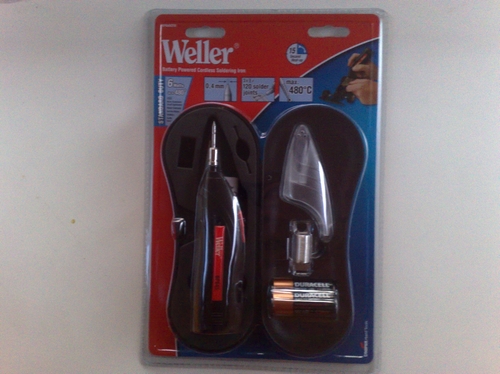
Got me a new toy – a “Battery Powered Cordless Soldering Iron” from Weller:

16042008044

The tip has a diameter of 0,4mm and the packaging says it reaches up to 480°C on the tip, but well….most of these little tips are just hot for a second and then the next second the heat has already dropped by 20°C…

16042008046

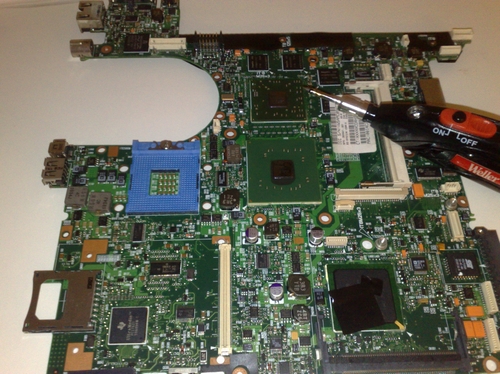
I’ve used it on the motherboard of an HP laptop – these coils next to the Southbridge chip (big bottom chip with that sticker on top) needed some resoldering and I really hope that they were the cause for the malfunctioning of this motherboard – otherwise…sijui.

The three AA-batteries inside the Cordless Soldering Iron won’t last for ages, but this little gadget sure helps to fix a few dots on the board and also it wasn’t that expensive so I’m not really as disappointed as I was afraid to be.

Once I can afford it, I will buy this! :-)

Zattoo Beta 3

tv
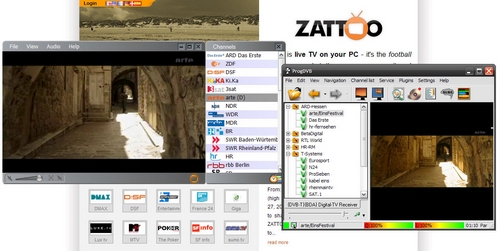
Zattoo (Inet live stream) vs. ProgDVB (DVB-T client), delay of 1-2 seconds…

Wer es braucht und so wie ich kein reguläres Fernsehempfangsgerät hat, wer seinen in ca. 40 cm Entfernung liegenden DVB-T USB Empfänger aus Bequemlichkeit nicht einstecken möchte weil da die Senderwahl jedes Mal einige Sekunden in Anspruch nimmt, oder wer auch einfach nur seinen supi Breitbandanschluss ausnutzen möchte, der kann sich jetzt bei Zattoo endlich auch deutsche Sender übers Internet anschauen.

Letztens habe ich das ja heimlich am Arbeitsplatz ausprobiert, ging natürlich nicht da Port gesperrt, aber trotzdem: läuft wohl auch vom USB Stick. Empfangstechnisch je nach Inetanbindung, Inettraffic und Senderwahl unterschiedliche Qualität, geringe Verzögerungen und Bild/Ton-Qualität (für mein Verständnis) gut.

Bei Zattoo ist die Senderauswahl wohl IP bezogen, d.h., in Kenia wird man hiermit sicherlich keine deutschen Sender empfangen können – wäre aber mal interessant zu testen. Harry, hol schon mal die DSL scratch card… :-)

Neben Zattoo als Internet-TV-clients gibts natürlich noch AnyTV, Joost und das neue Livestation (edit, 2024: Links alle entfernt). Oh, sehe gerade dass die aus ihrer Beta Alpha raus sind. Na fein. Ach ja, “streaming video” gibt es ja schon seit einer Ewigkeit, siehe auch Winamp & Shoutcast. Jedoch alles nicht so hübsch verpackt wie in den o.g. Oberflächen & nicht in ähnlicher (P2P) Übertragungstechnik. Erst recht nicht *live* und mit deutschsprachigen Inhalten.

Für mich als alten Funkfreund ist das alles nicht so doll – Antenne basteln und aufm Dach rumtoben fand ich da früher irgendwie spannender. Vor allem: erinnert sich jemand noch an die UMTS vs. WiFi Debatte? Mit UMTS hat es ja ewig gedauert – bis es zwischenzeitlich von freien, lokalen WLANs in der Praxis überholt wurde. Bei Handies gibt es ja zZt auch diese DVB-H Diskussion, also TV Empfang übers Handy, allerdings gibt es schon für die S60 Handyplattform (zB Nokia N95 & Co.) “live streaming” übers Mobilfunknetz. Sicher, live streaming verursacht immer noch einen hohen Datenverkehr = Kosten, aber irgendwann wird es auch bezahlbare und richtige Datenflatrates für den Mobilfunk geben.

Zattoo ist jetzt also in der neuen Beta 3.10 erschienen und mit einem richtig fetten Angebot an lokalen Sendern durchaus interessant.

Irgendwann werden sie uns fürs Fernsehen bezahlen, da bin ich mir sicher. Bis dahin genieße ich noch die Unabhängigkeit von diesem Zwang & der Hardware im Zimmer und schaue bei Bedarf trotzdem gerne mal kurz rein. Und dafür ist Zattoo ideal…

udon pleasures and the x-sato

05042008018

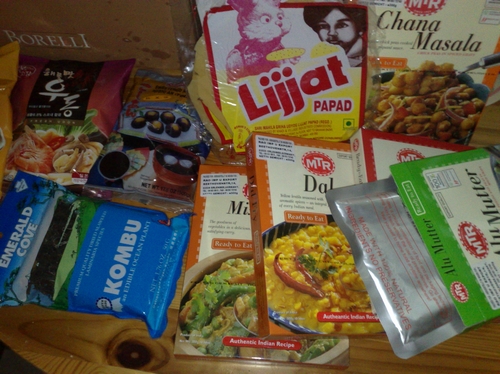
Buying ready-made food is a bit strange to me, especially as it comes packed within multiple layers of paper, plastic and aluminum foil, but….

05042008019
UDON nudoools actually look like tapeworms..

…being able to create a tasty UDON soup, enriched with fresh carrots, seaweed and tofu, in just 10 minutes is unbeataboool!

I really dig these Indian ready-2-eat food packages. They are nice for those moments when you don’t want to cook for one person (+ I can’t cook stuff in small portions, so when I prepare aloo mutter or chana masala it will always last for at least two hungry eaters). One of these MTR package costs EUR 1,80 – which of course is somewhere in between of what you pay for the same dish in India and in an Indian restaurant abroad.

@Kang-Ping: can you see that bag of red bean paste? Sweet & lovely!

This was supposed to be my first post from Kubuntu 7.10 + Konqueror and later on Firefox browser, but something went wrong + my WordPress 2.5 installation has tendencies of behaving like Rucy Kibaki, especially the media upload script will prolly need a user rights correction (i guess – or is there a bug?).

The best way to ruin your sato afternoon is by installing Kubuntu 7.10 and figuring out why the packet manager is behaving like Jeff Koinange after being asked the meaning of Perestroika on Omo-Pick-A-Box.

Well, that’s what weekends are made for, right?

The One Laptop Per Family initiative

The One Laptop Per Child (OLPC) initiative – yeah, “nice” – but let’s look at reality and at what we can / what we’ve already done in the past: inheriting a used, older computer to a member of the extended family – I call it the One Laptop Per Family initiative :-)

Be it in Europe, Africa or the US – in most cases we (we as in “the computer guys”) aren’t always around so what we’ll often do is giving them a Windows XP machine with basic software – hoping that they’ll be responsible enough not to click on any strange e-mail attachments. But then, malware may even enter a healthy system through swapable media drives, such as USB flash memory sticks. With a growing popularity of these memory drives, a system is quickly infected and delays productivity or even renders it useless. But what can we do instead?

A year ago, I gave my old desktop computer to my mum and left her with that WinXP installation. She was a complete computer newbie back then and I knew that she would also attend some computer training courses where they would teach her how to write an MS Office Word document, handle MS Excel or even just write an email, using MS Outlook (Express).

Knowing that I wouldn’t be able to help her when I am not around, I initially had some doubts about this setup and asked myself if I shouldnt have gone for a Linux distro instead – also since she was completely new to computers. Why Linux? Well, it’s much more secure and I wouldnt have to worry about any malware infecting the system.

Earlier last week, I’d paid her a visit and repaired the computer – reinstalling Windows XP because I didn’t have enough time teaching her how to use Linux (Ubuntu/Freespire with an XPDE desktop ) instead and setting it up to work with all external devices.

And this is exactely where the problem is: what kind of operating system (OS) would / will / have YOU installed on those machines you’ve left with your loved ones? Yes?
SANY0137
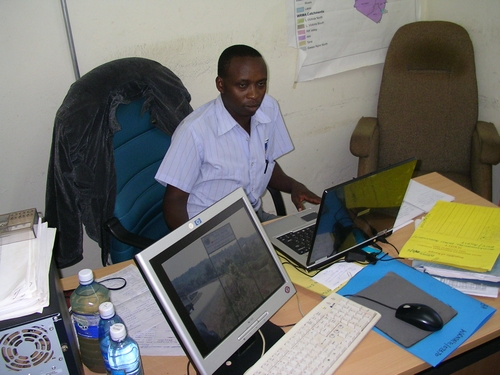
Zakayo @ work in his office (hey, you’ve just been blogged, dude :-)

Take my colleague Abdoulaye, for instance. He stays in Paris, France, works as a consultant in Frankfurt during the week and made the tragic mistake of buying a desktop-laptop three years ago. “Desktop-laptop”? Well, it’s an Asus Z8100 which comes with the same parts as a desktop computer, including the battery-eating cpu, a very loud fan, a horrible battery life and heavy weight. You wouldnt want to carry this machine around with you. Alas, this is exactly what he has done in the past. So we are in the process of getting him a better machine @ smaller size and made up plans how to set up his Asus Z8100 for use with his parents in (The) Senegal .

So there you are: an older computer at your hands that will be given to the extended family back home and the quest for a better operating system which *just* works.

With (a french version of) WinXP, we’ll sure find enough guys back home who’ll provide assistance in case of emergency and it will also be possible to connect a mobile phone to the computer (= inet access) with PC Suites that are available online from Nokia, Sony Ericsson and so on.

But then – there SURE will be someone unintentionally infecting the machine with malware and/or or things happening that will quickly kill productivity on this machine. The alternative?

The alternative could be a free and open (alternative) operating system – such as Ubuntu – but it lacks this out-of-box-experience to support a mobile phone and/or provide instant internet access. Also, it will be harder to find some local assistance in case of problems.

You see, there are currently many different Linux distros out there that all do a nice job of providing an interesting alternative – but which one of them provides this out-of-the-box-experience so that any average dude or dudette out there may just download a fresh copy, burn it to a CD, take an older computer, install it and give it to his/her family back home?

Something that will automatically setup a mobile phone to the machine (given that mobile phones / GPRS modems often are the only reliable way of accessing the inet in rural or peri-urban areas – provided that the area is covered with a wireless/gsm network); something that will automatically support most common desktop printers; something that will just work and provide a maximum connectivity and security even during power failures (no unstable file systems, that is).

This is why I think that initiatives like Ubuntu and or the general promotion of Free Open Source Software (FOSS) are much more important than giving out dedicated hardware to users because it’s the software that makes the difference, not hardware. And yes, the OLPC initiative is also nice + my understanding is that it was also developed to create some reverse-engineering spirit with the kids. But then – it’s still an investment whereby we – as end users – could just as well hand out normal hardware with an alternative OS. Think of your old laptop from 1999 and a copy of Edubuntu

So…if YOU know of any free and open operating system that provides this flexibility and “Luser” -compatibility, pls feel free to drop a comment here so that we can all benefit. Thank you! :-)

Linux Live CDs @ conferences

I’ve dropped an email to the IT dept. today, suggesting to them the use of Linux Live CDs for conferences.

Why? Well, what’s the scenario?
During an average conference, many different users from different backgrounds approach the guy handling the beamer with their usb flash memory stick. Unfortunately, their USB flash sticks are often infected with malware that may reproduce itself on the host system and consequently infect other usb sticks. Malware scanners in use may also not be that effective and often only fight the symptoms, not their actual causes. Hence, an infected base station is the ideal breeding place for malware.

Using a Live CD based on a Linux distro instead may prevent all this danger as such an alternative operating system isnt affected by such malware. Consequently, if used in the correct way, the simple spreading of malware through automatic infections is limited to a possible minimum.

It’s such a relatively simple method to prevent further infections so I am wondering: why isn’t this a standard procedure in a M$-Windows-dominated IT environment?

(@Apple users: *cough* *cough*….well…u know….*sigh* :-)

I was almost fooled…

…by (the benchmarking tool) HD Tune, telling me that almost all of my USB flash memory sticks aren’t bootabooool.

Well, apparently they are indeed able to supply any recent computer with a fresh copy of e.g. gOS – a new OS based on Ubuntu 7.10 + featuring lots of Google web apps.

21032008340

Just plug it in and start your computer with the latest release of [put your favourite OS here] – for inspirations, check out pendrivelinux.com

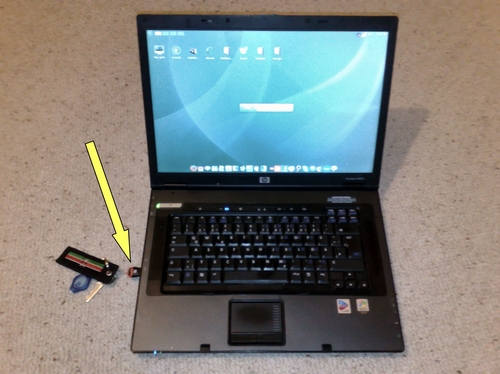
Reasons for bragging about it this way is that I am still amazed at this tiny 2GB microSD card inside the USB reader (see yellow arrow) and that it actually provides my machine with a very sexy-looking OS within a maximum of 20seconds boot-up time. And all of this at the size of a fingernail! (<== no, not those nails that have at one time been very popular with guys from Nyeri…)

Again, the provision of WinXP rescue kits, portable apps or even complete OS on a USB flash memors stick may just be the right extra income for IT students. Given that not everyone has his own machine, a USB flash drive may just substitute that need for virtual desktops.

Maybe one day we’ll only see ppl using terminal-like stations where all private data is stored on a USB flash stick if not remote on a central server?