JKE’s Nokia E71 review: (5) the headset(s)

The Nokia E71 (business) phone I received from WomWorld/Nokia earlier this week also came shipped with an extra goodie: the Nokia BH-903 Bluetooth headset.
SANY1174
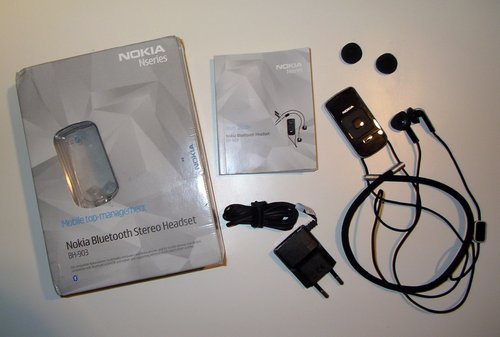
Nokia Bluetooth Stereo Headset BH-903: box, manual, charger, headset, earphone foam covers

As you can already see from the packaging, it’s meant to be part of the Nseries. N, as in eNtertainment. And that’s what it’s all about: adding value to your mobile audio entertainment.
SANY1176

The Nokia E71 Eseries phone does not really need an additional headset as it already comes with an adequate headset, the HS-47. So why would you want to add a high quality multimedia device to a business phone?

Because you can.

That is, if you’re already able to spend the proud sum of EUR 360,- on a business phone (E71), you may just as well be able to cough up another EUR 130,- for a true Bluetooth stereo headset that comes with up to 11h of playtime (150h standby), 32g weight, quick charge capability within 45 minutes, an extra radio, accepts the same charger as the E71 and offers different Bluetooth 2.0 profiles.

As mentioned in the previous part of this extended review, the E71-1 has a relatively high specific absorption rate (SAR) of 1,33 W/kg, with the antenna located at the bottom of the device. That’s why the use of an external headset makes sense to those who are afraid of any additional electromagnetic fields (Bluetooth = max 100mW, Rx/Tx unit is located inside the control unit and not on the earphones next to your ears).
And then of course you may want to have your hands free for other stuff: holding the phone onto your ears during longer conversations is just very annoying.

“OK – sounds like a good reason”, you may reply, “…but why can’t I just use the simple HS-47 headset that came shipped with the E71? And why not another, cheaper Bluetooth headset capable of the A2DP profile? Also, my company will prolly never pay for the extra headset….”

Four reasons why the BH-903 may just be what you’ve been looking for!
SANY1213
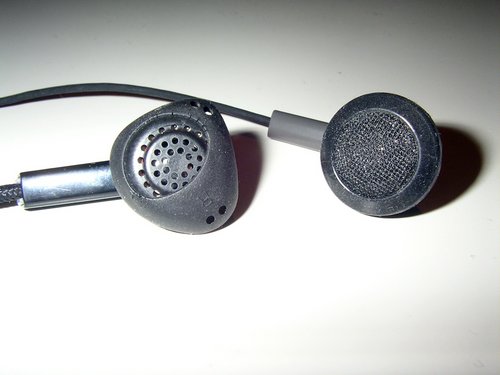
earphones on the BH-903 vs. HS-47

1. the shape of the earphones
What you see in the picture above are the earphones from (left) BH-903 and (right) HS-47. Can you spot the difference?

First, both devices may cover different frequency spectrums, but to most users, this dynamic range isn’t really important (as our hearing ability deteriorates with age, etc.). So, despite of such technical blabla, what do you see on the picture?

Right! There’s a special rubber around the (left) BH-903 earphone which makes it easier to fit these earphones into your ears and sit a bit tigther than the simple round ones.

I am using simple Sony MDR-E 818 LP on my N95 for this very reason, as these cheap EUR 10,- Sony earphones provide a similar comfort – even though they are just earphones, not a headset (no mic, no remote control unit, etc.).

As mentioned earlier, this difference is a BIG issue to ppl like me. If you’re as tall as I am (6’4″ // 1,92m), simple round earphones will at one point fall out of your ears and really spoil your mobile audio entertainment. So-called “in-ear” headphones (which apparently became popular with SonyEricsson phones) may be a solution to that, but when it comes to the old-fashioned/conventional earphones, a special rubber casing like the one above on the BH-903 headset makes a lot of sense.

Try it and you’ll spot the difference.
SANY1186
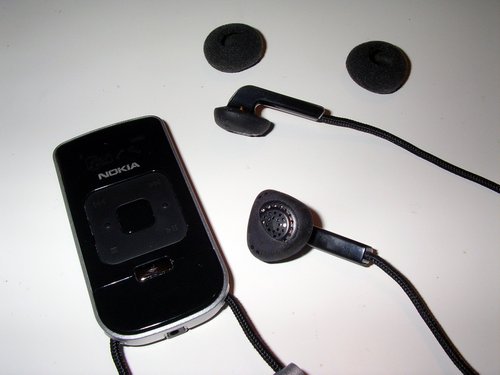
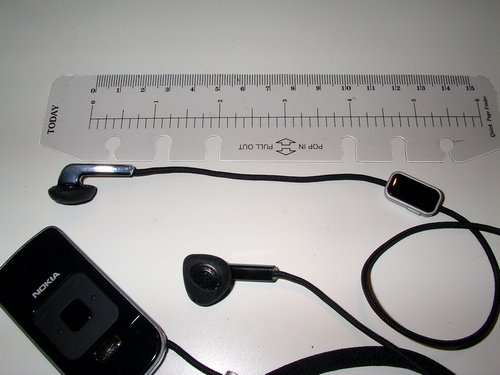
BH-903 remote control unit & earphones


2. distance betwen the left earphone and the microphone
The microphone is located on a small control unit, approx. 12cm away from the left right earphone. This control unit also contains a mute key on the side and an answer/end key on the front.

As opposed to other, previous Nokia headsets, Nokia really learned and improved their headsets by moving the microphone up from a position located on the chest to one at the height of the mouth – where it’s supposed to be. Have you ever seen ppl holding the microphone close to their mouth while talking handsfree on a mobile? Now that’s exactly why: because their microphone isn’t where it’s supposed to be. In a noisy environment (commuter train, downtown, etc.), this really is an issue – so with the mic now being closer to your mouth, you won’t need to hold it in your hands.

This is actually one of those reasons why I’ve always envied my SonyEricsson K800i friends who just had the better headset…
SANY1192
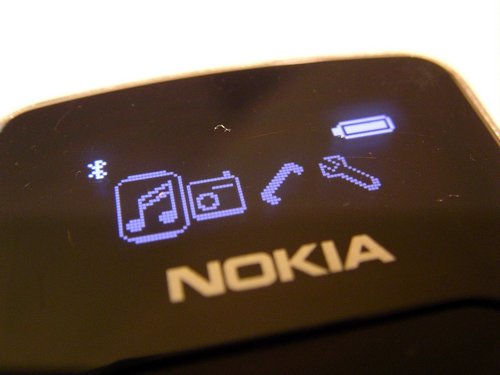
OLED (organic light emitting diode) menu display on the BH-903 headset: music playback, radio, telephone, settings; top row: Bluetooth + Battery charge indicators

3. Bluetooth 2.0 + EDR profiles
In short: Bluetooth is the wireless standard for short range radio connections between mobile phones, headsets, PDAs, laptops, etc; and profiles are different services that are added to a Bluetooth device. So for every wireless action (listening to music via the headset, sending the phonebook to the headset or to your car’s navi system, etc.) all Bluetooth devices need to support these profiles – but not all BT devices actually do that.

You wouldn’t really need a display on an external headset if it wasn’t for the extra options it has to offer. The terrific OLED display does not only inform you about the current radio station, but it also provides information on the following options:

(a) Phone Book Access Profile (PBAP): choose a number to dial right from the remote control via the menu without even removing the phone from your pocket. Nice!

(b) Advanced Audio Distribution Profile (A2DP): if you own a A2DP-capable phone (like the E71 or the N95), this means you can listen to the music from the phone on the headset.

(c) Audio Video Remote Control Profile (AVRCP): If your mp3 collection on the phone is ID3 tagged, you’ll will be able to read the filenames/ID3 tags of the currently played track on the display.
SANY1222
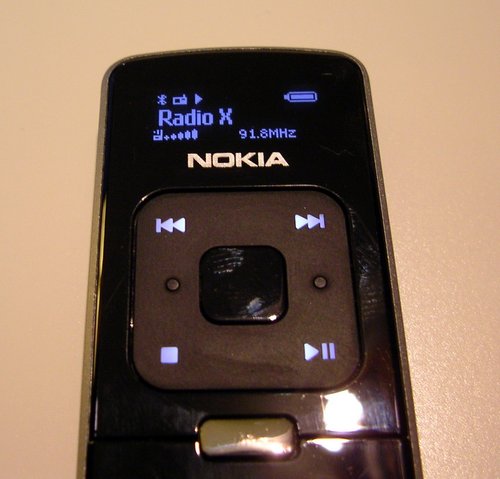
Frankfurt’s only good radio station “Radio X” via the BH-903

4. iPod touchpad
Yep, to raise the volume, just move your fingers clockwise on the touchpad. Don’t we already know this kind of volume control from the iPods and current Nokia (Nseries) phones? Neat!

Verdict:
Four plausible reasons why the BH-903 isn’t just another headset out of the many, many you can get for your phone from authorized retailers as well as from eBay China & Co..
130,- EUR are a lot of money for such a device, but if you’re really serious about wireless stereo audio entertainment on Nokia phones, you’ll probably quickly realize that there aren’t so many alternatives on the market. An alternative may be the SonyEricsson HBH-DS-970 headset although some folks complain that it isn’t really 100% compatible to the Nokia range of phones. Also, there are other – cheaper – Bluetooth headsets from Nokia that also just do the job. The BH-903 though (which, as far as I am informed, also is the most expensive one) does this job extremely good and provides the necessary information through a smart OLED display at the right location (hanging on your neck – and not somewhere on your ears).

I, the N95 user, am actually still looking for a decent & wired headset compatible with the N95 (angled 3,5mm jack without any special adapters, shaped earphones, mic close to the mouth) and have tested and bought three different headsets for my N95 from Nokia when the one that came shipped with the N95 failed after 4-5 months in use (due to a cheap battery inside the remote control unit).

I wonder why Nokia produces so many different headsets and doesnt keep them on the market for long. Why can’t they just produce one good wired and one good wireless solution? The BH-903 is one of those “(very) good wireless” solutions, but for wired headsets, a simple headset like the HS-43 should come with better earphones. Also, a headset shouldn’t be that expensive, at least not those that come with in-ear /earphones. Take the BH-903 earphones, add another 3,5mm jack and I’m your next customer. I’d be willing to pay up to 49,- EUR for such a solution.

P.S.: More images from the BH-903 on my flickr set.
Gcompris

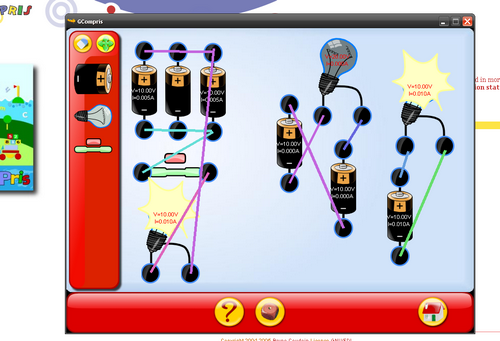
I’ve played with Edubuntu on the office laptop today and came across this nice suite for kids & boys like me who like to play smart games:

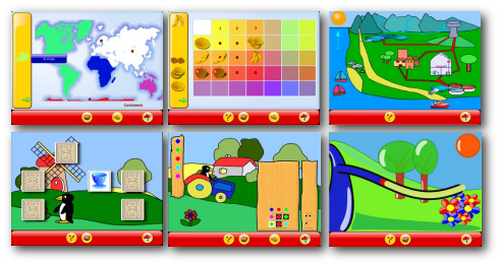
gcompris

If you have access to kids ;-), think they should learn something about computers and don’t want to buy any extra gadgets/toys, then GCompris may just be what you’re looking for.

screenshot selection

GCompris is an educational software suite comprising of numerous activities for children aged 2 to 10. (…) Currently GCompris offers in excess of 100 activities and more are being developed. GCompris is free software, that means that you can adapt it to your own needs, improve it and, most importantly, share it with children everywhere.”

In order to promote the use of GNU/Linux, the windows version has a limited number of activities. It is possible to access all the activities for a fee” – which is 20,- EUR. Best option is to use the LiveCD version, or – if you can – try Ubuntu with the Edubuntu add-on package.

Edubuntu has really improved since I’ve first blogged about it in 2005. Nice! My new boss has 3 kids who often play in the office. So I thought about giving them an older laptop with Edubuntu + a mouse and see how far they’ll get with it.

mobile blogging, part 3

It’s almost one year ago that I published three (1, 2, 3) articles on mobile blogging – and nothing has really changed since then.

Back in 2007, both the Nokia N95 and the Apple iPhone were released – two completely different phones that were only compared on numerous blogs due to setting new standards on each segment: the N95 being a true multimedia phone with a decent 5mp cam, 640×480 @ 30fps video (albeit a mono mic), a (slow) internal GPS module and a really nice multimedia player. With the latest firmware, it even plays flash videos (YouTube & Co.) and has different applications run at the same time (sort of multitasking). The iPhone on the other hand provided a compatible device that suits Apple users – a nice user interface and all-in-one device like the N95 which unfortunately still missed some basic phone tools (MMS, Bluetooth exchange, etc.). And although both phones aren’t the only cool devices out there, they sold quite well. Even if the iPhone doesnt feature all these special goodies the N95 comes with, Apple’s phone still has the best browser on a mobile phone.

screenshot0009

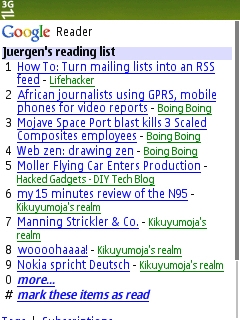
GoogleReader on my N95…

Back in 2007 I had bought the N95 because the music player on my Nokia 6230i had constantly failed (due to a bug in the firmware) and because I urgently wanted to have a new, sexy phone. Something that enables a better mobile blogging experience.

And that’s exactly the basic point here: until now, no mobile phone has actually delivered this *sweet mobile blogging* experience so far.

Back in 2007, I argued that it’s a software issue. And still believe it is. So instead of buying new phones, a systematic adjustment between the phone’s software (firmware & single programmes) and your blogging platform (WordPress, Vox, Typepad, etc.) comes into mind.

Sure, there’s this WP iPhone app some of us have tested some time ago, but still: it doesnt work that well, and it doesn’t provide a similar experience we’re having online on our laptop, surfing the net with decent browsers on bigger screens with full JavaScript support etc..

And this – I believe – is also one of the many reasons for the success of Twitter. Twitter just filled that gap on mobile blogging, phone manufacturers have failed on providing. Why? Because that special Twitter experience is the same whether you’re online via a browser window on your laptop, use it via an extra widget somewhere on the desktop, have it run as a stand-alone utility on S60 & iPhone platforms or just use SMS (for sending only, though).

You know I had a discussion with my Minister of Finance earlier this week on getting a new phone (again), and I had mentioned the new Nokia E71 and why it could be an improvement on what I am looking for (~ mobile blogging device). However, with the above mentioned discussion on mobile blogging being a software issue, I am rather confused now and think I should stick to my N95 at this point. Maybe wait for Google Android’s phone being released by the end of this year?

Another interesting developement since 2007 is the success of so-called Netbooks – which are lightweight laptops at 7″-10″ screen sizes, often equipped with an energy saving CPU, a solid state disk and enough flexibility to provide surfing the net, answering your e-mails and doing some other office work. Battery runtime still is an issue though, often only giving 2-3 hrs. Netbooks are currently sold for 300-400,- EUR in Europe and are small enough to fill that special gap the need for mobile blogging has created.

So here’s my conclusion: instead of waiting for the ultimate mobile web experience via a dedicated & maybe also expensive smart phone, I’ll bet on another setup: ppl – especially those in need in a rural Africa – will imho be introduced to the combination of basic GPRS & UMTS (3G) phones, hooked up to cheaper laptop computers such as netbooks.

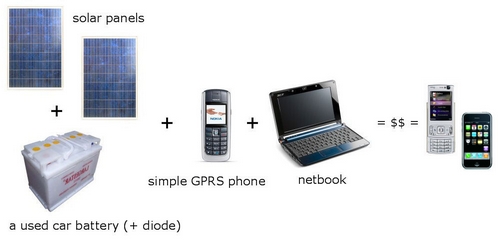
Not today, not tomorrow – but maybe in two years time when basic netbooks wil sell for ~ 150,- EUR and will also be sold on the African continent in a big style. Why? Because a mobile phone is – although it is often shared with members of the extended family – still a device for a single user (despite of these new Nokias that come with multiple phonebooks). A computer though can easily be shared with others. Here’s what I had in mind:

Image1

Solar panels are already for sale in rural Kenya as well as simple GPRS-capable phones, netbooks could be equipped with a free & open OS (+ BT, serial port & USB cable driver package) and it would still cost below the amount you’d normally spend on a) getting a normal desktop pc online or b) a fancy smartphone that just still doesnt deliver the real web experience.

And the best part: this setup isn’t reduced to the needs of a rural environment, but also applies to urban areas in the US, Europe or Asia. In other words: if I had to do true mobile blogging right now, I’d go for this setup (ok, maybe without those solar panels).

Netbooks are what Twitter is used to be to SMS: added value.

High Capacity Solar Charger Battery by Chinavasion

chinvasion-CVSBT-5504-7-computerx


Chinavasion has this new “High Capacity Solar Charger Battery for PC Laptop + Mobile Phone” for sale which looks quite promising in terms of it’s 20.000 mA/h accu – enough to feed your laptop’s battery.

Recharging the internal battery of cells (yeah! :-) is said to take around 3h @ AC and 8-10h through the use of the solar panel. What irritates me a bit is that on their website they are talking about a monocrystalline solar panel type, although it obviously is a polycrystalline type? Anyhow, an interesting alternative for ~ 96,- EUR. Let’s see when this will hit the European market (soon?).

I am still dreaming about a foldable solar panel that I can put on the cover of my 15,4″ HP nx8220 laptop and that will recharge a 2nd battery pack in an unused space, e.g. the media bay that currently hosts the DVD burner. Unless someone comes up with a much better (slimmer) rechargeable battery system, I am currently more interested in devices that generate power instead of just storing it (mechanical, solar, …. devices vs. NiMH/LiOn/…battery storage systems).

A sustainable power supply + decent bandwidth = JKE happy :-)

Make Some Green…

makesomegreen

The goal of the competition is to promote upcycling by encouraging the use of wasted materials to generate innovative designs and redefine the standards of environmental sustainability by fostering balance between conservation and development.

Despite this rather unfortunate phrasing ;-), there’s a very smart upcoming competition promoting the upcycling ideology (waste = food). Nice!

[h/t Erik!]

ambiguity at work

There’s this story going round that the German Federal Intelligence Service (BND) tapped an Afghan Ministry – which stirred up some dust on their work. The issue came into limelight when journalist of the SPIEGEL realized that they were also being monitored due to conversations they had with an Afghan Minister in the past.

Now, I am not the person to deliver any facts or details on this particular story, but I really have to wonder about some fellow Germans who apparently think that there’s anything wrong about this procedure…Well, is it?

I leave it to you to decide if an Intelligence Agency (responsible for foreign affairs) *should* use all available technical facilities to monitor all electronic communication. Obviously, this also is a a) a political decision and b) if *they* think it’s appropriate, they will do it – with or without a political or legal mandate.

What really worries me though is this new law in Germany that gives so much more power into the wrong hands and which enables them to monitor all electronic (communication) data within the country.
Only ~ 30.000 ppl out of ~ 80 Million registered with a lawyer in Berlin to impeach the Government on their behalf on this issue. I am one of them. We all HAD the chance of taking the Government to court on this stupid and dangerous law, but only a relatively few took the opportunity of doing so. Main excuse: “I don’t have anything to hide..”. As IF that was reason enough to accept this law without regarding the personal consequences this really implies. I did have some nasty conversations – even with relatives – on this issue and it always appeared to me that they never really wanted to understand the impact this will have on everyone of us in future. Ppl just dont’t want to understand it.

Oh, terrorism? “Terror(ism) is what they do to us”.

My colleague Chris also blogged on this in English earlier this year in a very comprehensive article.

Now, according to this article in the Frankfurter Allgemeine Zeitung (FAZ), all e-mail traffic of the named Afghan Ministry is said to be done via Yahoo!.

And this is exactly where I thought: WHAT THE….why-o-why are they still using Yahoo!?????

Take Afghanistan and replace that word with any other country. ANY! I am sure there are hundreds or thousands of potential victims out there (including me) who haven’t yet really protected their online activities or who don’t even know about how to engage protective measurements.

We do have a Federal Office in Germany – the Bundesamt für Sicherheit in der Informationstechnik – that provides directives and trainings on how to secure your online activities. Only, they are not being applied in this particular case, because if they were serious on this, they could have told the Afghan Ministry to stop using Yahoo! & other free (unsecured) webmailers. And politicians often aren’t the ones who think in IT-security terms. Hell, who does? So if they don’t know, it’s easier to spy on them. Simple as that. Besides, everyone knows that everyone is spying on everyone.

Case in point: I’ve seen many many fellow ppl working in the Government of Kenya who were using free webmailers. If you were interested in monitoring them, just wouldn’t need advanced equipment. And with the Government having access to GSM monitoring equipment, even cellular phones aren’t fully protected.
I believe there’s no 100% secure concept out there to protect you from any tapping or DDoS, so it’s up to you to decide what and to which extent you want to communicate online.

Another analogy to Kenya:

Six of the 20 Afghan cabinet ministers had spent part of their lives in Germany and spoke German, the newspaper said. Farhang holds a doctorate from the University of Cologne and taught at the University of Bochum before returning home. (source)

As long as there are interests and investments at stake, there will always be a monitoring of other parties, governments or just indivduals. With or without a political mandate, with or without any moral obligations and regardless of any “good relationships” with deployed politicians. Raila of course knows this, but hey: as long as the GoK keeps on buying Mercedes and strucks some maintenance deals for the fleet – why worry?

my new toy

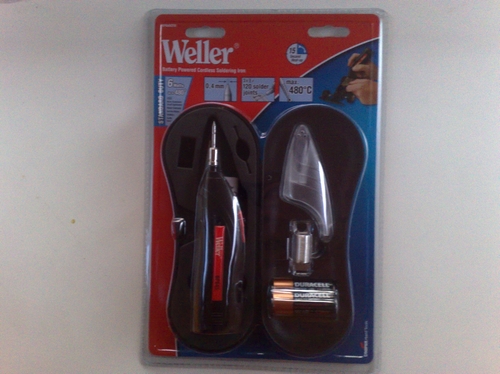
Got me a new toy – a “Battery Powered Cordless Soldering Iron” from Weller:

16042008044

The tip has a diameter of 0,4mm and the packaging says it reaches up to 480°C on the tip, but well….most of these little tips are just hot for a second and then the next second the heat has already dropped by 20°C…

16042008046

I’ve used it on the motherboard of an HP laptop – these coils next to the Southbridge chip (big bottom chip with that sticker on top) needed some resoldering and I really hope that they were the cause for the malfunctioning of this motherboard – otherwise…sijui.

The three AA-batteries inside the Cordless Soldering Iron won’t last for ages, but this little gadget sure helps to fix a few dots on the board and also it wasn’t that expensive so I’m not really as disappointed as I was afraid to be.

Once I can afford it, I will buy this! :-)

How to get your NGO online…

Disclaimer: Not a real post for now, but I’ll post it anyways…just a lose collection of thoughts (so that I don’t have to keep on repeating myself on this topic).

Obed, my colleague from Zambia, founded an NGO some years ago. Today he told me that his NGO actually requires a website.

At this point, most people will just hire someone who takes care of this and prolly lose some US$ down the road. Also, once the website is up and running, it doesn’t really imply that things are perfect. What he’ll then need is someone who does the site maintenance (admin) and who prepares all online content (content editor).

In order to get your NGO online, you will need:

a) a domain name
The shorter, the better; maybe best .org for an NGO; domain names are relatively cheap; if you have a CreditCard (!) or a PayPal account payments may be easier & cheaper (this CC thing really IS an issue!)

b) webhosting
1GB webspace, 1MySQL database, 1 FTP account, etc. = simple packages will do for most requirements; webhosting often includes one *free* .com domain name; there are some free webhosting sites that do / do not display advertisment (which you may not be able to control); user/server ratio often isn’t visible (= how many users/domain packages actually share one server? = perfomance index), service hotline?; backup = you are responsible for your own backups, especially with cheap webhosting packages; depending on your financial situation, you can manage to obtain all of this for *free* or pay a monthly fee. There are hundreds of providers/resellers out there + websites that give an overview of what customers are reporting on the actual quality of the provided service.

c) the right *software*
WordPress :-)
WordPress.org if you want to install a WordPress blog on your server and customize it, or WordPress.com if those standard templates on WordPress.com are ok with you. WordPress, a blog “software”, instead of an advanced Content Management System (CMS) because it will be easier to manage & often just does the job. WordPress.org comes with a HUGE community and many free templates that can be further modified.
Any other blog software will certainly also do, however, it just helps to illustrate the fact that this publishing platform is sufficient for most websites (see d)).

d) an idea of what to put online
Most crucial point. Who will be in charge of the online content? What do you want to put online? How many static pages? What kind of pictures? The person in charge of online content will probably also need to rescale pictures and trim them for online usage (lower dpi resolution), no need for 2-3 MB pictures that directly come from a digital camera. Apply a licence to your works (=> CreativeCommons) so that ppl will know how do deal with your (!) online content. Create a document and define what you want to publish online and how you want to interlink it – in short, create a concept. This will help everyone involved to see what the target is.

etc.

Bottom-line: getting YOUR page and YOUR mission online isn’t a matter of experts anymore. What you will need to figure out is how much money you want to spend on this, how the site should appear (layout) and who will be in charge.

I am mentioning all these *basic* facts (to most readers – I assume that most of you are running your own blog?) because it’s just SOOOOO often that you see a brother from somewhere who’s doing a wonderful job within his organisation, but is totally overwhelmed by the (relatively simple) job of creating a decent website that draws a clean line between horrible MS-Frontpage or MS-Office documents (converted into HTML/XML) and a smooth little website based on a sweet WordPress *simple-CMS* package.

Also, you’re not alone on this. Pls feel free to visit Kabissa.org to connect with others and discuss on how to promote your works online.