Just a video…
[youtube 0H5g9VS0ENM nolink]
…and a link. Ok, maybe also another link.
@MB: this + Edubuntu + B’s old laptop => test it with the kids!

What’s eyeOS?
EyeOS is virtual desktop / operating system accessible through a browser. Or as they describe it on their website:
eyeOS is a new kind of Operating System, where everything resides on a web browser. With eyeOS, you will have your desktop, applications and files always with you, from your home, your college, your office or your neightboor’s house. Just open a web browser, connect to your eyeOS System and access your personal desktop and all your stuff just like you left it last time.
[youtube Zt35LLcMlcM nolink]
So I’ve downloaded their latest release and installed it on my webspace. Note: I am still on 1&1 (1und1.de / 1and1.com) due to historic reasons (urgently need to switch to a cheaper host though – any recommendations that really work & are reliable? Uptime on 1&1 has been great in the past but they are just crazy about mySQL dbs and other extras. Automatization / user admin panel is still very nice on their system so any other cheaper service would need to offer a good admin panel as well. thx!) and eyeOS requires php 5 in order to run. 1&1 offers both php 4 and 5, but 4 is the default setting. In order to use php 5 on your 1&1 server, you’ll need to rename all files from .php to .php5 and likewise all links / references / calls to other php files within the install.php & index.php. Did that and it just works fine:
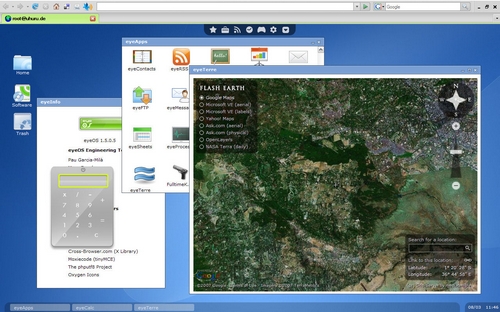
You can test it for yourself on eyeOS.info and I recommend to set your browser to fullscreen view (F11?) in order to fully enjoy the desktop.
So WHY is this interesting?
Imho, eyeOS is a very interesting alternative to….to what? To a virtual machine in the network via VMWARE or a remote VNC connection? Maybe. I think it rather indicates that the future is all about “being connected” = networked computers and that data will then be stored on a main server somewhere, accessible from anywhere in the world. Storing devices such as CDs, DVDs, USB flash disk are the best indicator to see how everything quickly changes from long-time archives to fast-and-forget memory. Following this line of thinking, the question of illegal downloades could one day just be solved as all multimedia files could remain on a central repository and usage (you dont need to physically”posses” data on your hard drive – you just want to use it, right?) would be paid for. Sure there would be ways to crack or bypass that but that’s just another question.
As for now, as broadband / fast inet connection isn’t available everywhere in the world, I tend to regard this only from a local area network perspective. Has this already been implemented at a local university? => Skunkworks Kenya / Kenyatta University?
I like eyeOS because it doesn’t require much to work. It’s simple, it’s efficient, it wins.
Two different persons approached me earlier last week, telling me about their plans of buying a new laptop. Knowing that they’ll be fine with a simple, stationary system (= forget about battery runtime) and a good cost/performance ratio, I told both of them to go for an ACER 5220 / 80 GB HDD / 1GB RAM + WinXPP for something around EUR 500,-.
I took this opportunity to also inform myself about current models and trends and came to the conclusion that I am just (still) VERY HAPPY with my HP (Compaq) nx8220. I’ve seen a lot of other equipment in the past and also lots of crippled corp. IT gadgets and then I always come back to my beloved nx8220 and think: Ahh, well done, JKE, it was a good deal back then. :-)
Really, I don’t care about fast CPUs or the latest gfx board if the machine does not provide a decent battery runtime under normal conditions and, most importantly, has a matt display, a real keyboard, an internal microphone, a lowered trackpad (see Sony VAIOs – horrible) and enough USB ports on each side.
So why not this dead cheap HP 530 running on Linux? Because it has its USB ports on the left side. Now imagine fixing your USB mouse to that port, pulling the cable once around the back of the machine to the right side. Or headset sockets: nice for fixing a headset – but given the (stationary) Celeron CPU, most users will keep this machine at home and may want to connect it to their stereo system. A cable in front just sucks. My colleagues in Mali are using such a HP 530 and again, I wonder how it performs under the heat…
Been standing in front of an MacBook Air ad tonight, explaining my Indian colleague the disadvantages of such a notebook and I would never go for it. He’s into Apple products big times (is there any secret or subliminal Apple advertisment in Google Talk or Orkut?? :-) but me, mimi I could nevaaaaa go for an Apple computer. (I’ve grown up on an Atari 1040 STF which should still exist somewhere in Nairobi so I’ve paid my dues to the UI on that platform…). I wonder why Apple assumes that most customers who are able to cough up enough pesa for a MacBook Air are also those who are frequent flyers and will be in such situations when this gadget actually plays out its advantages (light weight, energy consumption, data exchange limited to network connections, illuminated keyboard).
If my nx8220 dies one day, I’ll hopefully manage to buy another HP or, if they eventually switch the Strg and Fn key positions, maybe also an IBM/Lenovo thingy. But then, I’d prolly fix it and buy spare parts from eBay…
@M: are you still on that Toshiba?
@MB: what about your FSC Amilo – working again?
@CG: wie geht es Deinem DELL und wie oft nutzt Du Dein ThinkPad?
@Zed & CK: kommt mir jetzt nicht mit dem Apple! :-)
(vielleicht sollte man mich mal 1 Woche lang mit einem Apple PC einsperren, damit ich für das OS mehr Sympathien entwickeln kann…)
I was just going through my blogroll (which btw urgently needs to be cleaned up and /or reorganized – yes, mzeecedric, blogroll still valid in times of web 2.0?) when I came across the following two videos which I would like to share with you:
1. Bluetooth headset “sniffing”
[youtube 1c-jzYAH2gw]
[via]
2. security analysis of a voting machine
I am currently looking for a suitable Content Management System (CMS) for a website which is able to create an offline version of all pages to be run directly from a CD or DVD.
The only working solution I can currently think of is something where you’d have a (virtual) local server running which then provides the dynamics for an attached database, but I was hoping that maybe someone out there knows a better solution, maybe something where a script creates static versions of each page and then copies them into a folder (~ cron job every night).
Joomla? Drupal? Typo3? Anyone?
Any help is appreciated! Thx.
Some of you may remember my blog post from March 2007 about fake USB sticks: A friend of mine had gone to China on a business trip and bought two 8 GB sticks for EUR 11,- each, only to realize at home that he had actually acquired two 16 MB sticks. The problem is that you can only verify the real capacity of such sticks by writing data on them and then reading it back to the computer. Obviously, this best works with an empty stick.
Back then I even mentioned some progs that may verify if a USB flash memory stick is faulty or not. Germany’s c’t (Computer & Technik) magazine has now come up an alternative programme that works just fine and does a great job:
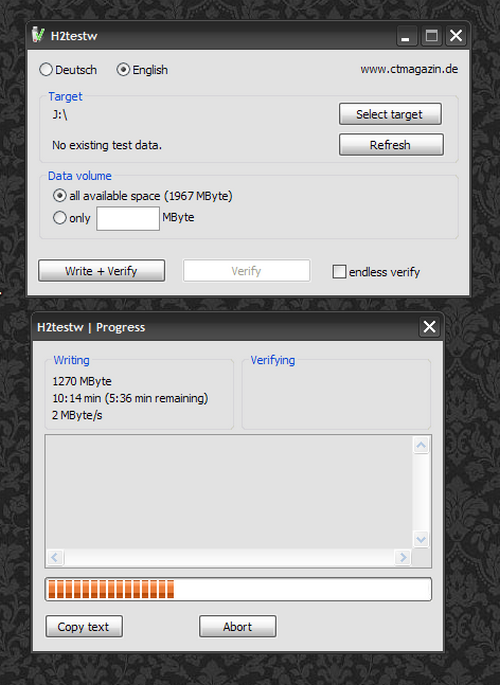 (screenshot of H2testw – and yes, that’s my desktop wallpaper :-)
It is available in German and English, free of charge, small (zipped ~ 220 kb) and “writes data in chunks of 1 megabyte”. H2testw.exe doesn’t also require an installation, so you may want to add it to you selection of useful tools on a usb flash memory stick (i do that + i have a folder designed for such purposes which contains also other goodies such as a free virus scanner + recent update packages that kill popular threats). It took this useful tool about 15 minutes to write and 3 minutes to read back data on my (freshly formatted) 2 GB stick.
I am mentioning it here because I know a lot of ppl are aware of faulty sticks but don’t know how to check them with the right software (there are some nasty “freeware” tools out there that do more harm than good). Also, since this nice little prog also fits on the smallest stick (hey, the above mentioned 16 MB sticks are still available, i heard :-), you may want to take it to the dealer and test it right there before purchase.
AOB: What happened to the Raila virus, btw?
Hier jetzt mal etwas ganz anderes, nämlich eine *Wie-geht-das?*-Anleitung für meine Mum und andere (ältere) Freunde, die neben dem Internet immer noch gerne in der Papierausgabe ihrer Lieblingszeitung stöbern.
Eines auch gleich vorweg: es gibt im Internet viele Möglichkeiten, um an Informationen heranzukommen. Diese Anleitung ist nicht all-umfassend und sicherlich auch nicht der beste Weg, aber dafür meiner Meinung nach relativ zukunftssicher…
Germany’s Heise Online (IT news) carried this not-so-new-news today about the ALEUTIA E1 Desktop computer which is said to consume only 8W and comes with a 200 MHz CPU, 128 MB SDRAM, 2 GB CF card, 3 USB 2.0 ports, 10/100 NIC, VGA up to 1280×1024 and an interesting carry-on size. Best features though are that it runs on Puppy Linux (2.14) OS which looks similar to what experienced users may be to used to from the MS-Windows environment.
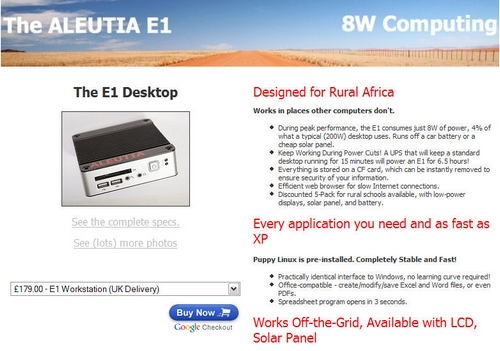
This machine is based on the eBox-2300SX “Mini Green PC” and has – in my opinion – just been equipped with some sexy marketing keywords (Africa, rural, internet, power supply, solar, etc.), although these guys behind Aleutia have indeed found the right arguments to promote their product.
So….no matter what technology you prefer (given the many different systems we have been blogging about during the last two years), my question is:
would YOU buy this for your folks back home @ shaggs*?
Yes?
My other question is: IF these computers are so much better – how come they are never bought by dev aid agencies who are supposed to know the disadvantages and unreliability of a MS-Win machine in most office environments all over the world and who actually have the political and economical power to stir such purchases in this direction?
I know that in most cases, money is just given to someone who then arranges a deal with a local HP, DELL, IBM representative + WinXP + the usual setup. So instead of talking about sexier computer solutions that may be more reliable in unstable working conditions (power supply, heat, dust, many users, malware, etc.), how about some political will from top-down that directly promotes the purchase of such computers in future?
(*i think that most ppl will just have an older MS WinXP laptop which is then forwarded to younger members of the extended family and which will presumably die after the first half year in use due to an unstable power supply, some heat problems or malware and/or missing WinXP recovery CDs…now IF i was much more into IT and an unemployed graduate of any varsity, I’d buy these used computers from KTs and refurbish them with a stable X release and then sell them to folks upcountry. but hey – that’s just me thinking loud…)