mobile comfort

28012009266b

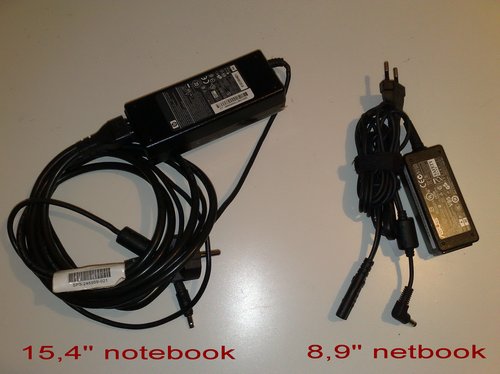
Another sweet reason that justifies the recent purchase of a 2nd hand eee Asus 901 is the compact size and weight of the power supply.

An 8,9″ display at 1024x600px resolution combined with a rather tiny keyboard for sure isn’t as perfect as the ideal combination of these two worlds – which would probably be an advanced 11,1″ notebook @ 1280x800px and full CoreDuo CPU – but any kg I do not have to carry around is very much appreciated.

Netbooks are cool and if Apple and AMD do not agree on this, then it’s just because they haven’t come up with suitable alternatives. With the worldwide increase in netbook sales, it becomes obvious that many consumers actually like these low-cost computers.

My eeePC has a 6-cell battery that lasts for at least 6hrs (tested!) – which provides real mobile comfort so I could even leave this power supply at home.

I think that netbooks – which ideally also come with an internal 3G modem and a basic Linux OS – are the perfect computer for most average households, whether in Europe, the US or Africa.

Desktop 2.0

Wow, I’ve eventually upgraded my tech-nomade life by switching to an improved home office setup.

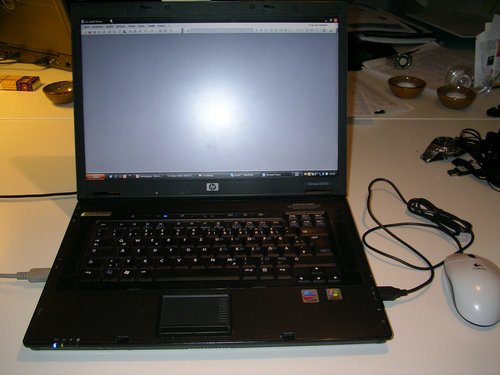
From a single (1280 x 800 px) notebook + cabled mouse…

SANY1762

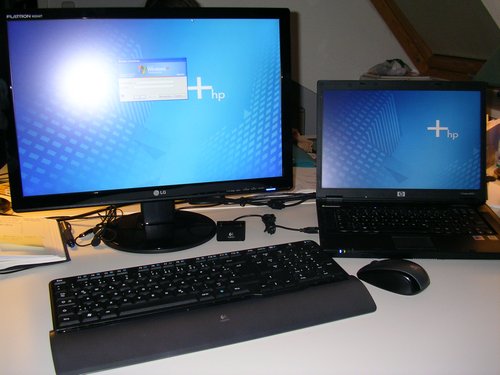
…to a (1680 x 1050) 22″ wide-screen monitor and a cordless Logitech keyboard & laser mouse:

SANY1777

You know I actually didn’t want to go this far and attach another screen to my system as I was afraid it would compromise my freedom (~ uhuru! :-). But it is SO much better to work on a bigger screen – which btw also has a much more vibrant colour contrast and provides more reliable results when it comes to photo editing & co.

Saw this setup (notebook + ext monitor) in use somewhere else and realized that I should upgrade my own desktop. Besides, being able to move a browser window from one screen to the other is just very, very convenient. Yes, I know, I am a bit late at adopting such “new” technologies.

The 22″ LG Flatron W2242T-PF is one of the cheaper screens and even though it comes with both VGA and DVI-D ports (this is a requirement to me), it does of course only feature a cheaper TN display (which will never be as efficient for decent colour works as MVA/PVAs, for instance). The monitor stand also is a bit shaky – it’s just a piece of ligh plastic with no real balance for the 4,7kg screen (manufacturers obviously trying to cash-in on selling extra VESA wall & desktop stands). However, my funds do not provide enough room for a much better monitor, so I’ll stick to this one for now. Am a bit curious to know what kind of screen type those 13,3 MacBooks come with.

Oh, and if you happen to own one of those new LGs: just make sure you reduce screen brightness and remove blue colour to a value of 23 (23 …there you have it). I don’t know why LG came up with such stupid factory settings in the first place.

The keyboard is a Logitech Cordless Desktop S520, kind of new model but it also has a nasty software bug: Logitech’s SetPoint software doesn’t like the Synaptics touchpad drivers as found on a laptop like my HP nx8220. Which means that about 50% of all extra (programmable) keys do not work (until Logitech comes up with a working solution, that is).

Compared to many other wireless keyboard-mouse dekstop solutions, the keys have a relatively low drop and it almost feels as if you’re typing on a notebook. Nice! The laser mouse is average but still better than my older + cabled 9,- EUR optical Logitech mouse.

I also managed to buy a used docking station for the notebook, so unplugging the machine for mobile use is much easier + the docking bay also has a DVI-D port. This really is the setup for me: a business laptop + docking station, hooked up to an external screen and keyboard once I am at home (thus avoiding the difficult scenario of keeping two different computers at sync…unless of course I’d be using a Mac machine, but that’s another story).

As for having a native 1680×1050 screen resolution directly on the notebook: I tested this a few months ago with another display panel, but 1680×1050 at something above 128dpi is just too tiny for my old eyes.

p.s.: Logitech stole 5h of my life with their f******** “SetPoint” software that’s supposed to power the extra buttons on the keyboard. What the…..??! Also, considering that this software just has to power some extra buttons and the mouse, you’re probably wondering about the 50+ mb download that comes along with using SetPoint.? Logitech hardware is nice, but their software really pissed me off big times.

[update: Logitech support wrote in (at least!), telling me to deinstall the driver for Synaptics touchpad. WTF? Sorry guys, your driver software is either certified, or not. I won’t install any shitty SetPoint crap on my system until that issue is solved.]

HSDPA via PCMCIA

As already mentioned some days ago, I’d recently lost my normal (DSL) internet broadband connectivity the other day and urgently needed to get back online. So I quickly went for a Fonic SIM card (operating within Germany’s O2 network) which offers the cheapest (not cheap, but still cheapest) surf & go flatrate for UMTS / GPRS connectivity up to HSDPA (3.5G) (2,50 EUR / day). All other flatrates currently on offer either come with a 24-month subscription, or do not offer HSDPA (3.5G) speed.

I’d used the Fonic SIM card on the Nokia N95 – my mobile phone I normally use for another line. Fonic also offers USB UMTS modems made by Huawei – however, these external modems often sell for 60,- EUR and above (Fonic sells them for ~ 100,- EUR with a new SIM card). USB modems are nice, also because they connect to any USB device (desktop pc, notebook, netbook) – but they are still too expensive for me. Also, I do have a PCMCIA II slot on my notebook I’ve never really used so far (except for my Harry’s TV card which is still with Harry – ati bwana, diese Lösung hier ist auch für Dich interessant).

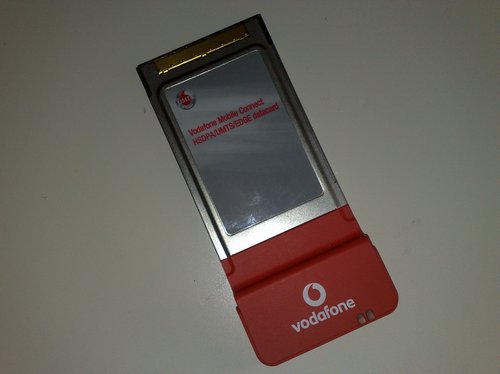
So I checked out eBay and found this really great offer where someone had this “Vodafone Mobile Connect HSDPA / UMTS / EDGE datacard” PCMCIA II card in an auction..

03112008120

…which I managed to secure for just 2,- EUR! :-)

03112008121

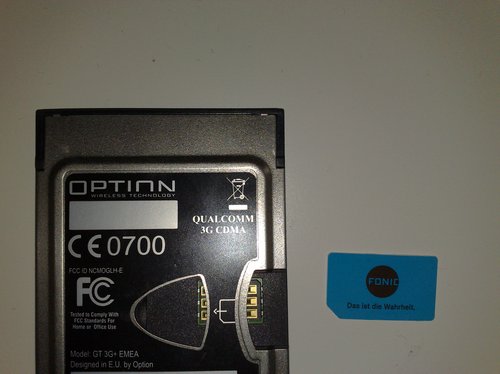
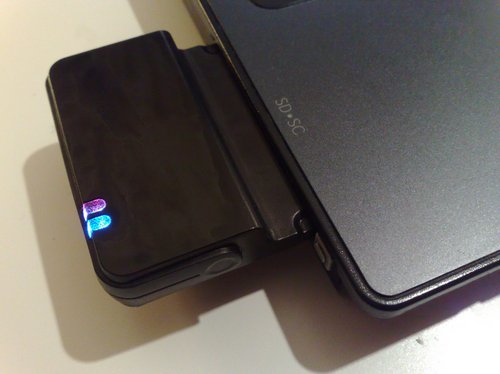
It’s a “Qualcomm 3G CDMA” PCMCIA II card, also known as “Option GT 3G+ EMEA”. Oh, and it also has an extra port for an external antenna, so this may be of particular interest to those who are living far away from the next base station.

Well…don’t be fooled by the Vodafone branding – this card isn’t SIM- or netlocked, and it will just work. Took me about 20 minutes to search for a valid driver package and programme to run it, and 3 minutes to install it.

The problem I had was that these Vodafone (T-Mobile, OEM, etc.) cards aren’t officially supported by Option, which is why I had to find a driver package for this card in the first place.

globetrotter
Option Globetrotter Connect

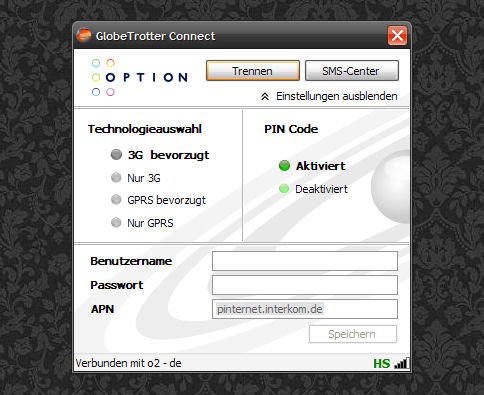
I’d previously used Vodafone’s 86mb package (Vodafone connect) to get the driver, but even after deinstalling it later on, I think the drivers are still on the system, so I can’t really tell right now if I am currently using the Vodafone drivers or the ones from this hidden Option Globetrotter Connect suite which is much smaller (2,6 mb vs. 86 mb). On the other hand, both software packages have drivers made by Option, so I guess they are all the same (except for Vodafone providing bloatware along with the plain driver package). [Update]: The above mentioned Option Globetrotter Connect suite is all you need. Install it, plug in this card, it will automatically select the drivers and you’re ready to go. Simple as that.

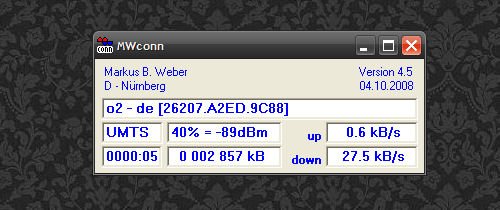
Another interesting alternative, and my initial reason for this blog post, is MWCONN – a really perfect little freeware (WinXP) access tool for mobile internet connections. Perfect, as it provides lot’s of interesting details to the running connection:

mwconnect

The whole setup still needs to be optimized and the speed improved (the network here currently only supports up to 1,8 Mbit/s, not 3,6 or even 7,2 Mbit/s). Also, since it’s based on a PCMCIA card, it will only work via PCMCIA slots (which is one of the reasons I’d thought about going for a used 12″ subnotebook instead of a 10″ netbook). But still – this internet connectivity is better than nothing + it is a dedicated solution that doesn’t require any swapping of SIM cards + carrying an extra cable for the phone as Bluetooth alone is too slow. Also, MWCONN on the other hand also has this *100# prepaid credit balance check built in – which makes sense because there’s no keypad as on a phone to type in such a basic command.

The only downside to MWCONN is the missing driver package, so if you’re cheap like me and into buying hardware only via eBay, just go for the Option package above. It really is all you need for WinXP.

03112008132
Vodafone sucks big times – and so does their branding :-)

Now let me see how it performs with Ubuntu 8.10…read somewhere that it is natively supported there. Which means: plug & play!

[UPDATE]

It just took me 2 minutes to get this thing online via Ubuntu 8.10 – out-of-the-box, that is. Plugged it in, chose the new network management tool, selected mobile broadband and entered the following data for Fonic:

APN: pinternet.interkom.de
primary DNS: 195.182.96.28
secondary DNS: 195.182.96.61

Compared to all the stress I used to have with such toys back in the days, this setup just works.

Verdict: if you own a mobile device with a PCMCIA II slot and want to get online, don’t spend a lot of money on USB devices if you can also have it this way. Works with WinXP SP2 & Ubuntu 8.10.

netbook vs. subnotebook?

My colleagues at work are using Fujitsu Siemens (FSC) Lifebook S Series laptops, which are more or less thin 13″ computers with the usual flexibility and relatively low weight (1,7kg). Some strange policy by the government requires them to buy FSC machines as well as T-Mobile contracts for their mobiles — whereas I, as a freelancer/consultant, have to rely on my own system (and consequently also have to finance it myself).

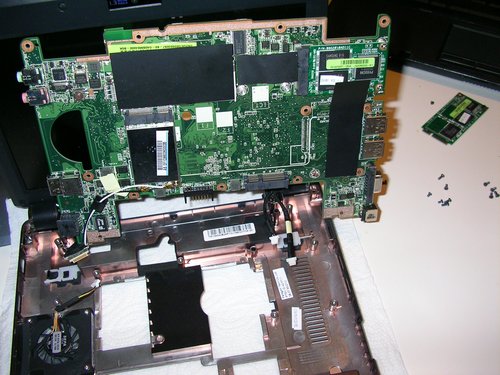
My own system is an HP nx8220 15,4″ notebook since autumn 2006 – a very reliable machine that also survived rural Kenya (~ power failures) and which I’ve disassembled a few times to exchange parts like another CPU, more RAM, new HDD(s), another screen, new keyboard, new touchpad and also a new battery. The only issue I am afraid of is that many other broken HP nx8220s for sale on eBay & Co. do have a faulty Northbridge controller chip below the touchpad, which would result in a costly repair (200-250,- EUR, reballing the chip) and what should hopefully never happen to my computer. To prevent this failure, and because my notebook actually weighs 2,8kg (plus the power supply cable), I’ve started using it at home only and relying on other machines at the office.

However, as I would like to be more mobile, I thought about going for one of those new netbooks to have a 2nd, very portable computer.

And this is where the story actually begins. I know a lot of other friends who are often travelling and attending conferences are tired of carrying their heavy MacBookPro around – which becomes obvious when you see ProBloggers like Ethan Zuckerman using (simple) 13,3″ MacBooks.

What would I like my future portable computer (notebook/netbook) to have?

  • small screen, maximum 12,x”
  • WXGA resolution (1280×800)
  • efficient & power saving CPU
  • min. 1 GB RAM
  • decent (multi-)touchpad or stick with good buttons
  • nice keyboard (ctrl + Fn key positions)
  • battery runtime of min. 4h
  • Bluetooth 2.0, Wifi a/b/g/(n)
  • internal HDD
  • if possible: internal 3G or 3.5G modem
  • 3x USB
  • weight: below 1,8kg (maximum!)
  • affordable price

While going through the specs of all current and upcoming netbooks on the market, my five netbook favourites are so far:

  • Samsung NC10
  • Asus Eee PC 1000H (Go)
  • HP Mini 1000
  • Dell Inspiron Mini 12
  • Lenove Ideapad S10

These netbooks actually provide enough flexibility for me on the road, and if they all stay below 400,- EUR and weigh not more than 1,5kg each, I could easily agree on one of them (ask me in a month from now and I’ll probably name three other ones).
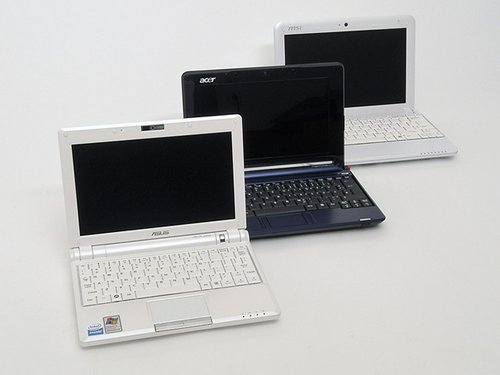
1024 600 netbooks

However, netbooks are netbooks, and the Intel Atom N270 CPU and their chipsets aren’t that great – compared to full 12,x” notebooks that come with the same powerful CPU my own notebook currently has (Intel 750 – no CoreDuo etc.).

What I am talking about are used subnotebooks like IBM’s X40/41, T40p (Steve! :-), HP nc4200, nx2400, Dell Latitude D400/410. These business models that intially sold for 1.500,- EUR and above to the corporate world, are now often selling for something like 300,- EUR. Despite of a worn out body, display and keyboard, they also often have an old battery, so you easily end up adding another 80,- EUR on a new battery. But still, these old subnotebooks are often still better than new netbooks. Especially the screen resolution is by far superior to the tiny screen on a netbook, even though some of the latter ones have a modern LED backlight screen.

Depending on what you want (or rather: are able) to spend on a 2nd computer, I think it makes sense to consider going for a used subnotebook instead of a new netbook. I also buy my HP printers according to this philosophy: new cheap consumer printers = expensive cartridges, older business printers = cheaper cartridges. It’s like buying a used Mercedes instead of a cheaper, fully-equipped Korean car.

The only part I still have to figure out is how to sync two computers – because I can only work on one machine at once and would still want to have my 50 GB of private data with me all the time.

So here’s my question to anyone who ever wanted to have a lightweight computer for travelling: what would you do? Keep on carrying the old 2,8kg around until it falls apart, go for a restricted new netbook or buy one of those older subnotebooks for more or less the same amount most netbooks are currently selling for (300,- – 400,- EUR)?

(@Mac-Fan-boys: I’d even consider an Apple Netbook, but not the MacAir :-)

——————————–

Other than that – what I really like about netbooks is that they provide affordable computing – much like the OLPC which apparently was the initial reason for Asus to start producing netbooks. I think we are yet to see in due time how quickly netbooks will replace mobile phones as the major online platform in Africa. Much like local WiFi networks started substituting 3G UMTS connections in the past (because it was simpler and easier to set up a local Wifi network than to wait for all network providers to update their infrastructure), I think netbooks have the potential to substitute the ailing browser development on mobile phones.

WAP alone has been around for so many years now, and still the iPhone is the only phone with a decent online browser. Consequently, netbooks – because they are cheap and will in future also have a SIM card holder for an internal 3/3.5G modem – could imho be the ideal mobile platform – all over the world.

Datenrettung

Nachdem mir gestern der Inhalt einer 30 GB Partition auf einer älteren, externen Festplatte – einfach mal eben so – ins Datennirwana aberauscht ist, kann ich jetzt für WinXP ein gutes Datenrettungsprogramm empfehlen, das wirklich hilft:? GetDataBack von Runtime Software, dass es jeweils in einer FAT und NTFS Version gibt.

Auf der 60 GB Festplatte hatte ich seit ca. einem Jahr diverse Publikationen aus dem Bereich Water & Sanitation ausgelagert, größtenteils also PDFs und Office Dateien sowie ein paar Videos, die man zwar zu 70% wiederbeschaffen könnte (= von CDs zusammenkopieren und ausm Inet herunterladen), was aber auch viel Arbeit bedeuten würde.

Leider hatte ich die Festplatte in einem billigen USB Gehäuse untergebracht, dass ich vor ca. drei Jahren bei eBay gleich 2x erstanden hatte und dessen Fehlfunktion ich immer auf einen defekten Controller in meinem alten Rechner geschoben hatte. Jedenfalls scheint da bei einem Schreibvorgang die Stromzufuhr unterbrochen worden zu sein, so dass das “Inhaltsverzeichnis” der Festplatte nicht mehr neu geschrieben worden konnte.

Für Laien: Wie bei einer wissenschaftlichen Arbeit, hat auch eine Festplatte ein Art Inhaltsverzeichnis, in dem genau steht, an welcher Stelle die jeweilige Information zu finden ist. Wenn man dieses Inhaltsverzeichnis herausreißt, findet man die gewünschte Information nur noch dann, wenn man das Buch Seite für Seite durchliest und ein neues Inhaltsverzeichnis anlegt.

Ein Datenrettungsprogramm muss also in der Lage sein, trotz aller Vorgaben stur die Festplatte abzugrasen und passiv auszulesen, was dort steht. Genau das schafft dieses GetDataBack.

Nachdem ich nämlich fünf verschiedene Programme ausprobiert und schon fast aufgegeben hatte und GetDataBack erst gar nicht starten wollte (defekter Bootsektor auf der Festplatte), hatte ich es dann später doch nochmal versucht und GetDataBack tatsächlich dazu überreden können, die Festplatte abzugrasen. Nach ca. 3-4 Stunden war es dann soweit – es wurden die alten Daten angezeigt, die man sich dann über einen Viewer anschauen konnte. Leider werden Doc Dateien dabei verfälscht angezeigt? – erst nach der (kostenpflichtigen!) Wiederherstellung sahen die meisten (nicht alle) Dateien wieder normal aus.

Vorteil also: es funktioniert tatsächlich, wenn auch nur zu ca. 95% (bei mir zumindest);

Nachteil: GetDataBack ist richtig teuer und die Vorschau auf die rekonstruierten Daten hatte mich eher abgeschreckt. Die Datenrettung kostet dabei mehr als eine Festplatte – eine professionelle Datenrettung jedoch mind. 10x so viel.

Schön wäre es, so ein Programm auch noch als Freeware und für Linux Distributionen zu bekommen. TestDisk ist auch nett, aber hatte mir leider nix gebracht.

Mit einem der diversen Datenschreddertools habe ich es mir danach nicht nehmen lassen, die alte Festplatte komplett mit “Yesu ndiye mkombozi wa maisha yangu” zu überschreiben (statt Nullen und Einsen) – was als Kunst und dreifache Codierung zu verstehen ist (~ geheime Botschaft auf alten Festplatten versteckt, die für jeden einzelnen eine andere Bedeutung hat).

Falls hier jemand Ahnung von Filesystems hat, würde ich mich über eine Aufklärung darüber freuen, welches FS stabil ist und für sich selbst läuft, d.h., bei Verwendung auf externen Festplatten nicht so anfällig ist. Bisher hatte ich dafür immer Fat32 (wg parallel installiertem Ubuntu) verwendet und alle Partitionen (außer WinXP Boot Partition) über 32GB Größe (WinNt/2k/Xp Limit) mit GParted eingerichtet. Thx!