
Interestingly, you’ll find quite a few “10 reasons why I dislike my MacBook Pro” posts on the internet, but you won’t find blog posts titled “10 things that I hate about my HP Elitebook xyz” . While that’s pretty amusing, it’s about time to add my own reasoning. Also, I need to find out why people love their MacBooks so much.
Category: kompyuta
Dear diary…
As someone who works from his home office, I depend on a working IT infrastructure. Being a freelancer also means there’s no IT department you can call in case there’s something wrong. And boy, something IS wrong.
I recently “upgraded” to Windows 7 on my main machine, because my new computer came shipped with a Win7 Pro DVD, and because I like the look and feel of Windows (2K, actually). More than any other current Linux distribution and/or OSX. I am also the kind of guy who switches off Aero and Compiz and has a plain wallpaper on the desktop. Old school.
What I don’t like is when a computer tries to be smart and take control away from me.
With this attitude, I am actually predestined for a GNU/Linux-based operationg system, because it is said to give a lot of control back to the user.
The problems I have with Linux are not only the cryptic driver installation processes (even though things got a bit better) or its lousy power management on mobile devices, but also that I, as a user, actually don’t know what’s REALLY going on in the background, and also how to find out how to get a better overview on it.
“Sure”, you may reply, “go and RTFM. Go and study an operating system and its possibilities before you rant”. Yeah, well…
And Windows7? It equally sucks. WinXP used to be a bit more stable (no Bluescreen of Death like in Win7), some things are a bit smarter with Win7, others just very irritating. I currently do not have the feeling I am in control of my computer, I don’t feel the operating system is using the full potential of the installed hardware, something just seems to be very wrong.
I hate that. I want to be in control, or else just use it without having to worry that anything bad may happen in the background.
I will need to trust my computer. When will this be possible?
I’d be willing to invest 100 € on a DVD with a free & “secure” operating system that’s fully adjusted to my HP EliteBook 6930p laptop (plain desktop, superb power management with optimal battery runtime, full support for all components, idiot-proof driver installation, full list of active processes accessible from the taskbar (“top”) and so on).
HP Extended Life Battery AJ359AA
It’s strange to see how my blog has turned into a tech-blog, where I am often documenting my love for gadgets. After almost 5 years of blogging, I think it’s safe to assume that I am geek who loves to bring his gadgets to perfection* – only to quickly realize that there no such thing as “a single truth” or even “the perfect computer”.
One of those attempts at improving my IT hardware is the recent purchase of the extended battery pack for my HP 6930p laptop.
This particular machine…..well….*sigh*…. is very peculiar, and not what I expected when I bought it (2nd hand) a year ago. The issues I am having with this computer are the following:
-
The WXGA+ display has good colours, but it drains the battery like any other CCFL screen. Too much, I think, while the competitors already come with modern LED screens. Plus, it is only really bright when screen brightness is set to a maximum (ambient light sensor turned off). Not good.
-
The internal EV-DO/UMTS modem (HP un2400) may be able to work with many different global mobile networks due to the fact that it dynamically loads its firmware on each start, but this also means that it’s a pain to get this working within GNU/Linux. Also, it may only be activated while the main battery is inserted. WTH?
-
Faulty display lock – as mentioned earlier (which I’ve meanwhile fixed myself to some extent).
-
Thermal design. My laptop actually never overheats, but I’d love to see fan intake being on the side instead of at the bottom. I think I’d only see this with an IBM/Lenovo ThinkPad though.
-
Battery runtime. As mentioned above, I get about 2-3 hrs on the standard 6-cell battery with about 60% screen brightness and one wireless adapter (Wifi OR WWAN) activated. The HDD is also optimized via HDDScan + some other tweaks to save on battery power. I should, however, mention that my laptop has a dedicated ATI graphics card and no internal Intel gfx solution (my previous notebook was an HP nx8220 with 15,4″ display, 8cell battery but also ATI gfx card and had a standard battery runtime of about 3.5-4hrs).
I think when it comes to power saving, the best method is to use an operating system that was optimized to run on this laptop and consequently comes with a good power management. With a standard Ubuntu 9.10 installation, you won’t find this comfort for different reasons. I *think* it’s against this background that the default setting on a Ubuntu installation is to quickly dim the screen while the computer is idle because the screen often consumes the most energy next to the HDD and the (often obsolete) DVD drive. Win7 adopted a similar approach and now comes with an improved power management which I am yet to explore and compare to my previous WinXP experience.
Last week, I found this really cheap offer (30,- instead of ~ 120,- EUR) for an HP AJ359AA 8-cell extended battery pack that directly connects to the bottom of this laptop and is also compatible with the docking station I am using at my home office:
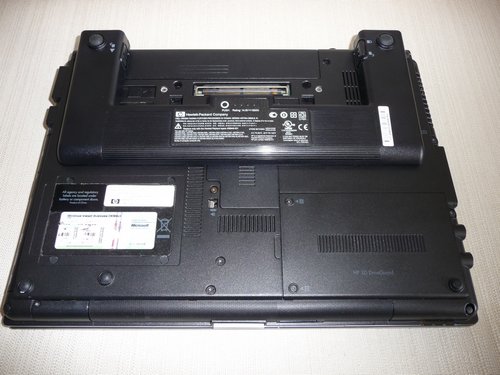
The extended battery pack may cover some parts of the vent / fan intake, but this really doesn’t make any difference for the machine.

With both batteries connected, the laptop now weighs 2.867 gr – which may sound quite a lot for a 14,1″ laptop, but it doesn’t feel too heavy and also due to the good materials used on this HP, there’s no flex on any parts. Single weight is about 446gr for the 2nd battery. (+ ~ 500 gr for the power supply AND it’s heavy power cord !).
HP power supplies actually deserve their own blog post. Seriously. These bricks also come with thick & bulky power cords in most regions which may be required by law but also suck tremendously. Plus they don’t have an active LED like most other competitors and are very sensitive to irregular power sources. The Kensington power supplies aren’t an alternative, btw.
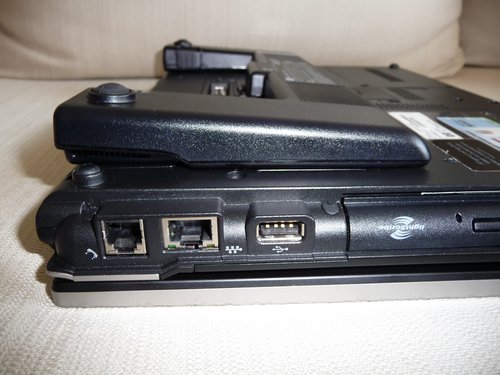
It’s not as bulky as it may look like from the pictures.
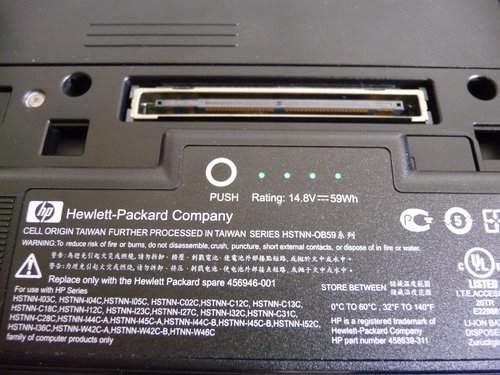
HP also eventually included an indicator on the battery for the charging state – good! You’ll also find this on DELL laptops from 2004, though… what took them so long?
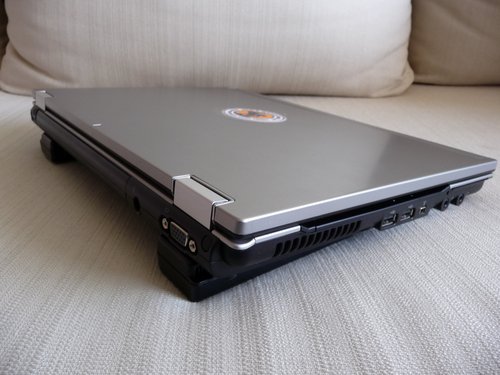
The lifted bottom in the back not only adds a convenient angle for typing – it also improves handling of the computer while balancing it on your knees. Also, for those who aren’t using their computer on a docking station, this also eliminates any heating problems with the fan intake on the bottom as it lifts the computer up and provides a better circulation of air.
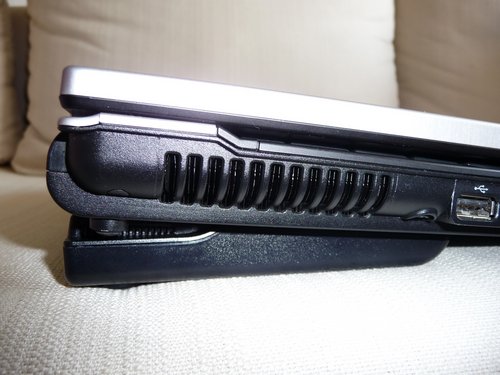
One important detail is that the laptop uses the energy coming from the extended battery pack first – and then switches to the primary battery. Smart!
My preliminary verdict: for only 30,- EUR, this was a very smart purchase as it not only improves overall battery runtime, but also adds handling comfort and an improved heat management. For any owner of an HP laptop, this is a highly recommended add-on (not only for those who require that extra battery runtime).
I am sure you’ll get about 10-12h out of these two batteries with an LED screen and SSD drive. But then, even the cheaper Acer Timeline consumer notebooks will achieve that… (that is: I am not sure if my next notebook will be a business machine when I get a similar or even better performance with cheaper consumer hardware).
*perfection: I am always looking for the BEST laptop that will provide a perfect keyboard, a bright LED screen with great contrast, at least 3 USB ports, an iluminated keyboard, good weight below 2,5kg, 12,1″ – 14,1″ screen size and standard battery runtime of at least 5hrs. Sounds like a MacBook (Pro) to me, or an IBM T410s. Hmm…. still too expensive atm. My gf does not understand why I am so picky on this, but she’s also never been in charge of IT in a government institutions in Kenya where productivity depends on a perfect mixture of hard- and software. Or in other words: I choose my hardware for a scenario which would also enable me to use it in an internet café in Nairobi as well as taking it to Lake Turkana – or a conference in Europe.
Ubuntu, my 6930p and me
I am a Windows XP user.*
Please excuse the following rant, but I will try to explain why I’ve stayed with Windows XP – until now, that is. Feel free to comment further down below and convince me of something else.
The hardware setup: HP Elitebook 6930p notebook with HP docking station, external USB keyboard + mouse combo, 2.1 Creative Speakers, 22″ LG Flatron W2242T monitor + Terratec Cinergy Piranha DVB-T stick (with Sineo 1000 chipset). Extras on the notebook: internal Chicony webcam, internal HP UMTS modem (HP un2400 wwan adapter, as mentioned earlier).
Operating system: As long as it works fine, doesn’t require broadband connections due to frequent updates, won’t become infected by malware and on top of that also runs my favourite applications, I will make do with anything. I know that Windows XP is very prone to malware, but it does the job for me. At least compared to the following OS:
Windows Vista: nein, nein, nein, nein, nein, nein….
Windows 7: I actually have a fresh copy of Windows 7 which arrived via snail mail a few month after the purchase of my HP Elitebook 6930p notebook. Installed it in a VirtualBox, didn’t like the new menu, couldn’t find a way to switch it off, saw some external solutions to retain the old school menu. *May* switch to using Win7 one day. Not yet convinced why I should, though. I am the kind of guy that switches of Compiz in Ubuntu.
Apple OSX: doesn’t run on my machine, too expensive hardware + I am a typical Windows user = maximizing all windows + some things on Apple machines that I don’t like (even though I’ve understood that a smaller choice of available software tools isn’t necessarily a bad option as it saves you valuable trial & error time). I’d switch to Apple for Final Cut (Pro), though.
GNU/Linux: first experience with it ~SuSe 5.1 in 1998?, tried different distros over the years (like everyone else), eventually settled with Ubuntu because ….well, I am a Windows XP user! Also: I’ve accepted Gnome as my desktop.
You see, I am currently writing* this blog post inside an out-of-the-box Ubuntu 9.10. Firefox 3.5.7 is installed and deletes the complete row of characters (inside the WP’s tinyMCE editor) if I don’t pay attention. Already frustrating enough when an OS doesn’t do what I want it do – or worse: does more than expected. Not a good start. And then there’s this screen issue I am having: I just can’t figure out why this ATI Catalyst Control Center won’t start in admin mode. I urgently need to turn the 22″ monitor into the main screen (with taskbars on it). How do I do that? Sure, I could consult one of the many Wikis on Ubuntu and get it to work (Update: it is “sudo amdcccle”). Another issue: the DVB-T usb stick which doesn’t work at all within this Ubuntu 9.10 (I remember it used to run in 8.04 on my older HP nx8220 notebook but not really sure about it now. I do have another, older DVB-T stick which worked with Me-TV in 8.04). Or the internal UMTS modem which is kinda tricky because it requires extra firmware, presumably because it can adjust to local 3g networks (the trick is to have a tool which extracts its firmware from the Windows (!) driver and then loads all required settings). All of these things make me want to reboot my PC in Windows XP right now.
Heck, I couldn’t even switch to using Ubuntu all the time and would always have to run WinXP (full or in a virtual box) because my clients (!) also use WinXP. E-Mail clients and the browsing experience are adjusted to my clients (aka typical corporate IT setup). The other day Mzeecedric and I worked on a blog, and then we had to start all over again because it just didn’t look good on MSIE 7.x (while it shined like a beauty in FF 3.x @ Ubuntu 9.04).
Power management is also one of the reasons why I am using WinXP HOME (which otherwise is a no-go) on my Asus eee PC 1000HG netbook. The netbook also runs an Ubuntu distro with eee control applet, but it’s not the same power management as when running on WinXP with all Asus drivers and so on. Power management is a crucial issue on mobile devices though.
What I am asking for: a GNU/Linux distro, specifically adjusted to this HP Elitebook 6930p. Put it in my DVD drive, boot it up, install and have it ready to go. No further adjustments necessary and everything (EVERYTHING) just working out of the box. I’d be willing to cough up money for such a CD as I think it would be a good investment. And yes, I do understand that part of this Ubuntu experience is to find answers and check Wikis on my own, but then: I just want to work with my computer and have it ready to run, even in offline environments where there is no broadband or stable inet connection. Plus I am getting older and don’t want to waste time on my machine for stuff that I am taking for granted on my Windows XP installation. And I am saying this as a WinXP user, not a Mac user (most of my Mac friends aren’t geeks).
HP 6930p vs. Dell E6400 (review)
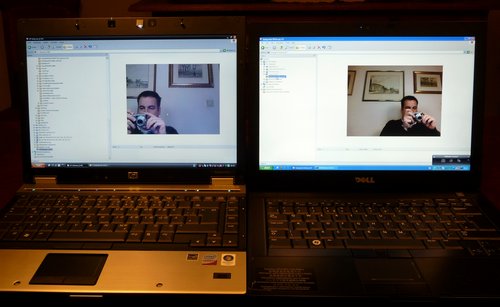
I recently had the chance of comparing the HP EliteBook 6930p with the Dell Latitude E6400, both 14,1″ business laptops (notebooks) for professional use.
3x 3G modems
I recently bought a new notebook (HP 6930p) and made sure it also comes with extra antennas (next to the WLAN antennas on top of the display) so that I could install a Wireless Wide Area Network (WWAN, pictured below) adapter which I had to buy separately.
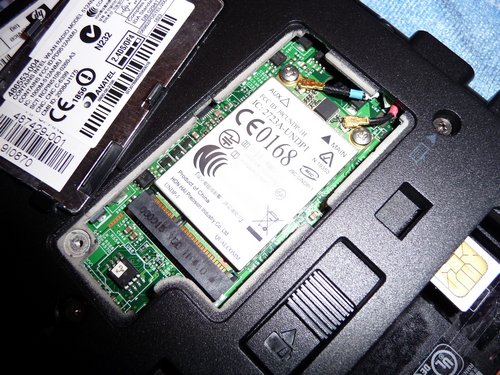
HP un2400 wwan adapter on the HP 6930p
The good part about this wwan adapter – an HP un2400, also known as Qualcomm Gobi 1000 – is that it supports different frequency bands so it can work in many different parts of the world. This, however, and maybe that it is hidden under a cover inside this computer so you don’t have to carry extra gadgets, is the only good part about this modem.
My other computer is a netbook which also has a wwan modem – an Asus eeePC 1000HG. Just slip in your SIM card (underneath the battery), boot into WindowsXP or Ubuntu and you’re ready to go online, simple as that.
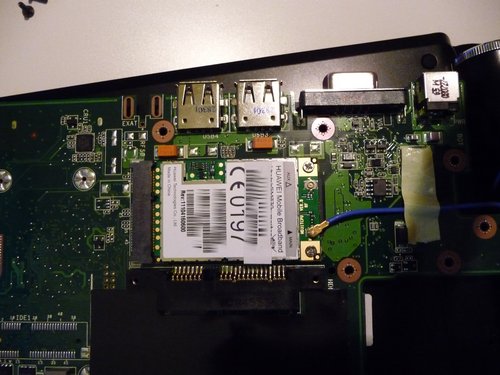
HUAWEI EM770 Mobile Broadband modem on the eeePC 1000HG
The HP un2400 modem on my HP notebook, though, will ONLY work when the (main) battery is inserted. HP names “carrier certifications” as the reasons for this requirement as:
-
This prevents SIM fraud
-
This prevents any possible corruption if the SIM is removed while the notebook PC powers on
Yeah…right.
Just to remind you: the 3g modem on my Asus eeePC will work either way – whether the battery is inserted or not, it just works.
And then there’s this thing called “Firmware” – which also is a very peculiar process on the HP modem. Whereas most gadgets will normally come with their own (preloaded) Firmware (which may or may not be updated by end users), this Qualcomm Gobi modem requires an initial load of the firmware prior to its use (HP’s Connection Manager will take care of this under Windows XP). Once you restart your computer, you will have to reload the firmware. The only possible reason for this – to my understanding – is that it enables the modem to adjust to different wwan environments. But that’s about it. Needless to mention that you won’t find any drivers for this device for Win7, and I’ve only come across a few users who managed to get this device working under Ubuntu after lots of fiddling.
And again, no problems with my netbook & its Huawei EM770 3g modem. Real plug & play, regardless of the operating system.
“So where’s the problem?”, you may ask, “aren’t laptops/notebooks and netbooks designed to be run from battery power anyways?” – Well, yes, BUT! I always remove the battery on my notebook when I’m about to connect it to a stable power supply for a longer period. Like when I plug it into the docking station at home, I always remove the battery. I do this to save it from being constantly charged. It’s a precaution that helps me keeping the battery at ~90% initial charging capacity after three years usage (as seen on my old HP nx8220 notebook). It’s a proven method that worked for me and saved me from spending another EUR 80,- on a spare battery.
And the worst part about this wwan adapter is that HP locked the BIOS to _ONLY_ use these modems. It wouldn’t be possible to use the 3G modem from the eeePC on the HP notebook.
Alternatives
Now, this is the part where I actually want to talk about alternatives to these internal solutions, which are often still considered to be the optimal solution. As described above, it’s a not-so-perfect solution for those who want to use other operating systems then Windows XP and/or Vista. It’s an epic fail that HP still needs to realize. An epic fail on all of their “EliteBooks” as HP calls this series (HP 2530p, 6930p, 8530p).
The eeePC I have is also available without such a 3g modem – the price difference used to be EUR 100,- less. People (not me, I got it cheaper :-) actually paid this difference in order to get a netbook with an internal 3g modem. As for the eeePC, the price difference is (was) justified as you had to cough up about the same amount for an external modem some time ago.
However, now, in September 2009, things are a bit different. Be it Germany or Kenya, you’re actually able to get an external USB-based 3g modem for something like EUR 20,- to 30,- – which is a decent price, I’d say. Sure, you could even get it for less (in Germany) if you go for a 24month contract with a network provider but I am only talking about prepaid solutions here.
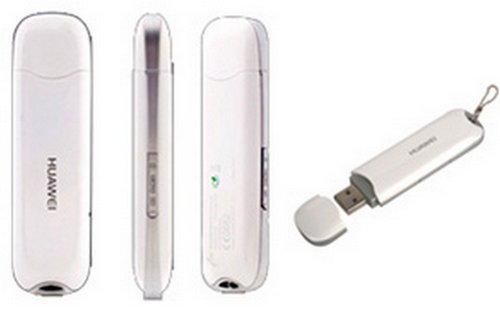
the popular Huawei E169
And these USB sticks are the very reason for blogging all this. I think that these external 3g modems are still the best solution for the following reasons:
-
they are supported by different operating systems & often well documented on the internet
-
they often come with their own software so you won’t have to worry about that part
-
power consumption on these devices is moderate, also because they are easier to remove (and wouldn’t require a software switch on the OS) – just unplug them
-
some of these sticks come with an extra socket for an external (UMTS) antenna
-
some of these sticks come with an extra flash memory capacity
-
they are relatively cheap these days
-
they can be used on more than one computer – just unplug them and hand them over to your friends (provided you have an unlimited data plan)
The disadvantage of course is that you’d have an extra device at the side of your notebook which blocks one of the often limited USB ports.
In the past I’ve also used thethering my Nokia phone to the computer and using its 3G capabilities to surf the net; and on my old & beloved (and now sold) HP nx8220 notebook I had used a PCMCIA (PC-Card) version of these 3G modems which I blogged about earlier. The PCMCIA version worked fine, albeit the PCMCIA port being known for quickly draining the battery (which also became obvious as it heated up pretty quickly). My new HP notebook has an ExpressCard slot, so this could also be an alternative if USB ports are really limited and already used for other devices.
To be honest, with this limitation of the internal 3G modem on my HP 6930p to Windows XP & Vista (and probably also Win7 one day), I’d probably go for another machine in future. I actually don’t know about the 3G modems on a Dell E6400 or Lenovo T400(s) – all of them seem to come with a Gobi device these days -, but I hope they aren’t as crippled as this Qualcomm Gobi? HP uses on their EliteBooks.? And signal strength (RX/TX ratio) actually isn’t so much better with the internal antennas which have to compete with the WLAN antennas for the limited space above the display. However, I understand that it isn’t the modem which sucks (some websites claim it even comes with an internal GPS chip?!) but rather HP’s policy which prevents us from using alternative operating systems and even locks the system down to this device only.
And with my policy of drawing a clear line between user data and the operating system + hardware, the external USB modem is just so much more convenient. It’s a plug & play device that adds modularity & flexibility to the system.
FarmVille ni…
Story by KBW correspondent
Publication date: Aug 25th, 2009

FarmVille is a new Kenyan game on Facebook where you can grab land, excel in overgrazing farmland and overstocking sheep & cattle, buy luxurious decorations and spend the rest of the time idling with a sundowner in your hand.
A report by the KenyaTimes recently revealed that most employees in Nairobi CBD are spending their lunch break in front of computers, playing FarmVille. FarmVille is said to have 9 million users worldwide, a quarter of Kenya’s current population.
A personal computer, commonly referred to as an IBM-compatible device, is a machine often see in offices, hidden under a dust cover. The first personal computer was brought to Kenya by an US-American bible translator family in 1979.
One employee of Kenya Paraffin, Lanterns and Candles (KPLC) who wants to remain anonymous, told us that Kenya currently experiences a power rationing program due to an excessive use of Facebook.
Facebook is a very successful website on the internet (mtandao wa intaneti), often used as a dating site and for subversive political and digital activism. The website includes a microblogging service called “status update” which has recently substituted the blooming Kenyan blogosphere.
Another popular microblogging service called “Twitter” (ndege kelele) has meanwhile been condemned by the Government Spokesperson Dr. Alfred E. Neuman who said that “it can not send SMS” to him. In a related matter, Dr. Alfred recently anounced that those without telephone network should sms him directly so that he can forward the matter to the relevant ministry in charge of terrorcommunications.
A delegation of Kenyan MPs, who is currently touring the United States, recently wrote a letter to the Office of the President, asking for a national holiday to celebrate FarmVille Day. This, as they explained in their open letter, will also help those urban citizens who have in the past failed to secure their own upcountry shamba due to lack of funds and competition in their extended family networks.
A group of young Kenyan writers also published an open letter, claiming that FarmVille actually comes from the United States of America and was introduced to Kenyans by visiting UN interns and PeaceCorps youth who used their daily allowances to access the internet from remote villages. This, as they claim, is “clearly evident as there is no mobile version of FarmVille”.
A group of talented programmers from JKUAT is meanwhile working on a mobile version of FarmVille. The project is financed by Sufericom.
In other news, a Mr. Kamau from Muranga’a was today injured in a battle with Mr. Ezekiel Oluoch, an official from the National Bureau of Statistics who had approached Mr. Kamau for Kenya’s fifth national census. In a heated debate, Mr. Kamau refused to state the actual number of his lifestock.
The fifth Kenya National Census is an inititiative by the GoK to allocate farm land on FarmVille according to family size and fixed assets. In an unexpected move, the World Bank and outgoing ambassadors recently called for a country wide introduction of FarmVille so that no Kenyan will have to suffer from malnutrition in future.
HP 6930p & service quality
….so I just received my (new) HP 6930p back from repair which I had to send in to JABIL Poland where they were supposed to repair the display lock issue and check why the docking port connector had a problem.
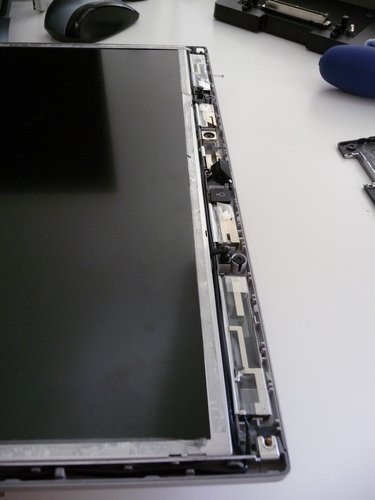
the stuff you do when you receive repaired hardware:
open it up and double-check for any changes…
(both microphones weren’t inserted properly!!!)
HP Warranty Hotline was quite helpful, responded quickly and knew what I was talking about. My notebook comes with a 3yr warranty, so UPS came the other day, picked it up and returned it today. The whole process took 10 days to complete which is ok, I think.
JABIL replaced the motherboard (good!) and even tried to fix the display lock. The lock is still kinda sensitive to external pressure (opens up by itself as there’s too much mechanical tension on the springs), but at least it is better than before.
BUT!

Maybe I am too German to complain about such things, but the service technician with JABIL Poland actually removed the transparent business card holder which is on top of the licence stickers and service tags.
I had used this BC holder on both my notebooks in the past and am quite upset about this fault. You won’t even have to remove this plastic sheet in order to open up the notebook, so I can only assume that the technicians just didn’t care enough and/or removed it to have less reflections while reading those bar codes with a bar code scanner. And even if so, this is a 2cents piece that should easily be replacable, especially by service technicians.
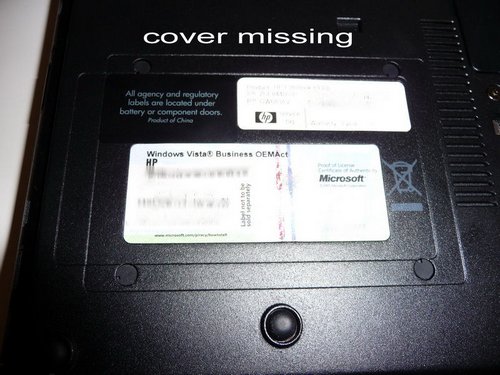
So I once again called HP service hotline, informing them about this missing piece and the (very helpful) lady on the other end told me: “Yes, in such cases we normally dispatch a service technician who will come to your house and probably replace the whole bottom cover.” – “So what about these stickers?” – “The technician will use a hot air gun to remove these stickers and put them on the new bottom cover”.
3h work & someone else even spoiling the remaining stickers on my notebook just because HP is unable to provide such transpartent business card holders as spare parts? No way!
Case closed.
Besides, how will he apply those stickers if they are covered by a transparent business card holder sheet on the new bottom – the reason for an exchange? Ati?
Why can’t they ever handle these items with enough care and return it the way it came? The original plastic bag is also missing. I am really upset about these “technicians” and would like to hit them with the oversized UPS box. There’s nothing worse in the technical world than service technicians who just don’t care enough or hotline staff that’s just as dumb as the fee you’ll have to pay for calling special service hotlines. Fortunately, the ladies from the Hotline were nice and friendly, but their outsourced technicians still suck big times.