The Kiondo & The Kikoi

Barbara of the GI in Nairobi forwarded the following invitation to a public forum, which? I? think? is? of? public? interest,? hence? the? desire? to? reblog? this? on? my? blog.

kiondokikoi038small.jpg

PRESS RELEASE

PUBLIC FORUM
“THE KIONDO AND THE KIKOI”

Tuesday 31st July 2007
4.00 pm to 6.00 pm
Goethe-Institut Auditorium

(=> Maendeleo House, Nairobi)

“The Maasai Market Empowerment Trust in partnership with Legal Research and Advisory Centre invites to a Public Forum “The Kiondo & The Kikoi”.This is a cooperative effort in the highlighting and development of Intellectual Property Rights in Kenya.
The forum brings together artisans, designers, producers, legal officers, law enforcers, activists and policy makers to deliberate, trouble shoot and strategizse on how to tackle intellectual property issues specifically in regard to the Kiondo and Kikoi in an attempt to preserve the Kenyan heritage.The Maasai Market Empowerment Trust is a non profit making organization whose key xobjective is to uplift the standards of living of the people in the Curio-Crafts industry. It is registered as a public charitable trust and is led by a board of trustees drawn from the industry and from other strategic movements with similar ideals.”

I? wish? I? could? just? attend? this? event,? especially? since? this? matter? of? Intellectual Property? Rights? is? something I had blogged about two years ago – after stumbling across an interesting paper by James Shikwati on this matter. I recently met someone of the? (liberal) FNFoundation during an event organized by the GTZ and was pleasantly surprised to find Shikwati’s paper among those primary papers they displayed as proof of their work. Kenyanism everywhere :-)
Also, I am using a picture of a Kikoi I bought on Maasai Market as the header logo of my blog. I founded a Kikoi group on the German equivalent of Facebook, Studivz.de, and am having a particular interest in promoting this part of the Swahili culture as found on the Kenyan coast line. I never travel without one of my Kikois, and as such find myself at terrible unease to associate the brand name “Kikoi(y)” with a UK based privately held company.

Raila “Virus”

Fortunately, I haven’t yet come across the “Raila Virus” on my systems, but my colleague in Embu told me earlier this week that it took him two days to organize someone who cleaned all machines – one by one.

Some months ago, I switched from an older Kaspersky 5.0.x release to FreeAv/Avira AntiVir by the (German) company AVIRA. A free English version (PersonalEdition Classic) for private use is available online (~16 MB). Standalone virus definitions are also available from this (more or less hidden) source, so anyone who wants to update some computers only has to download the definition files once.

Mimi sijui if this is of any help, but according to this list from July 26th 07, there’s a “Raila” definition included with the latest release. I actually installed freeAv on some GoK computers last year and managed to clean them of a nasty worm that kept on coming up. All of this within just 30 minutes! McAfee & a Norton suite often come shipped with new computers, but frankly said: they suck. Norton even more than McAfee. So in case you want to save some mbeca on the computer guy (sorry folks, I know this is killing business :-), pls feel free to try out Avira AntiVir if you haven’t yet done so.

Oh, and btw: once downloaded, pls save the setup executable on a write-protected medium (protected flash stick, CD-ROM, etc.) so it doesn’t become infected itself.

Hmm. I guess this is just another proof of how much we actually need to have free and open source, reliable, stable, compatible and secure operating systems installed on all computers that are running within government institutions. Dito in Germany (some cities actually already switched). Aahh, politics… (and there you go wondering why it was called Raila in the first place! What’s next – ThikaRoad Traffic Jam Virus? :-)

from iGoogle to GoogleReaderMobile

…so I changed my feed reader today: from iGoogle – Google’s personalized homepage – to (the mobile version of) Google Reader.

BECAUSE:

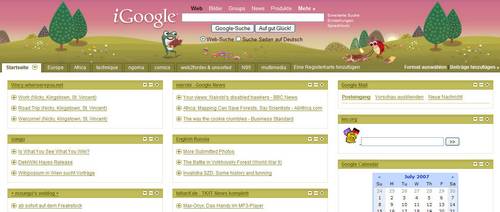
iGoogle looks like this on my laptop screen:

igoogle screenshot pc

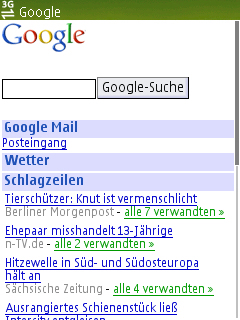
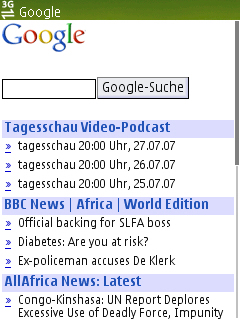
and like this on my Nokia N95:

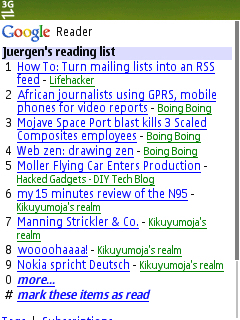
Screenshot0007 Screenshot0008

==> opening items takes some time and is a bit old-fashioned. While it’s good to obtain an overview on what’s new on each feed, it actually only lists items in a static order and you’d have to continue loading another page in order to see all feeds. Hence the need to switch from iGoogle (which I’ll continue using on my laptop) to Google Reader…

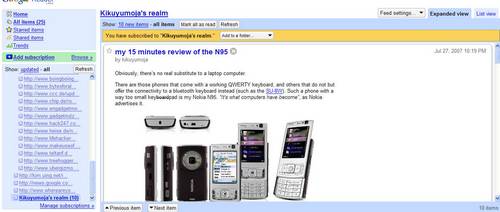
…which looks like this on my laptop:

googlereader screenshot pc

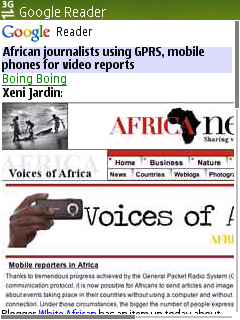
and like this on my N95 (==> http://www.google.com/reader/m !):

Screenshot0009 Screenshot0010

Obviously, accessing my feeds using the dedicated Google Reader – also because of it’s better navigation – makes sense. Hey guys, this thing is fast and it works!

All it requires is this awesome little export to opml utility that generates an *.xml file which may then be imported onto your GoogleReader settings page. In case you’re having different tabs installed on iGoogle, just merge all xml files into a big one. Kudos to Mihai, author of the OPML utility.

It’s fast, it’s simple, it works, it wins!

AOB: Soapstone Simpsons. Kenya believe it? :-)

my 15 minutes review of the N95

Obviously, there’s no real substitute to a laptop computer.

There are those phones that come with a working QWERTY keyboard, and others that do not but offer the connectivity to a bluetooth keyboard instead (such as the SU-8W). Such a phone with a way too small keyboardpad is my Nokia N95. “It’s what computers have become”, as Nokia advertises it.
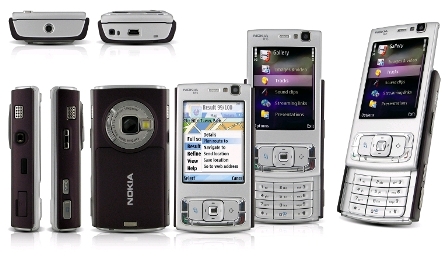
b141581.jpg

Only: you can get a full size laptop computer for the same amount you’d have to cough up for a Nokia N95. In other words: for an amount of around EUR 600,-, this phone has to be really good. But it isn’t.

It primarily is a phone, and as such it does it’s job quite well. The interesting, multi-tasking operating system Symbian S60, 3rd (feature pack1) does a remarkable job, and it is while working with this phone that you realize how this little gadget actually works. Much like an iPhone, I suppose, that also offers an interesting GUI which takes time to load – and sometimes hangs itself up due to a system-hiccup. A reboot as the interim solution, or the flashing of the internal firmware does the job. Frankly said, with banana software that ripes with the customer and short product cycles, I never expected anything else but exactly this behaviour. Another drawback besides of the ever draining battery (this has improved over the time now and I’ve managed to keep it running on one battery charge with normal usage for something like 48 hours – which would include lots of SMS and listening to music) is the narrow keypad, which makes entering text a pain in the…fingers (the multimedia buttons, actually, not so much the 0-9, *# keypad). The delete (“C”) button on the lower right of the front buttons is just next to the so-called “multimedia button”, meaning that I sometimes accidentally hit the multimedia button, and I have to switch back to the draft folder within the SMS menue where the started sms was – fortunately – saved automatically. Also, the other multimedia buttons on top when you slide down the front part are just useless. I hardly ever use them!

Now, those are the bad sides of the phone. And there have been numerous reviews on this phone during the past 2-3 months, a huge fan base around the world that diligently describes every new trouvaille, so nothing, really nothing is unmentioned. As for the Nokia N95 vs. the Apple iPhone – I am 100% d’accord with Steve Litchfield: the iPhone is 5 years ahead, but it lacks a LOT of features even average, mass-market phones such as the Nokia 6230i or the SonyEricsson W810i already have.

Which gets us to the hightligts. I initially decided for this phone coz I started using the mp3 player that came shipped with my previous Nokia 6230i. The phone had been “pimped” with a 2GB multimedia memory card (MMC) and thus had some “issues”: a) indexing took ages whenever the player was started afresh (after rebooting, as the index list wasn’t saved for whatever reasons) and b) it sometimes just rebooted out of the blue. So the idea was born that I would need to invest into a new phone. I wanted to get a phone with a working mp3 player, a decent internet browsing facility (~ screen size) and, most importantly, a good camera. The Nokia N95 has all this!

And this btw is also why I didn’t go for a Nokia E61i or the brand-new E90 communicator, both from Nokia (the E61i is very tempting indeed, only that it doesn’t have such a nice cam). The N95 DOES have a great cam (for a phone, that is!), it has EVERY possible communication interface there is: USB, IR, Bluetooth, Wi-Fi, GPRS, EDGE, WCDMA (UMTS 3), HSDPA (3.5G), a reliable mp3 player that remembers where I stopped the last time, even after rebooting the phone in between (nice) and the ability to record videos in near DVD quality (with a mono microphone though, which is kinda sad compared to the stereo mic on the N93).

So the point is: the N95 is a multimedia phone, and as such it does a great job.

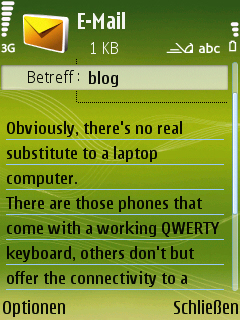
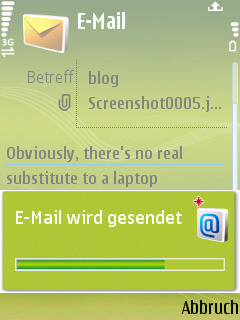
And then of course there’s the e-mailing thing. I know there are other phones that do this job much better, even those with a push client etc (Blackberry & Co.), but for my private & “always-on-the-road”-needs, the internal e-mail client just works.
screenshot0005.jpg screenshot0006.jpg

Heck, it even allows me to attach photos, video, audio files or other content!
Well…I guess some of these HTC PDAs running on Windows Mobile 5.x /6.x aren’t bad either (i hear you, Aegeus :-) and I should give them a try next time.

I switched back from using GMail to (the German freemail provider) Web.de which offers IMAP. This constellation is more reliable than GMail and even GoogleMail’s GMail dedicated java applet something hangs. For quicky checking my e-mail on the road, this is the quickest solution. Me I like… :-)

Oh, and btw: I didn’t pay anything for the phone so far, as I got it subsidized with two contracts – which are supposed to generate revenue for the network provider and pay up the subsidization. There’s a montly base fee, but apart from that, nothing else unless you use the two SIM cards. Well, I won’t.

p.s.: how could I forget to mention the awesome GPS inside the phone? You know what they are saying about men and how they never ask for any directions once they’re lost?… so this little add-on is just sweet! :-)


Nokia spricht Deutsch

System Rush: Evolution (DEMO) bietet zwei Hacker-Level. Dabei steuert der Spieler sein Fahrzeug durch die beiden 3D-Level und gewinnt an Geschwindigkeit, wenn er mit dem Bit-Stream zusammenstößt, den Energie- Brocken, die der „Keeper“ zurücklässt. Nutzen Sie den Bit-Stream, um den „Keeper“ einzuholen, und zerstören sie ihn, indem Sie seine Energie absaugen. Dank des intuitive Designs zum Steuern von Spielfunktionen mit nur einem Daumen können Sie Ihr Fahrzeug mit der Richtungstaste steuern, bei Gefahren schnell reagieren und über den Bit-Stream des „Keepers“ selber noch schneller werden.

Ist auf jedem phone vorinstalled, und kann man sich sonst anytime von der Nokia website herunterdownloaden. Oder noch besser: das Game ist playable on the phone wenn es heruntergedownloaded ist.

In der Knowledge Base von Microsoft steht tatsächlich das Wort “gedownloaded”.