4 days on Android

old vs. new

There’s something about Apple’s iPhone that just won’t go away. I think it’s this “one button to rule them all” philosophy – the home button – that will make things a bit easier for the user.

When you’re already used to an iPhone, it’s hard to switch to any other mobile OS, especially if this includes letting go of a beloved app and a service that made things a bit easier for me:

  1. the app to control my bank account (currently no Android app available)
  2. no push notifications for Android 2.1 & Twitter app

I may be repeating myself here, but such a basic and important service like Twitter push notifications (forget about Facebook) not being available on my Android device is really sad. The only alternative to this is the use of an automatic sync (~ every 15 min.) via TweetDeck, Hootsuite & Co..

Else, my first 4 days on an Android device were less hectic. I received the phone, installed the latest available update (it’s still on Android 2.1!) and downloaded a plethora of interesting apps. Apps that I can even share with the rest of the world via Appbrain. Wow!

You know it’s a bit irritating when you’re already using Google Chrome, have a Gmail account, sync everything via this account and then you are wondering where your bookmarks are. Not synced! Why? No browser on Android supports this. Yes, there’s an extra app for this + I am a LastPass/Xmarks Pro user, so solutions are available, but still – this chaos at Google reminds me of Nokia’s Ovi.

Unfortunately, the Moto Defy also still has some open software issues and tends to “forget” a few settings after each reboot. I will also need to optimize energy consumption on it – my Symbian approach of closing apps which are not in use does not really work with Android.

As for the iOS vs. Android discussions:

  • Need games? => iOS
  • Need your (Google) tasks & calendar on a home screen? => Android
  • You’re fine with iTunes? => iOS
  • Want to backup your phone to a Dropbox account? => Android

To be honest, I am still at this point where I think that an iPhone is the better phone for most consumers – even though I’ve seen a lot of iPhone users who’d even be ok with a simple Nokia S40 phone (as they only need telephony and SMS).

Motorola DEFY docking station (DIY)

JKE Motorola DEFY docking station project
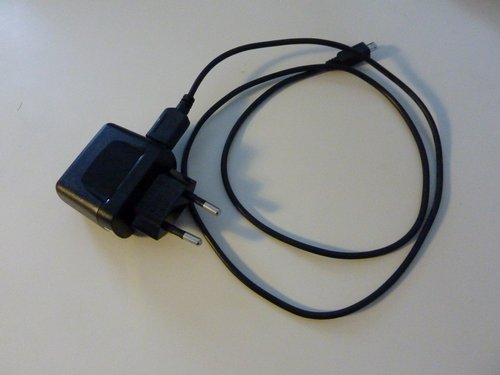
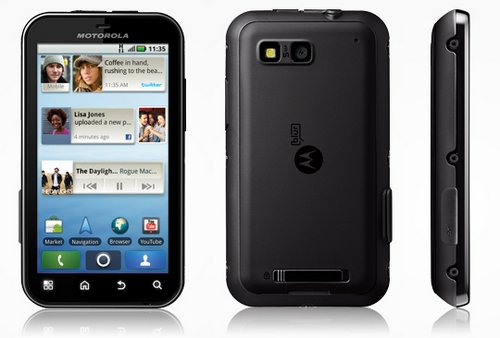
The Motorola DEFY ships with a simple (bulky) charger & a micro-USB cable.

Docking stations for mobile devices may not be on everyone’s agenda, but since I am working from home most of the time and also use a docking station for my HP laptop, I prefer these convenient solutions to have the phone (or any other mobile device) charged when I need it. Besides, I’ve also used such docking stations for my previous phones, so I made sure I’d get mine for this new phone.

The problem: there’s no docking station available for the Motorola DEFY, even though it has been on the market since November 2010 and has since then sold quite well.

There’s an offer on eBay for such a third party docking station from China, set to be available from March 2011 onwards – or later, because the same was also said in Decemeber and January and the release date has been postponed more than once.

Another issue is that the micro USB port is covered by a little flap, so you’ll always have to move it to the side while accessing the USB port. It may be against this background that third party manufacturers haven’t come up with a docking station for the DEFY as of yet.

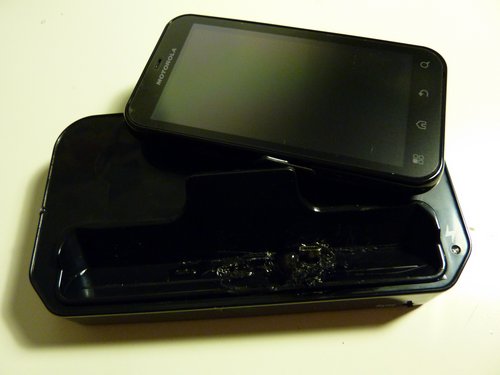
The solution: build your own by modifying one made for the Motorola Milestone. Such Milestone docking stations like the one below currently sell for 10,90 EUR via eBay.DE (incl shipping), which is ok.

JKE Motorola DEFY docking station project

Now, the beauty with these phones is that they flip the screen when you insert them into such a docking station – and display a special screen with access to basic functions like alarm, gallery, media, etc..
In fact, it has two screens – one for desktop docking stations and one for car mounts. You can manually activate the car mount display (huge buttons with access to the navigation system, telephone, music, etc. – very nice, see previous post with bikertech.de image) via a link on the home screen, but I am still to find the link on the menu for this desktop docking screen.

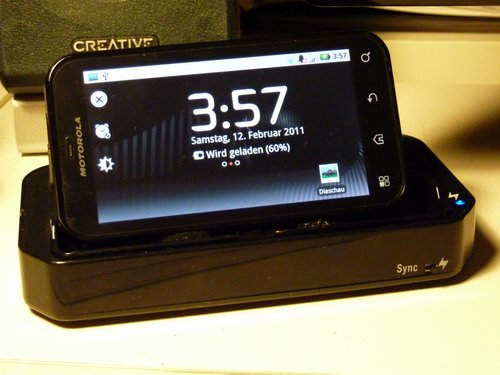
With this docking station, the screen automatically rotates and shows the docking screen. How’s that done? SIMPLE! The phone responds to a magnet which I’ve mounted inside the docking station. In fact, this docking station also came with a small magnet for the Moto Milestone, but it never worked, so I used one of those neodyanamic magnets from last week’s MAKE: LED Throwies DIY project during our local Frankfurt Ignite event wich does the job quite well. You insert the phone et voilà, the screen rotates. Perfect!

Here’s what I did:

JKE Motorola DEFY docking station project

Removed the covers on the screws.

Motorola DEFY docking station DIY « Kikuyumoja

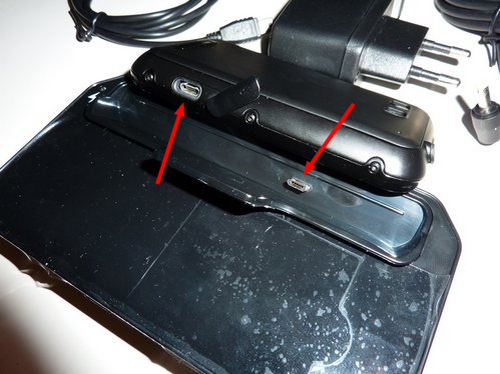
The position of the micro-USB port on the Motorola Milestone obviously differs from the one on the DEFY :-(

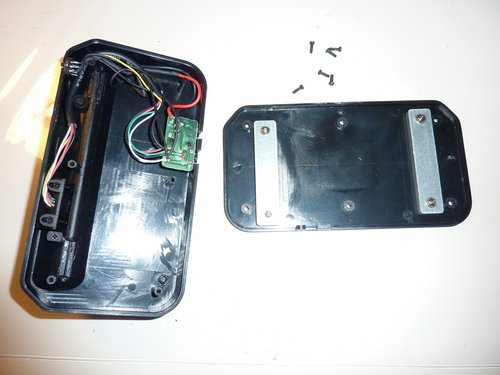
Let’s open it up and see what’s inside:

JKE Motorola DEFY docking station project

JKE Motorola DEFY docking station project

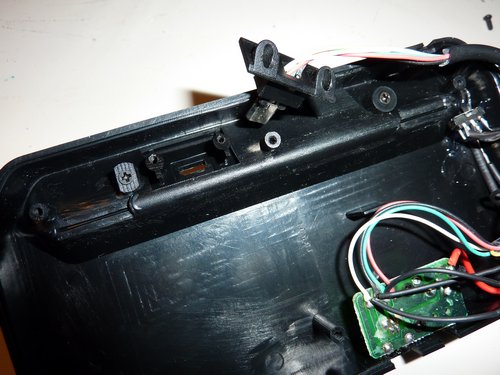
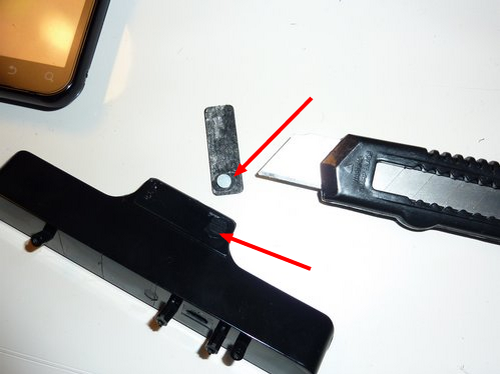
The micro-USB plug is screwed to the plastic frame – good! Let’s remove it….

Motorola DEFY docking station DIY « Kikuyumoja2

The old magnet from the Milestone docking unfortunately didn’t work for the DEFY…

JKE Motorola DEFY docking station project

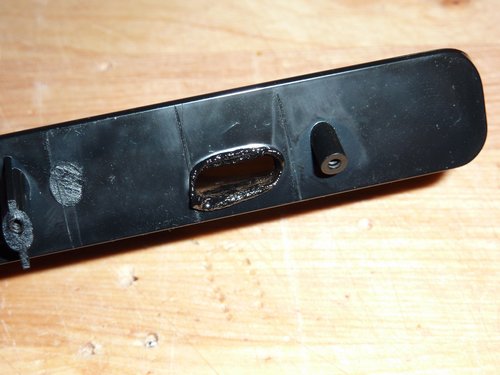
Ok, now this is what you do when you don’t have a Dremel ;-)

(using your soldering iron – very jua kali, but hey, it worked….)

JKE Motorola DEFY docking station project

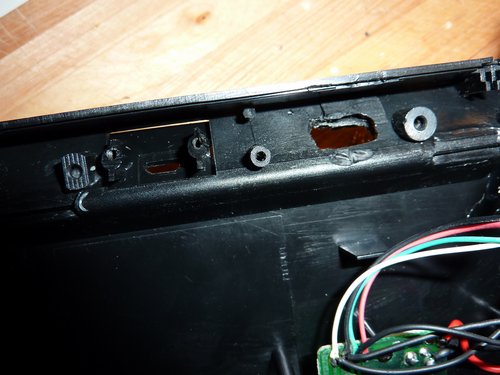
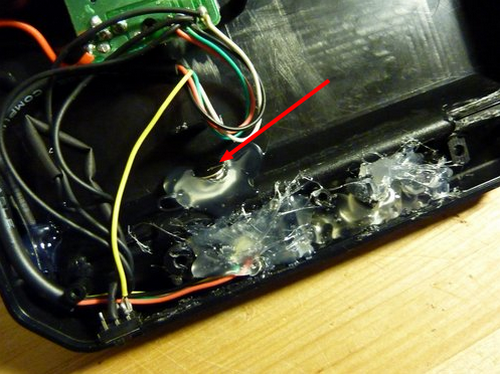
So I “drilled” a new hole for the USB plug…

JKE Motorola DEFY docking station project

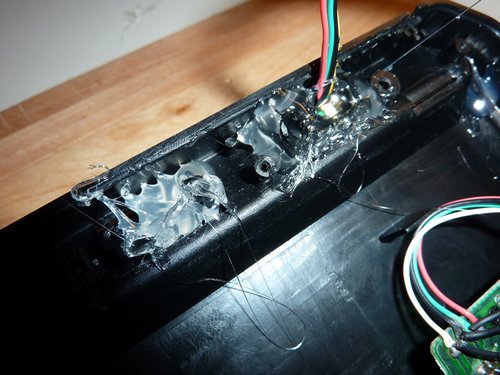
…and fixed everything with hot glue (nasty stuff).

Motorola DEFY docking station DIY « Kikuyumoja3

Can you see the magnet in the middle?

Ok, let’s put the bottom cover back on and turn it around:

JKE Motorola DEFY docking station project

It may not look that nice…..

JKE Motorola DEFY docking station project

..but the final result it good, works fine & makes me happy! :-)

This DIY project is based on an idea I picked up on a German Android forum, which also has a pic of where the magnetic sensor is located inside the Motorola DEFY. Btw, the 2 screens for the docking station (a) this view (as above) and b) the car mount view) only depend on the polarity of the magnet. Flip it over and the other screen will load. Obviously, this isn’t possible with my construction because I’ve glued the magnet to the plastic frame. But you get the idea and may want to use it on your own DIY car mount….

And yes, this docking station will certainly never be as elegant as the slim one for the iPhone, but it fits the phone and does what its supposed to do. Also, there’s something about Motorola I will never understand. The hardware and build quality they offer is terrific! But anything beyond that like adopting the open Android approach (i.e. open bootloaders) or cooperating with third party accessory dealers – nada. Motorola, to me, is like a headmaster of a conservative school that prefers adults (business customers) only. Very strange…

Hello Moto DEFY! How dey body?

So I did it.

Motorola Defy JKE

I bought this Motorola DEFY mobile phone today. It’s my first Android device and I am still to find out if I can get along with its operating system, the available apps and the user interface. I’ve picked this model (and not the HTC Desire / HTC Desire HD / Samsung S / Nexus S, etc.) for the following reasons:

  1. It is dustproof and water & scratch resistant. There are various videos on YouTube that document how this phone still works after (and while) being submerged in water and other fluids. Try this with an iPhone :-)
  2. It was recommended to me by my mate Adrian who has 10 (!) of these and uses them for a scientific (geologic) project. Of course, if I could afford it, I would probably also long for a Nexus S (like Adrian) because of the availability of a pure and fresh Android 2.3+. The Motorola DEFY currently runs on Android 2.1 with its own (lame) skin MOTOBLUR. Android 2.2 still needs to be rolled out in this region for this phone, and it is uncertain whether it will ever make it to 2.3. Of course there are unofficial releases, but Motorola only allows signed bootloaders. F*** Y**, Motorola. Not good. Android is open. You’re not. Why?
  3. It was also recommended to me by fellow blogger @bobbes who’s a Linux guy and showed me his DEFY earlier last week.
  4. It is affordable and has a very good price-performance ratio. This is an average device with an average camera. My old Nokia N95 (ex 2007) has a better camera. I’ve paid 265 EUR (this is a refurbished/like-new piece of hardware!).
  5. Android! Because I needed a change. As a Win/Linux user, iTunes is a pain in the ass. Else, I still love my iPhone on iOS 3.1.2. The iPhone is very slow on the browser, though, and urgently required an upgrade. I am not really sure if Android will make me as happy as iOS did, but I’ll never know unless I try.
  6. 480×854 pixel screen size. For an operating system, where app compatibility also depends on the pixel resolution of the target device, this is a welcome screen resolution.
  7. I’ve always kept & treated my phones & gadgets in a good way, never had a broken screen so far, but it just feels good to know that any sweat on the display (holding the phone next to your ear) will not result in a water damage. Given how fragile these phones are on the inside, this DEFY hopefully defies all water attacks :-)
  8. It’s smaller than my iPhone, faster and will presumably also run a bit longer. This argument about exchangable batteries….in all honesty, I think no one really needs that in reality. And for those moments you really need it, you won’t have a fully charged spare battery in your pocket. I usually carry a bag with chargers and spare batteries for all my phones in my laptop bag. During all these years, I’ve only used them twice. Once in Kenya, and once in Germany on the train (only to realize that the cheap MadeInChina spare batteries drained too fast).
  9. It has a good GPS chipset. My iPhone Classic doesn’t have GPS. My Nokia N95 has GPS, albeit a very weak one that needs to be hardware hacked one day (extending the antenna, that is).
  10. It has a microSD card. This alone is reason enough to drop the iPhone (where I used Dropbox for non-multimedia files).
  11. It has two microphones that “intelligently amplify your voice and filter out background noise”. This is supposed to be a modern standard (worked fine on my E72), but my iPhone Classic didn’t have this and I sometimes missed it. I don’t like to use my iPhone as a telephone, prefer Nokias when it comes to pure telephone functionality because of the improved acoustics. Estonimoja (with his beloved 6210) and Mentalacrobatic(s) (with his love for the 6230) will certrainly agree on this.
  12. As a hardware guy, I checked Youtube for “disassembly defy” and found this video. Going by the main PCB and the plastic cover, this phone is very similar to good Nokia phones. You’ll notice the difference while opening up iPhones or HTCs – which are much more fragile and consist of many small cables and parts directly printed on these copper cables. This obviously is a business decision and sometimes the cause for failures (that you won’t have with such single-board phones, imo). In other words: good built quality needs to be based on something.
  13. This being an iP67 phone, my assumption is that it will continue to live despite any stupid Motorola bootloader policies. In other words: while this phone has something that makes it unique (the water/dust proof thing), other current Android devices may only be short lived and soon dropped by many users for the prospect of using better hardware. I think this Motorola Defy will stay with us for a long time, similar to the Siemens ME45 or the recent Nokia 3720.

What I miss is a docking station, and/or the USB socket at the bottom of the device. I’ll have to open the flap that covers the USB port (on the left side of the device, see pics), which is a bit annoying. The iPhone (or the HTC Desire) clearly wins here. Obviously, there’s no perfect phone out there.

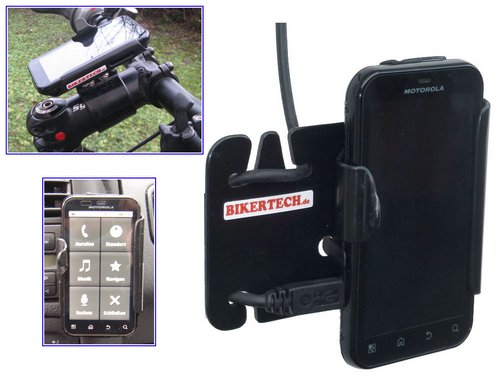
Oh, and you can buy this mobile phone holder (yeah, simu holdaaaaa!! :-):

DEFY-holder-Bikertech.de


…. which will probably attract Enduro-fanatics like Bwana Whiteafrican or Bwana Mzeecedric who need tough gear for their motorbikes.

This mobile phone holder for bicyles and motorbikes is available via bikertech.de – the above image is (C) by them. The guy who runs bikertech.de builds these holders one by one, they are all hand made and can be adjusted to any specific requirements. Love it! In fact, seeing this pic finally nailed it for me. I can’t imagine using an iPhone in an Otterbox case (which are awesome, see their review from my Nokia E72) on such a holder. But the DEFY? Of course!

Anyways. I know the DEFY won’t be the ultimate phone, and probably also not be my last one. If it proves to be as reliable & versatile as the iPhone Classic, I’ll be more than glad.

UPDATE: After receiving this phone, checking out Android, installing a lot of apps and slowly understanding what makes Android so special, I realized that the simplified car menu (see bikertech image above for an example) that gives you access to basic functionality is VERY nice and convenient.

Should I stay or should I go…

The following blog post may be filed under “things I do when I am supposed to do other, much more important stuff instead”, but I just need to write it down and share it here.

I am in the process of buying a new mobile phone, and my switch to the iPhone Classic some month ago made me realize that – in the end – I am no real software hacker (hardware, yes) and prefer a system that’s reliable and just does the job.
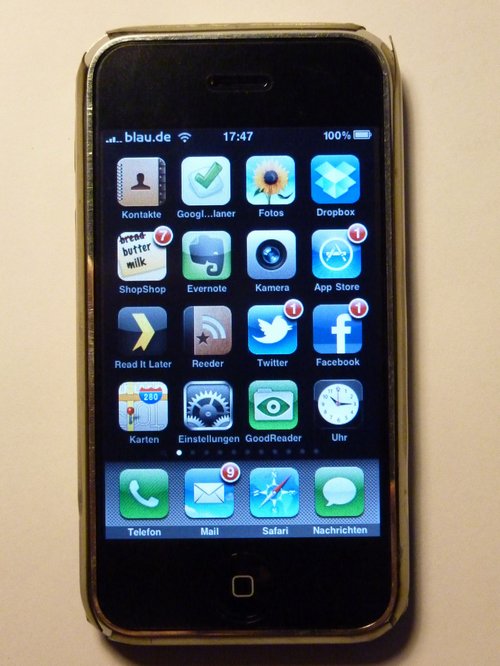
P1030474
main screen on my iPhone Classic
(note the Full Body Film coming off on the top right corner)

Meaning, the limited options on an iPhone Classic with a jailbroken iOS 3.1.2 aren’t necessarily negative, because you end up using only a few apps of the 140+ apps I’ve meanwhile installed on the system and also adjust to the user interface. I think we are human enough to accept user interface design flaws as long as we’re getting things done.

From my experience with Symbian and iOS so far, I can tell that iOS is kick ass and only has a few things that I would probably like to change (on 3.1.2, but also 4.x). There’s a plethora of apps available for iOS, there are many good apps also ONLY available for iOS (like the app provided by my bank) and everything is just very straight forward. There’s no doubt that Apple’s / Steve Job’s ZEN approach and the things they DON’T do or offer on their devices isn’t wrong, but instead one of the main reasons for their success – even in Japan, where analysts feared that the somewhat limited iPhones wouldn’t succeed (as stated in this brilliant article).

This week I went to a local Twitter meetup and realized that almost everyone was using an iPhone. Except for two coders who were on Android devices.

JKEs-iPhone-Classic

the back side of my iPhone Classic – with the partly worn out & yellowish Full Body Film (that covers the gaps on the aluminium back).
QR Code = my address for business contacts

Android and iOS. Let me be clear on this: I judge phones on their reliability and what I can do with them. I said it before, Nokia does not interest me anymore despite their awesome (really awesome and unbeaten) hardware. The camera on my Nokia N95 from 2007 is still very good when compared to current devices. And this although it only has an LED flash!

It’s the apps. No apps, no fun.

Hence it’s only iOS or Android to me these days. Likewise, any change of mobile phone operating systems has to be well planned. Seach the now (eventually also via web accessible!) Android app store online and see which app relates to the one you like best on your iPhone. Also, sometimes there’s no extra app necessary on Android as the functionality is also included on the default operating system. I am a bit afraid of software hacking any future phone, but going through the various forums/fora online I realize that a lot of ppl manage to hack their Android devices, so I should also manage to hack it to some extend.
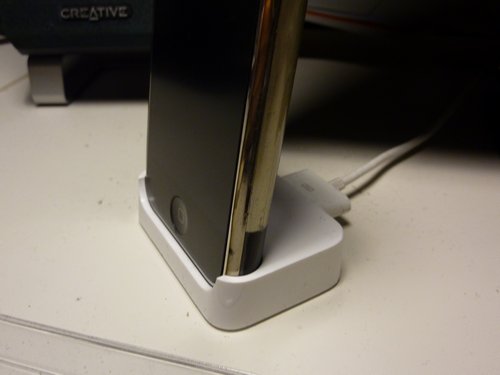
JKE-iphone-Classic-docking
iPhone Classic docking station

Hardware

What you see in the snapshot above is the very nice, small & slim docking station for my iPhone Classic. I have two of them – one on my desk and one on my bed table. This is VERY convenient and also necessary, because they battery on this phone isn’t original and only lasts 8-10 hours maximum. I am using Kirikae multitasking switches and SBStoggles on the iPhone to kill unnecessary apps and free available RAM, there are no constant data connections and I mainly use it for Twitter/FB/Reader & as a phone. The battery and the display are both not original and thus a bit peculiar on energy consumption. Missing 3G speed, a lousy camera, battery life and limitations of iOS 3.1.2 now made me consider an upgrade to:

a) an iPhone 4, paid for in installments @ 25 EUR / month, iOS 4.x (= 649 EUR)
or
b) a Motorola DEFY, Android 2.1 (+ unofficial UK upgrade to 2.2), currently selling for ~ 290 EUR

Now, given that I can get the same things done with a cheaper Android device like the Motorola DEFY, why should I upgrade to an Apple iPhone 4? From a “let’s-be-real” perspective, the DEFY will just do as well. Most of the apps I am using will also be available via Android Market, and since I’ve also already jailbroken my iOS device, I will probably be able to hack an Android device, right?

Right?

Interestingly, one of the main reasons why I still haven’t bought the DEFY is the lack of a docking station. The DEFY also has its connector on the left side, so you’ll either have to modify a Motorola Milestone docking station (with a magnet, so that the display flips 90° to the side) or build your own, but in any case I will always have to remove the plastic/rubber flap that covers the USB port on the DEFY. Do I really want that? And will they be dureable enough?

Another alternative would probably also be an HTC DESIRE on Android 2.2 because it has its docking port at the bottom. This, the availability of many custom firmwares and the camera on the HTC DESIRE are reasons why I would go for an HTC DESIRE. But for the moment, also because of it’s rugged character – the Motorola DEFY is rated as IP67 – the DEFY looks like a current Android device with a very good value for money. The still missing & rather complicated docking station issue and the only average camera (I take a lot of photos for use on my Posterous blog) – sijui… will still have to make up my mind on this.

The recent launch of the Huawei IDEOS U8150 in Kenya triggered my interest in low-cost Android devices. A friend, who is currently programming a scientific app for Android devices, also recently recommended the DEFY (given my budget) as he’s currently using one himself. I had the chance of playing with the DEFY for a few minutes and liked what I saw. Of course, it’s not an iPhone 4, but it costs only half as much and makes me getting things done.

So here’s the question: wait for the iPhone5, buy an Android device like the DEFY or DESIRE, invest into an iPhone 4 or stick with the old one because there’s never “the right time” for buying Android devices?

(pls note that I didn’t even mention the convenient microSD card memory on these Android devices & the lack of iTunes, which is a nightmare on Windows & also reason for the change to Android)

Chrome flaps

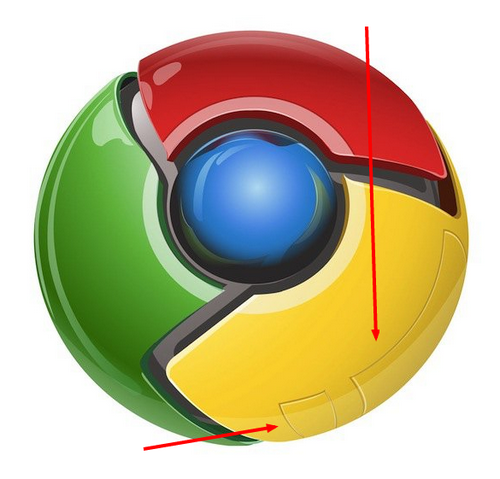
On of Germany’s most popular tech bloggers (@Caschy) recently published a notice about Google Chrome 9 final on his blog – and attached the following Chrome logo to the news…

Google Chrome 9 final Portable Google Chrome 9

..which I’ve marked with red arrows, because I’d like to know from YOU, dear reader, if you know what these sort of landing gear flaps on the logo are all about (?).

Someone on Caschy’s blog suggested it is part of the Jefferies-tubes, someone else wrote they are flaps for a microphone and a camera.

Seriously, do you know why they’re part of the Chrome logo and what’s the story behind them?

Fun?

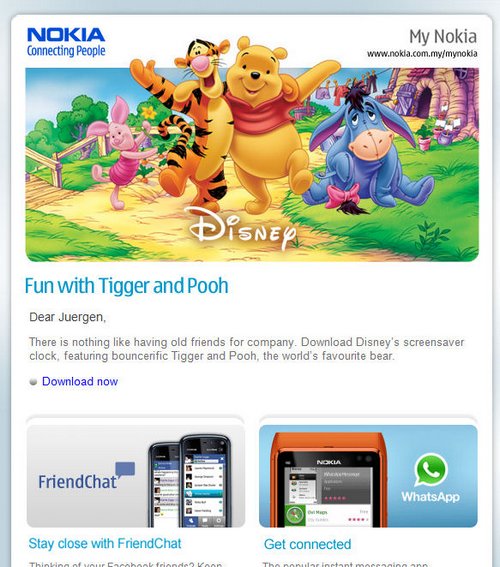
Bild1

I don’t know what kind of CRM software they are using over at Nokia HQs, probably none, because otherwise my e-mail address wouldn’t be registered with their nokia.com.my (Malaysia) website.

Now, I’ve been to Malaysia once, as a child in 1981, but other than that and me taking part in a Nokia Malaysia competition many month ago, there is no other connection between them and me. Also, it is against this background (SE Asia, Malaysia), that I understand the Disney promotion within the cultural context.

Their multiple databases online and the promotion of such BS software for any serious user are just two reasons why I am happy with my iPhone. Just the other day it amazed me how quickly and without any regrets I managed to drop my Nokia fan boy thing, but looking at such e-mail spam I am just reassured that I took the right decision.

Webcam a.D.

test my webcam screenshot
A flash-based web-solution to test your webcam.

Mutter: “Was heißt A-Deeh?”
Sohn: “Adeeh (ade) is Schwääbisch und heischt Uff Wiederseen”
Vater & Sohn lachen.
Familie Heinz Becker

The Candidate

There are quite a few things I dislike about my laptop, but mainly financial reasons and the lack of a much better alternative (suggestions welcome!) make me being stuck with an HP Elitebook 6930p, a laptop that’s most often operated at home on a docking station because of a) a heavy power cord (the cord, not the transformer), b) a CCFL screen (instead of an LED option which would add another 1h of battery runtime), c) an internal 2G/3G/EV-DO modem that will only work in a MS-Windows environment and d) lousy battery runtime of about 2-3h on 4cell battery (I have another travel battery that extends it for a few hours, but also adds weight).

This computer…. I don’t know. Back in the days we used to say: HP = High Price, Huge Problems. The 6930p is quite durable and well built, but the CCFL screen is so 1990s. Brilliant colours vs. battery draining. Uargh…

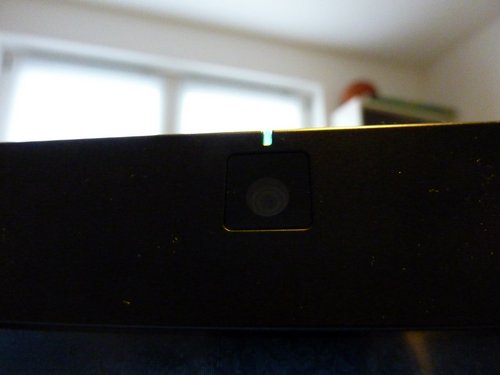
The Webcam

P1020864

The webcam on this said laptop has no cover – like many other modern laptops. If you feel being spied on via your webcam, mistrust the LED that’s supposed to show activity on the cam or never pay attention to it anyways, there are simple and professional ways to cover your webcam. I’ve used a piece of a note-it post in the past, others use their beloved duct tape or whatever is around. And then there’s the good solution that will cost you ~ US$ 12 or EUR 15 (even though it’s a German company!). Good but also expensive for a little piece of plastic. For half the price, ok. But 15 EUR is a bit too much.

https://www.youtube.com/watch?v=7W6tygVIzSM

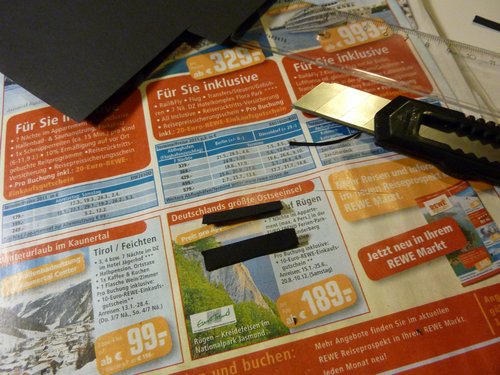
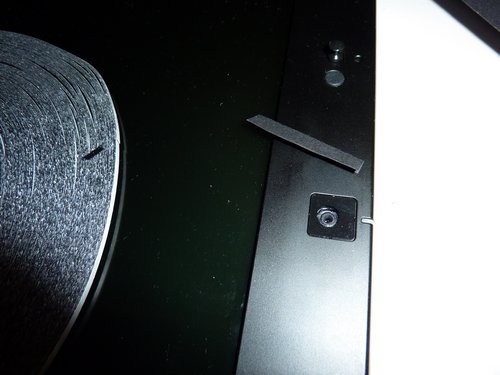
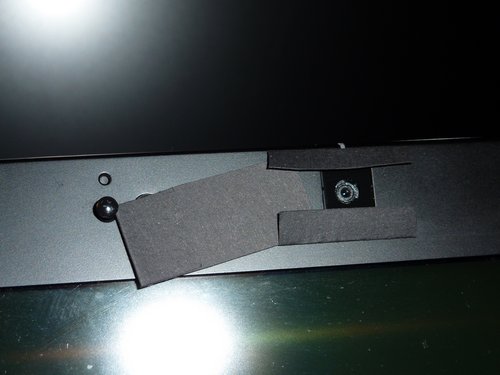
Time to build my own solution using black cardboad:

P1030318

P1030316

P1030326

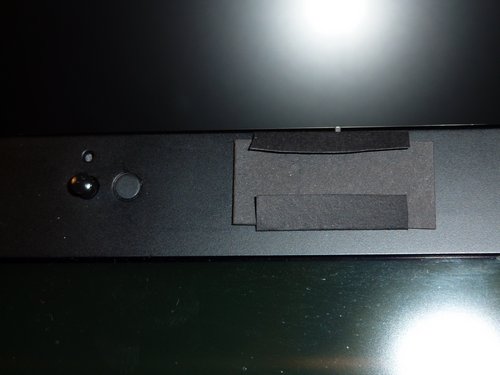
P1030330

It’s cheap, it wins, it works!

P1030331

The laptop lid also closes without problems. Very nice!