Six reasons for the change of…

A final blog post for the end of the past year 2011 which unfortunately saw too many deaths of beloved people and only a few posts on this blog – also due to the Posterous / Facebook / Twitter competition and not many actually willing to read longer blog posts as a result of the information overflow.

It’s not that I am only into tech stuff, but I am passionate about these gadgets and that’s also reason enough to note down the following motivation.
iphone4-Defy
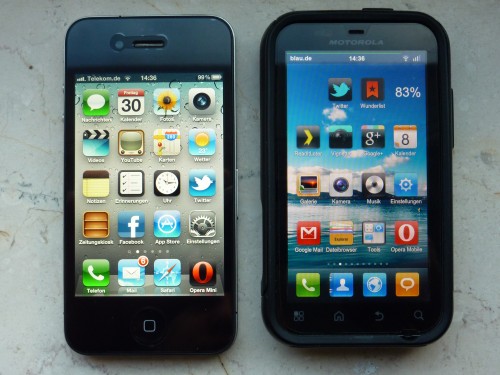
The Apple iPhone 4 vs. The Motorola Defy

There are three four five six reasons why I’m planing to skip the freedom that comes with Android and switch (back) to an iPhone 4 (not 4S) in 2012:

1. There may be great Android phones and my Motorola Defy (“Jordan, MB525”) is a lot of  phone for the money, but it’s a few millimeters too small for my fingers which means that typing on the screen is easier and quicker on the iPhone.

2. Both cameras on both phones have 5mpx sensors, but there’s some magic to the iPhone 4 camera that the Defy camera just does not have. And I’ve tried all cameras on the Android market, am using MIUI on the Defy which also includes the CyanogenMod7 camera app and…well, I just don’t like the results. It always takes several attempts to get a decent, not blurry picture and if the flash is activated, then it’s even worse. It could also be the software processing, less the hardware.
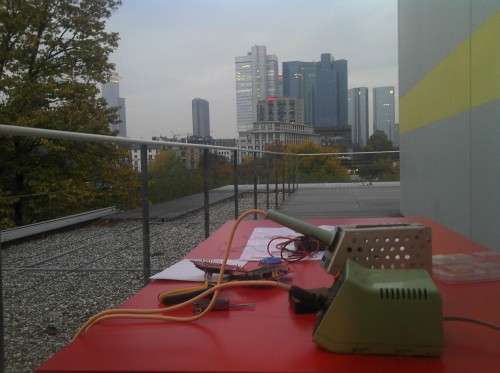
Defy camera test, outside
A somehow blurry snapshot, shot on a cloudy/rainy day in October. Not really what I expected to receive from the camera.

I take a lot of pictures with the phone, I knew that the camera on the Defy wouldn’t be that great and I’ve learned my lesson. If a decent camera on the phone is important to you, then go for an iPhone. Also compared to what Nokia used to produce – it’s imo better to use a 50-60% camera that “just works” than one that only delivers blurry images or blinds people with an aggressive flash (hello, Nokia N95!).

3. The dock connector. I am using a docking station on my desk and next to my bed. When I fall asleep, I just want to drop the phone into the docking station where it’s being recharged etc. – and not manually open a flap on the side of the phone and plug in a mini USB cable. I’m used to this procedure now, but I also know that these things are easier with the iPhone and a bit more complicated with the Defy (which is why I sold/gave away both docking stations I had for the Defy).

4. I got a very generous offer from a friend that I just have to accept and which enables me to make the swap to the other phone. The irony is that the iPhone is currently locked to ze Görmän Terrorkom (T-Mobile) network and will only be unlocked in the middle of 2012, but all of these limitations don’t matter to me for the above mentioned reasons. Another motivation probably also is that iOS 5 finally brought the changes that I requested iOS to have (and which I preferred on Android).

5. Not a real reason, but still: my sister, who always refused iPhones (“I don’t need them…”), suddenly surprised me in mid 2011 with the purchase of an iPhone 4 32GB. Which comes with FaceTime! All these years of introducing Skype within the family were rather unsuccessful, but this (stupid) FaceTime app now suddenly introduced video telephony within the family. Yeah, well…. whatever.

6. Payment options on the market. I really like Android but there’s this one thing where the iTunes store is just more advanced: payment options on the iTunes store include the use of vouchers. Now, this may not be an issue in the US, but in Germany, a) you only get a credit card when you’re 18 (so many consumers do not have one, or use someone else’s card, or use a prepaid one) and b) with many banks (who issue these cards), you have to pay an extra charge of 1,85% of the complete transaction fee for foreign apps. Which means that app purchases cost extra and more than expected. Sure, we’re talking about Euro cents here, but still it’s more – and the purchase / availability of prepaid vouchers, available at local supermarkets like they are for iTunes, would imo be the perfect solution for the Android market. So until this issue is solved, the iTunes store is a bit more sophisticated to me. This is imo also why the “for free”-culture is much more alive on the Android and Nokia ecosystems than it is with the Apple ecosystem (where hardware is already expensive enough). Payment options are key!

Android: What I will certainly miss is the removable battery (haha, just kidding – the only reason to remove it is to reset the phone – seriously) and the microSD card which – and I differ here with experts like Eldar Murtazin – I think is very great because it enables you to keep your user data in one place. Water damage with the iPhone? You’re doomed! But not so with phones where microSD-cards keep most of your data. I think that’s pretty convenient and a valid argument pro microSD-cards. Also because not everyone trusts iCloud, though it’s a step in the right direction. In 2011/12, hard- and software should be independent from each other. If a device (phone/laptop/car, etc.) fails, I’d like to exchange the hardware, type in my credentials and continue on a new device where I left the old one. Another great convenience of course is that you just type in your gmail address and it will automatically setup your phone. Totally awesome. Or alternative app stores like AppBrain – so many more options (except payment) than the iTunes store. The best part about Android certainly is how apps are connected within the OS and how they offer a level of connectivity I am yet to find on iOS (e.g. saving a page to ReadItLater).

As I said, Android is good, attractive and my preferred OS of choice. The Defy is a very nice phone but I’ve realized that for my own daily needs, the iPhone just does a slightly better job.

Half of my geek friends are from the “there’s-no-other-smartphone-than-the-iPhone” group, and the other group is more like “Android-is-better-because-iOS-is-worse”.

So the bottom line probably is that it takes a longer test of all available systems and a small set of important apps that just need to work in order to see which phone suits the user.

Oh, and in case you’re wondering about the redesign on this blog here: I’ve updated WordPress to 3.3 and that somehow destroyed my blog template – which I had been meaning to change since 2006! Again, it probably takes some interaction from the outside to make the switch. Thx, @alipasha!

Everyone, please have a peaceful and happy New Year 2012!
Life’s too short for crap

I may be late to the party, but I just couldn’t resist and ordered an iPad 2 (16GB, 3G).

It’s a strange situation because I am already an Android user these days for the phone side and really appreciate the freedom (and costs!) that come with it despite Androids downsides (my main criticism is that there are no vouchers available for the Android app market as opposed to the iTunes store => +1.85% on each app purchase while using my EU credit card).

tc4400-ipad2-flytouch3
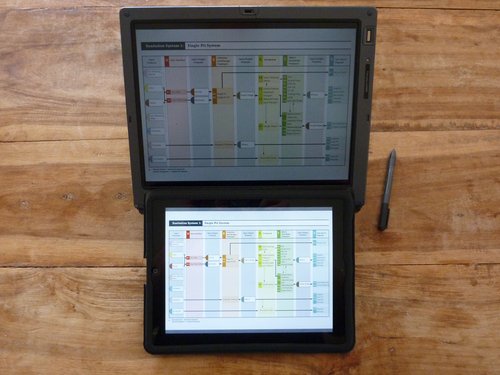
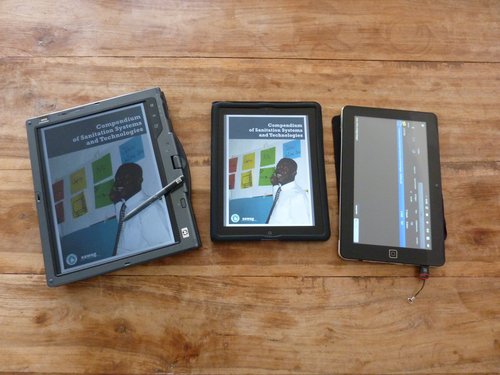
My beloved HP tc4400, the iPad2 on iOS5 and a FlyTouch 3 Android 2.2 tablet that still lacks a PDF reader because it’s already on auction. The FlyTouch btw also has a 1024×600 screen – as opposed to the other two that offer a 1024×768 screen resolution. Good for movies, bad for PDFs.

No, there’s much more to an iPad, obviously, and probably also more than enough reasons why over 29 million (!) iPads have already been sold till now. A “tablet revolution”? No, but a tablet revolution based on the iPad – that’s for sure.

I am used to buying second hand hardware and this time I am glad I had found a way to finance this purchase (via a mobile phone contract = subsidized hardware) and with the sudden loss of a dear family member earlier this year, I also realized that life is indeed too short for crappy products. Why should I waste time with stupid hardware if instead I can also go for the real thing?

This very emotional reason probably is the most honest excuse for this purchase, but you know what? Clicking that “buy” button felt damn good. Whatever they say about Apple products and their fanboyz – it’s true, it’s a *feel-good-world*.

So why should I still blog about this purchase if 29 million out there have already made this buying decision? Because I have a smart list that matters to me. Here’s my TOP5 reasons for the purchase:

Passion
After watching this documentary earlier last month about former Microsoft employees, it eventually occurred to me that most MS products just lack passion .

This is exactly what I like the most about these portable Apple products: a meticulous CEO that demoed his products and also looked at the smallest details.

Or Linux developers who create stuff out of passion. Not because they have to, but because they want to. That alone is a totally different approach and a sign of quality to me.

I am yet to see that on MS products. And I am a Win7 user most of the time, along with this crap called Outlook 2007 (HTML rendering, bollocks!).

And it’s not just the software you can buy. Just yesterday I read through this publication from Microsoft Research on the need for meta data to be implemented in future generations of filesystems. Very valid points and I understand that MS Resarch are doing good work, BUT! – again – the paper was much longer than necessary. So much blablabla and yet the important stuff could have been said on one single page. This out-of-focus-approach is so typical of MS, I think. As a customer and user of MS products, I don’t feel any passion in their products and meanwhile also believe that many lines of code on their OS & apps are just random data.

Hence: any company that shows a passion with their products is highly appreciated. A passion to deliver good quality.

Reader
I think the iPad is the best reading device. Why? Because I can not display most of my PDFs on a 7″ eInk display without constantly zooming in and out. So as long as eInk readers aren’t running a bit faster for this purpose, the iPad is the better alternative to me at the moment although I am sure we’ll soon see more 7″ devices.

The Amazon tablet(s) would have been an interesting alternative to me, but their 7″ Fire tablet isn’t even available here! In my opinion as a customer, if you can’t launch/ship global, then don’t even launch it for a single country. You can do that for Japan, maybe, but not for the US that are so connected with the rest of the world.

Apps
There are SO MANY apps available for the iPad. In fact, most publishing houses in Europe ONLY offer iPad apps for their print products. No Android app, only iOS. Sad, but still the bitter reality. Because I’d also be happy with a competitve (and available) Android tablet.

Talking of Android tablets, my friend Dave recently got an Asus eeePad Transformer TF101 and – as a pilot for an international airline – tried to pick the better alternative. Unfortunately, his tablet already broke after only two month and his biggest complain was the lousy App situation for Android Honeycomb (as compared to the iPad, of course, which is hard to beat). Dave – go and get your iPad. Now!

Adrian – I missed my chance to get an HP TouchPad for 99 EUR. I reckon that it would have been an interesting PDF reader and surfing device for me.

Runtime
Battery runtime on the iPad is just totally crazy. It’s long enough to get me through a day at a BarCamp and that’s all that matters to me.

Also, 29 million customers enable a fabulous aftermarket. You’ll find plenty and cheap chargers as well as other accessorries on eBay, on FocalPrice and so on.

Portability
I remember when Eric told me about his daily trips to the office through Nairobi traffic and mentioned how the iPad actually is the solution to his mobile office.

Just look at how many of us laughed about the iPad and its limited capabilites back when the iPad1 was launched. And now we are even using it to have a mobile office and a quick device for that daily “lemme google that”-moment.

Sure, the iPad2 is heavy and we’ll probably all complain about the size once there are more 7″ readers/tablets, but after my previous experience with a 8.9″ and a 10.1″ netbook, I know for sure that 12″-14″ is the best laptop size for me and that this 10″ tablet does it for me atm.

tc4400-ipad2
HP tc4400 vs. Apple iPad 2
(the HP tc4400 tablet pc also serves as my backup machine)

———————————-

I am not yet ready to fully convert to the Apple world (+ Ubuntu is cheaper anyways :-), but this lack of passion on MS products certainly is a very valid reason for me. It’s also kind of ironic that Bill Gates himself is very passionate about his philanthropic foundation for this passion has already enabled so much good work (the BMGF are imo doing a very good job by financing smaller projects). I wish some of this passion could also reflect back on Microsoft and that their future tablets with Windows 8+ will provide a suitable alternative. But atm, I highly doubt that.

Tumaini

Two days ago, someone on my G+ timeline published a post and some photos of a stray dog they had found earlier on Wednesday morning – with a limping leg. A quick visit at a veterinary clinic revealed that the dog has a broken leg and urgently needs some surgery. Expected costs: 500-600 EUR.

mercy

So we were asked for donations and I did that, donated a small amount (via Paypal). You can do the same if you’d like to and can afford it.

Now, the person behind this G+ post lives in Spain, is probably German with Spanish roots and I’ve never met him. So why should I donate anything to a foreigner I’ve never seen “in real life”?

In February 2010, I posted this item called “offline/online” on my blog, asking my readers: “how important is it to meet offline? Does it change anything? Would you continue working with your online contacts if you were to meet them offline?”

When we told this story to my (probable :-) father-in-law, his first reaction was: “…but you don’t know him! Maybe he’s trying to con you?”. I am sure my sister and my mother would react in the very same way.

Eh, if you grew up in Nairobi, you’re used to folks trying to con you. Or trying to milk your pocket just bcs you live in a bigger house.

And still I gave some of my hard earned money to a stranger. For me, this time it’s not (only) a matter of sharing or giving because you can or because I felt sorry for the dog, but to prove that even these pure online connections matter as much as meeting somone offline. I am following this user on G+ for some time now, read his posts and that’s enough reason to trust someone. For me, that is.

Someone else from the German blogosphere even wrote that “this is how Social Media works”. Amazingly true. A network purely based on trust. Some things will never change, and while these “trust” networks obviously work in other cultures (Dabbawalla in India or Hawala in Somalia), this Christian part of Europe is still having problems with this modern form of trust. But why?

(I just realized that “Tumaini” is a recurring issue and post title on my blog :-)

Novag Robot Adversary chess computer

I was recently asked by a friend of mine if I and the folks behind our local DIY / maker initiative @makefurt could have a look into an older chess computer that would have some issues.

The owner – a former advertising designer here in Frankfurt who collects old movie posters and created this interesting website about it (in German) – came over today and brought this valuable robot to my place: the Novag Robot Adversary chess computer.

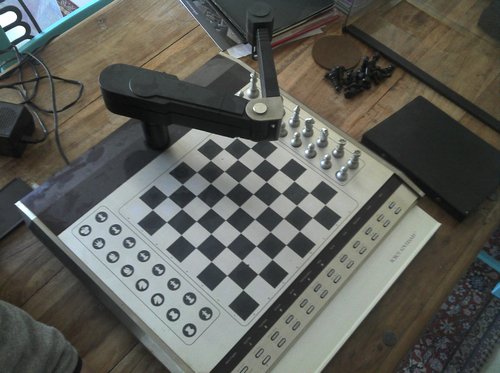
Novag Robot Adversary chess computer
The Novag Robot Adversary chess computer when it arrived…

A quick search on the interwebs reveals that “The Novag Robot Adversary is the most iconic of chess computers. Apparently 2000 were built but the failure rate was high and the vast majority of those sold have long since developed faults.” (src)

It’s a chess computer with a robotic arm that moves all chess pieces over a magnetic board, animating each move with an extra show. Hence it’s not just any other chess computer, but probably the coolest or most epic one out there.

According to this Wiki page, this machine cost about DM 3000 back in 1982 which is about EUR 1500 and is powered by a Z80 (CPU) from Zylog, running at 7.5 MHz, has 5 KB of RAM and a 32 KB ROM.

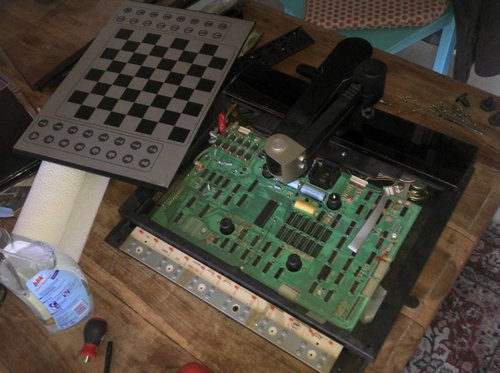
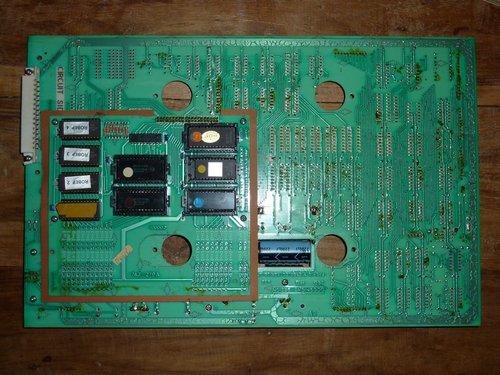
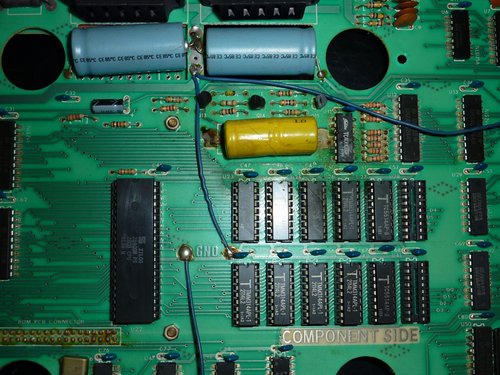
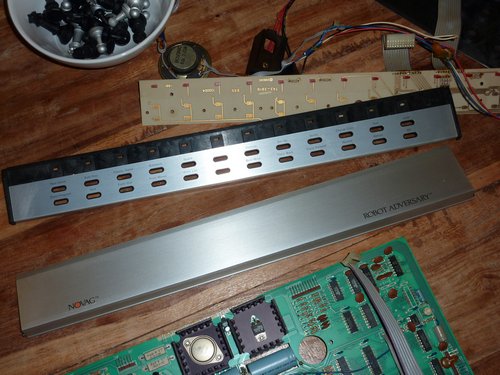
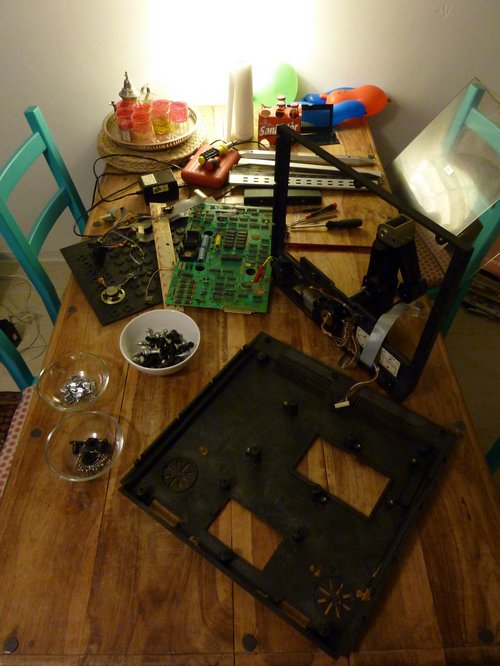
There’s a lot of information on this computer out there (including this Spiegel article from 1982, in German) but we’re yet to find a circuit diagram. Also, I am more the hardware guy so my first step was to completely disassemble it, clean everything (= removing nasty nicotine stains and glue from old gaffa tape) and check the wiring and the PCB for broken components:

Novag Robot Adversary chess computer
20 minutes later

Novag Robot Adversary chess computer

Novag Robot Adversary chess computer

Novag Robot Adversary chess computer

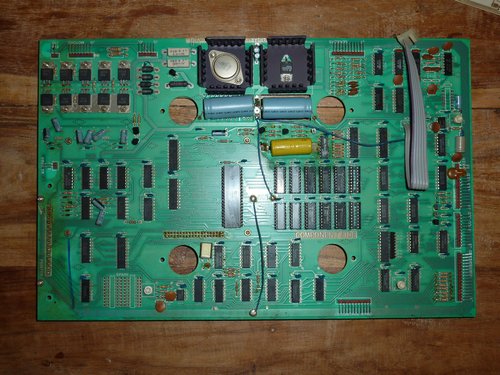
That yellow thing looks like a battery to me. Probably needs to be replaced…

Novag Robot Adversary chess computer

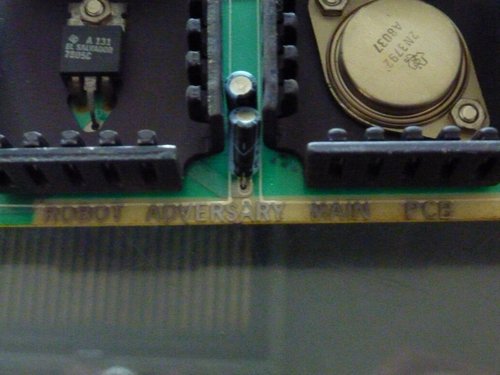
“Robot Adversary Main PCB” – old school! :-)

Novag Robot Adversary chess computer

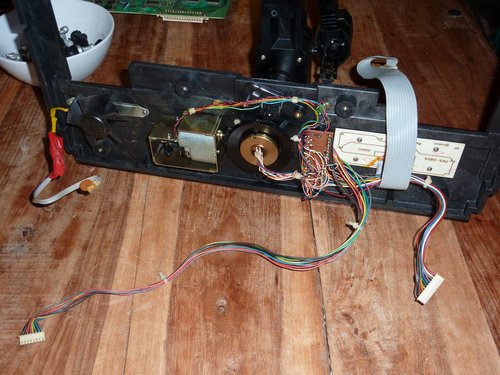
The motor that turns the robotic arm. Kindly note some previous repairs (badly done, imo).

Novag Robot Adversary chess computer9

s/yellow nicotine stains/soap

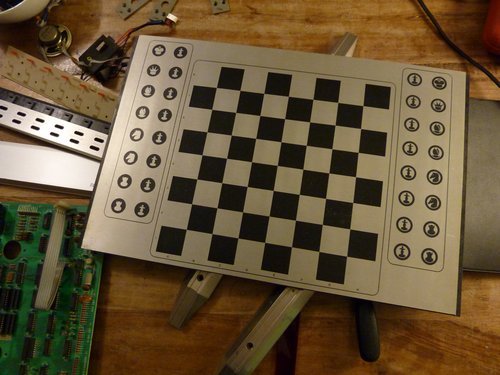
Novag Robot Adversary chess computer

There are magnets for each position on this board (underneath).

Novag Robot Adversary chess computer

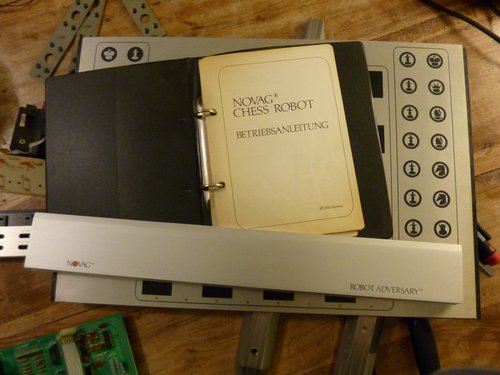
We do have an owner’s manual (in German). Circuit diagram is still missing though…

Novag Robot Adversary chess computer

I’ll have another look at the robotic arm now and will then try to reassemble everything in order to keep all parts in one place and where they should be.

If you’d like to help us fix it, please feel free joining us next weekend on October 30th, 2011 from 3-5pm at the Museum für Kommunikation here in Frankfurt. Or ping us anytime at info@makefurt.de // @makefurt. All are welcome!

Hallo, ich habe da mal eine Frage…

Liebe Lufthansa,

Deutsche Lufthansa Lufthansa DE on Twitter

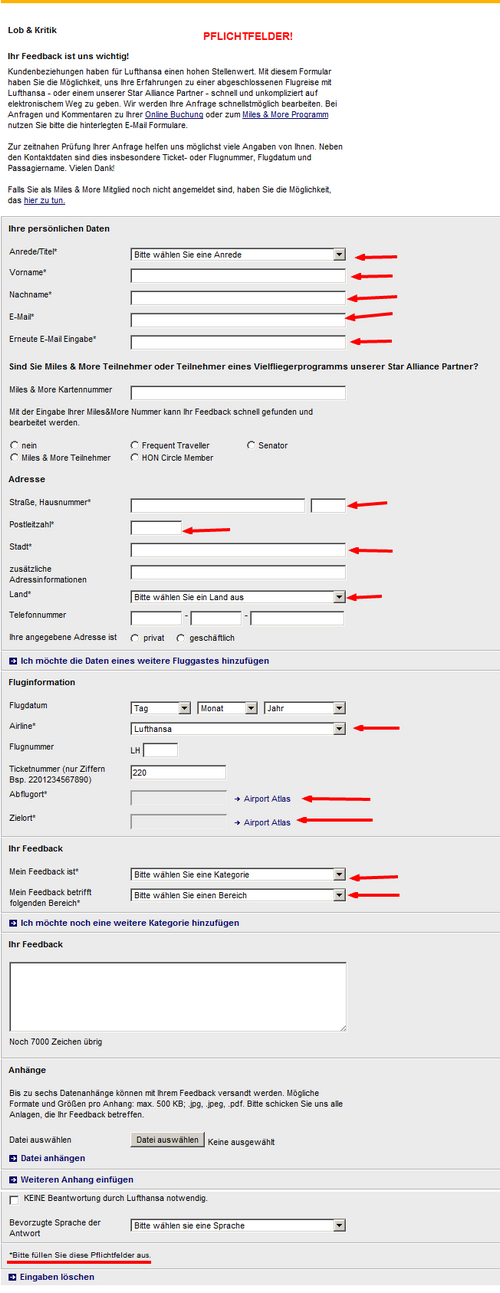
bei Twitter auf das folgende Formular verweisen…

965654

…ist so ziemlich das Dämlichste, was ich seit meiner Anfrage bei einer Frankfurter Behörde via E-Mail (Schreiben kam als eingescanntes Word Dokument via E-Mail zurück) gesehen habe. Einfach weil es aus Sicht der Kunden total frustrierend ist und den SINN von Twitter (“zwanglose Kommunikation”) total untergräbt. Und da kann das o.g. Formular noch so optimiert in die Geschäftsprozesse passen und gut dabei helfen, den richtigen Ansprechpartner zu finden… aus meiner Sicht (“Ich will mal schnell eine Frage beantwortet haben”) ist das völlig unbrauchbar und ein MEGAFAIL.

Homo faber

“What took you so long?”, you may ask.

And I will only be able to reply: “I don’t know. I don’t know what took me so long until I finally coughed up 20 EUR and bought a set of fine Torx screwdrivers.”

jke-tools

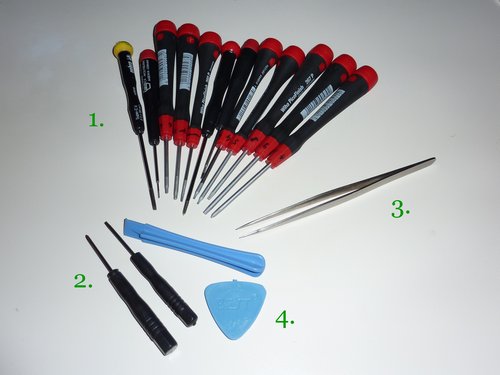
Wiha PicoFinish 267 P“, a set of Torx No. 4,5,6,7,8,9 and some other (older) Wiha and Gebra screwdrivers (1) that made me switch from the Chinese crap as pictured above (2).

The Chinese alternative aka short & black Torx screwdrivers…well, they work and for the occassional repair job they are just fine (I’ve been using mine since ~ 2001; I have a lot of these cheap Torx No. 5, 6, 7), BUT! these Wiha screwdrivers are just so much more comfortable and also FIT the screws without any quality issues. Working with good tools just pays off – I could name endless occasions when I killed a screw just because of bad tools. Stupid me! And it’s just 20 EUR. Sure, a lot of money for srewdrivers that I already had. It’s just after buying a Phillips-head screwdriver from Wiha for another project when I realized that I’d been wasting my life with bad tools so far.

Another reason for this blog post are the pair of tweezers as pictured above (3). It’s just amazing how much you can fix with these tweezers. Just the other day I read about a gourmet chef who cooks with a pair of tweezers (!) and I can only assure you that it makes a lot of sense. But also anyone trying to fix Apple products needs such tweezers. They are just as indispensable as the plastic opening tools (4).

the tablet alternative

Intro
I have about 20 GB of water & sanitation (watsan)-related publications on my computer. Most of them are in PDFormat, and most of them I’ve just opened once and then archived out-of-sight. With some I’ve also only read the abstract (if available) because relevance is important and I feel there are a lot of policy blabla papers out there that don’t get me anywhere. Still, I actually need to read them.

I work from my home office and don’t have any IT department I can call when I have an IT problem. Which means I have to have a backup solution in place for when there’s a problem. Like a 3G modem when the cable modem is on holiday. Or a second computer, ready to be used in combination with my 22″ TFT and external keyboard + mouse combination.

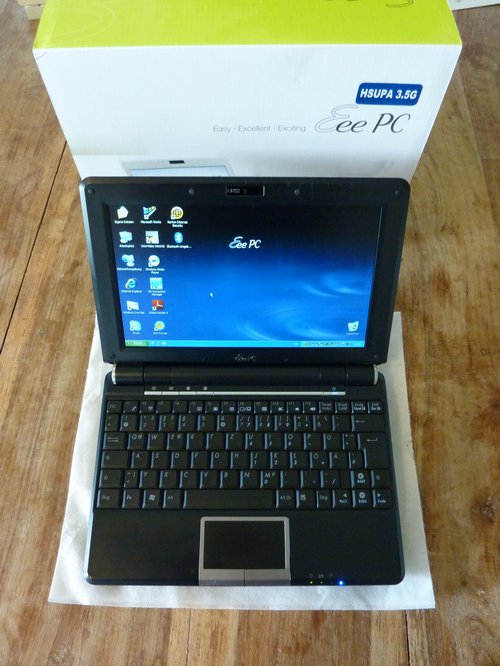
In the past, I’ve used an Asus eeePC 1000HGo (1000HG with a 3.5G modem) netbook ex 2008 (which I’ve blogged about here) for this task and liked this litte machine:

eeepc1000hgo

It’s a very nice netbook with the typical 10.x” setup, matte display, 160 GB HDD, 2 GB RAM, 1.3mpx webcam and a 3.5G Huawei modem (which surprisingly works well and out-of-the-box with Linux). The best part about these eeePC netbooks certainly is the tiny power supply. I don’t like the bulky cords (the cords!) that come with 90W power supplies. Eh.

I’ve also been using it as a mobile DVB-T receiver (TV) and while travelling + on holiday. My other, main machine is an HP EliteBook 6930p on a docking station, so I am “mobile computers” only. This eeePC also has a button to switch screen resolutions within Windows between the default 1024x600px to 1024×768 (compressed view) and 800×600. That’s something very handy when you’re dealing with apps that need more than 600px vertical height.

The problem

Now, I’ve been wondering how people actually read all these PDF publications? Do they print it out? You know, some of these publications are well over 100+ pages, also with a lot of graphics. And then I just can’t see myself reading these documents on my main computer. My eyes already hurt and balancing a laptop on your…well…lap… isn’t a long-term solution.

Yes, tablets. The Apple iPad or modern Android Honeycomb tablets. Both still kinda expensive and also limited, but very good in what they do. I am actually waiting for Amazon to launch their 7″ Android tablet later on this year. And eBook Readers? I’ve thought about buying an Amazon Kindle (also because it’s affordable), but a) eBooks in Germany are often as expensive as the printed version and b) the current eBook Reader is too small for displaying readable PDFs in vertical mode (I think). The Kindle DX would have been an option, yes.

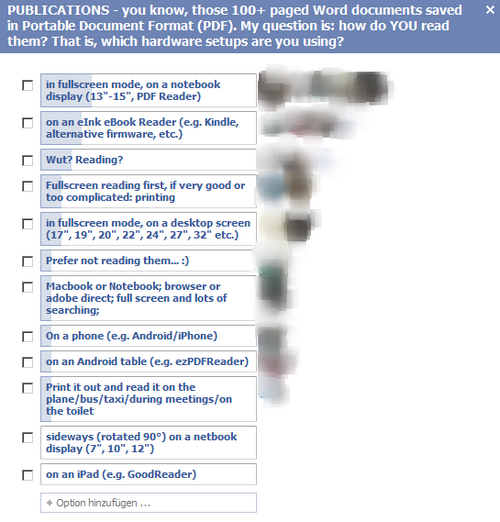
I also did this little survey via FB and some of my friends voted as followed:

ebook-umfrage

Most of my FB friends, it seems, are using their notebook/laptop to read these PDFs. Also, eBook readers seem to be very popular. I also use an eBook Reader / PDF reflow tool like GoodReader (on iOS) or ezPDFReader (on Android) to read PDFs directly on the phone. But even though my Motorola Defy mobile phone has a very nice screen resolution, trying to read longer text on a small device is just an interim solution.

The solution
I’ve often been dreaming about using an IBM ThinkPad X4* or X6*. Fellow blogger Steve had at one point in the past already recommended HP tablets to me and also is an avid user of an X61s. I like ThinkPads for two reasons:

a) you can set the recharge level of the battery and leave it on the machine, so it won’t overcharge. Not possible with HP laptops.

b) Fan intake is at the side of the laptop body, not underneath. It’s not that they are cooler than those who suck in air at the bottom, but it’s a matter of overheating because most ppl will keep the laptop on a table or, even worse, balance it on their lap, so the intake may be covered. ThinkPads are smarter in this regard.

The other – important – fact to mention is that I realized how crazy this miniature thing actually is. I am tall and don’t want to balance a small 10.1″ netbook on my lap. Makes me look even taller and there’s no need to use a small machine when I can also be a bit happier with a 12″ device. In fact, I think my next main machine should be a ~ 13″ device. Perfect size, imo.

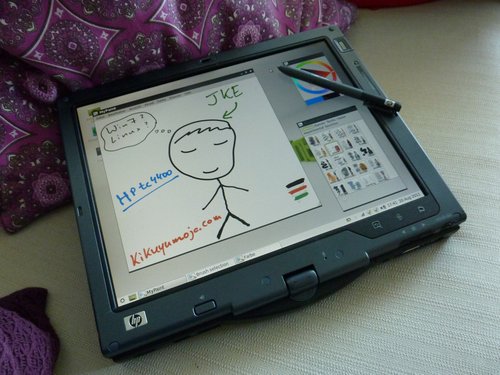
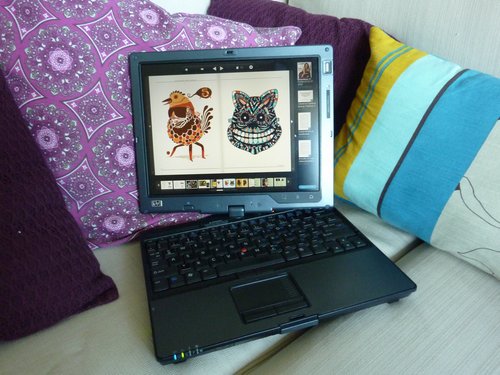
So I sold my netbook and bought this HP Compaq TC4400 instead. It’s a 12.1″ XGA tablet notebook with a Dual Core CPU (albeit 32bit), 2GB of RAM and some old-fashioned stylus thing. It’s my first tablet, my first Wacom pen tablet (my last + cheap drawing tablet was from 1999 and never really worked) and I am very curious how I will use it. Also, it was cheap. 97 EUR + a used 250 GB HDD + another keyboard with EU-layout (US-keyboard misses one key) + new battery = about 160 EUR. Not bad, given that I received a similar amount for the sold netbook :-)

tc4400-drawing

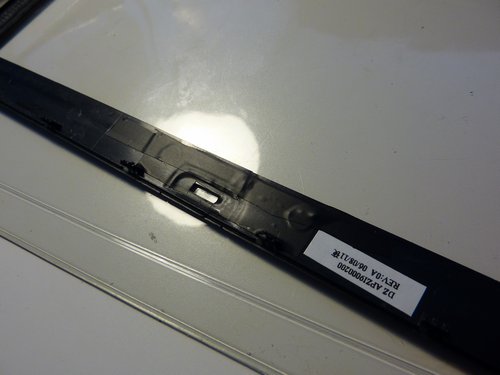
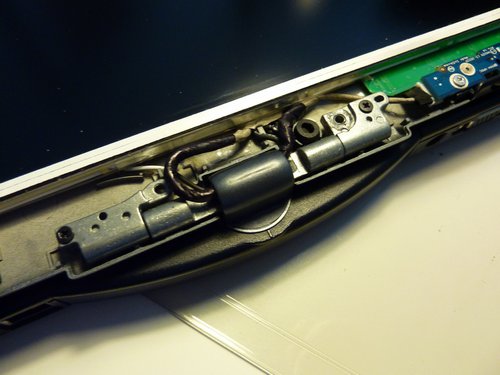
Buying 2nd-hand / refurbished items sometimes is like gambling – you never know what you’ll end up with. Of course with a dealer you can return the item (12 month in Germany!), but I didn’t want to return anything and actually enjoy fixing stuff myself. I had to glue a broken display bezel, but to my surprise the rest was very much ok as the vent (often reason for overheating) had already been cleaned by the previous owner.

P1050331

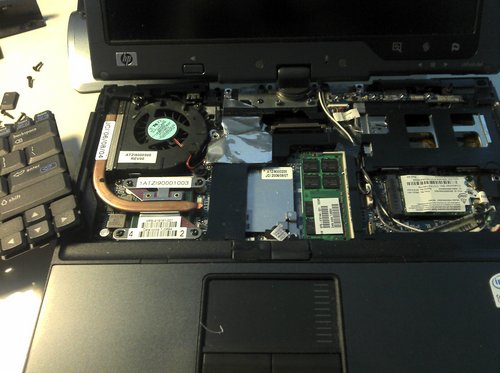
opened-tc4400

P1050326

Note : it’s recommended to refasten all screws on a computer, even the internal ones because the “grade B”-rating that made this one cheaper was upgraded to “grade A” after disassembling it, cleaning all parts with isopropyl alcohol and then reassembling it again.

I am currently running both Win 7 and LinuxMint LXDE on this tc4400 and already love it. Sure, it’s a pen-controlled tablet with a keyboard pre iPad era, but with Win7 a lot of cool stuff is already supported out-of-the-box. Battery runtime seems to be 3.5h (and the battery is really small). I also like it because:

  • It’s compatible with both HP docking stations in our home office (HP nx8220 and HP Elitebook 6930p).
  • Caps lock keys suck and unfortunately there’s no keyboard light / illuminated keyboard available. What it does have, though, are yellow led lights next to the key so you’ll instantly know if you’ve activated the caps lock key. Smart design, imo.
  • I dig the XGA screen resolution. Yes, it’s only 1024×768, but you know what? My 14.1″ Elitebook is WXGA+ 1440×990 which results in about 128 dpi. 128 dpi is tiny! My eyes hurt. Also, it does not have an LED screen (hey, the machine was cheap and is from 2006!), but it has good viewing angles. My main machine does not have such good vertical viewing angles.

That next thing I will need to figure out is why the touchpen (PL800A) has to be so expensive as a spare part (update: i found this one via eBay). The pen has a circuit inside and while drawing a sample picture on my tc4400 today, I often acidentally clicked on the right-mouse-button of the pen. Maybe it’s just me but I’d also like to try out some alternatives here. Any recommendations?

tc4400-sofa2

And the best part? It’s both a laptop and a reader. Kudos to Steve for recommending this one to me!

I am very curious how I will make use of this (cheaper) alternative to the netbook and how or if I will use it as a reader for the many PDFs waiting to be read. After all, I can still sell it if it doesn’t work out for me and my needs. But going by other reviews online, especially by what HP tc4xxx owners have said about their tablets, this one seems to be one of the best tablets out there.